SYSTEM TAB - CONFIGURATION
MDU Solutions
®
– UCrypt
®
QAM to QAM – Quick Start Guide 13-1
SYSTEM TAB - CONFIGURATION
13. SYSTEM Tab - Conguration
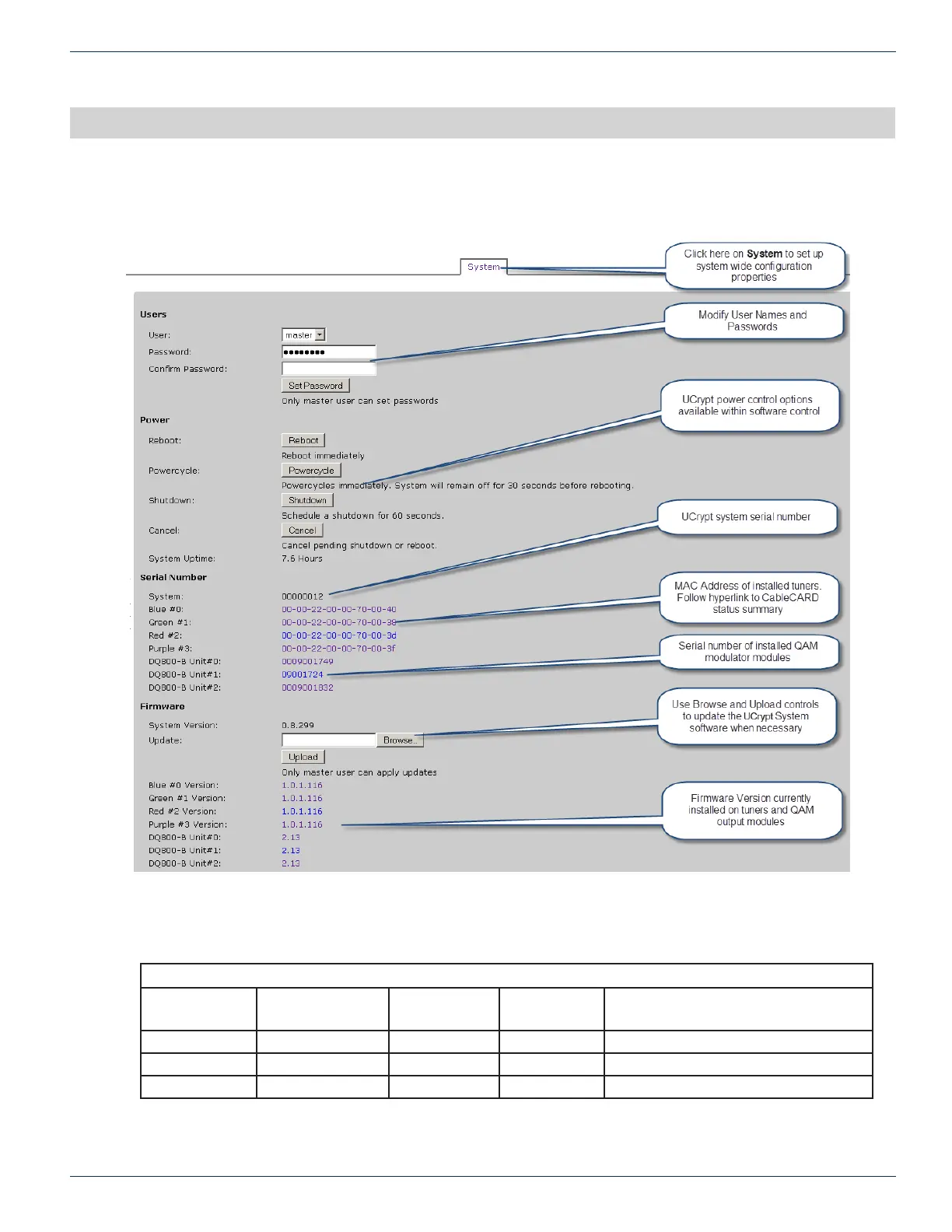
Access system wide conguration properties here:
System Conguration Tab - Part 1
13.1 Default User Names and Passwords
Default Values
Account User Modify UCrypt
®
Settings
Install
Updates
Set
Passwords
Default Password
master Yes Yes Yes atx_ucrypt_master_password
admin Yes No No atx_ucrypt_admin_password
user No No No atx_ucrypt_user_password
For detailed information on conguration of this page, go to the ATX website (atxnetworks.com) in the Resources & Sup-
port section, User Documents sub-section to download the Installation & Operation Manual.
CHAPTER 13:


 To Next Page