MANAGEMENT INTERFACE
7-2 MDU Solutions
®
– UCrypt
®
QAM to QAM – Quick Start Guide
◦ In the IP address eld, enter 192.168.0.x (where x represents any number from 1-253 except 23).
◦ In the Subnet mask eld enter 255.255.255.0.
◦ Click OK and then OK again in the previous window.
7.3 Log in to the Management Interface
On the management computer, open a web browser and enter https://192.168.0.23 in the address eld.
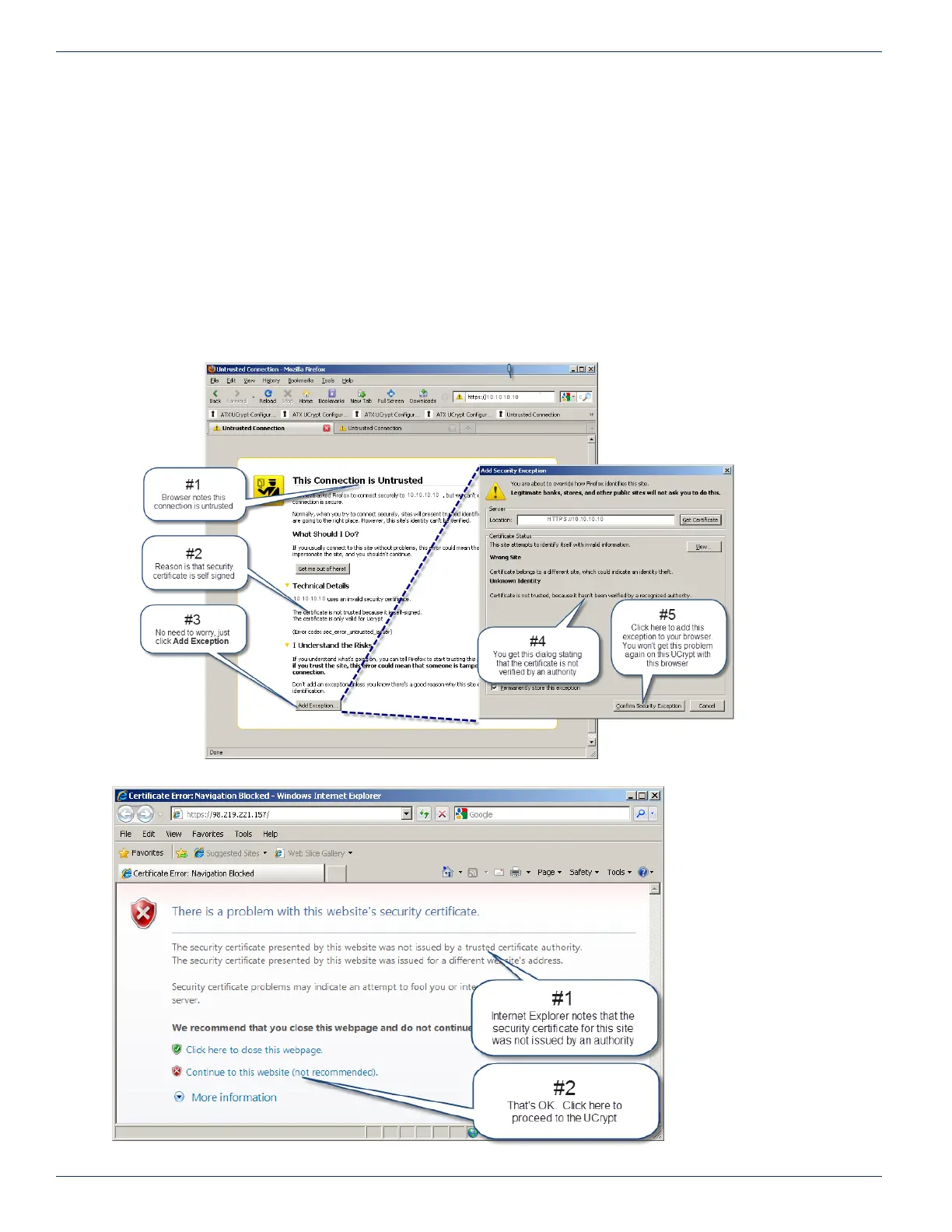
If this is the rst time you have connected to this UCrypt device with this Management Computer, you may get a warning of a
security violation or error. This is due to the UCrypt device having a self signed security certicate and is not a security threat
but your browser identies it as such. Simply accept the security exception and proceed to the login screen as shown next.
Other browsers will typically respond in the same manner.
Warning For Firefox Browser:
Warning For Internet Explorer
®
:
CHAPTER 7:


 To Next Page