the rotary function dial. If the parameter is set to the desired value, scrolling to the next field
can be done by turning the function dial. When adjusting the frequency, a 5 digit number
is shown and the adjusting digit can be selected (turns red) and confirmed by turning and
pressing the rotary selection dial. Consecutive digits will increase when the maximum value
has been reached. After the desired frequency has been selected it can be confirmed by
pressing (turns orange) and turning the function dial clockwise to the entire right side where
the ‘OK’ word will appear. After pressing again the frequency is confirmed and the next
characteristic can be adjusted. If all characteristics are set to the required value, select the
‘BACK’ option and you will be returned to the output setup menu.
RECOMMENDATION
When separating frequency ranges in two or more way systems, a Linkwitz-Riley filter with
24 dB / Oct roll-off is recommended between different frequency ranges. A high-pass
Butterworth filter with 24 dB / Oct roll-off is suggested for elimination of low frequencies
outside the frequency range of the loudspeaker, avoiding subsonic overload.
Output setup >> Equalizing
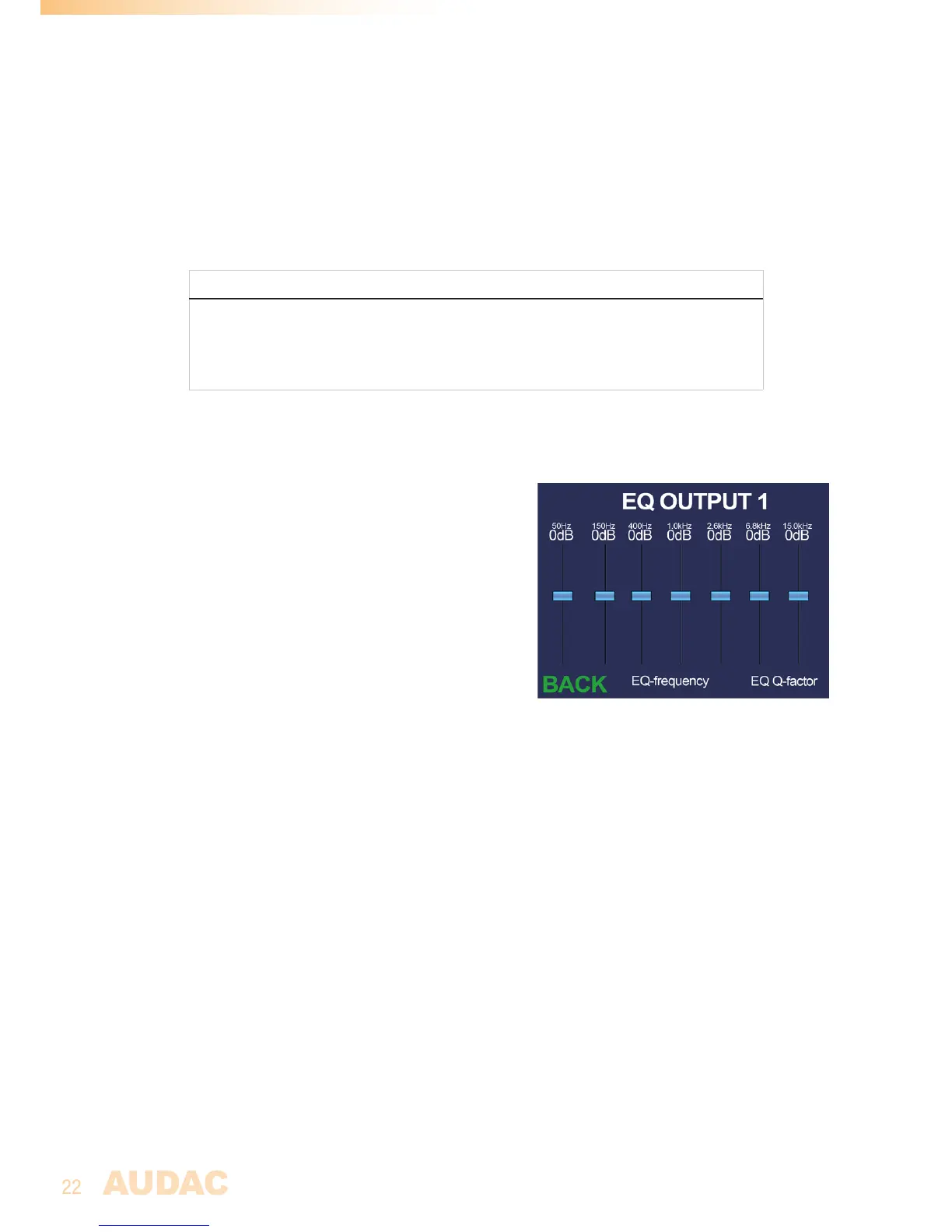
A parametric 7 bands equalizer will allow to cut or
boost specific frequency ranges, helping to improve
the sound and adapt it to acoustics of the location
where its being used.
A standard configuration with center frequencies for
60 Hz, 150 Hz, 400 Hz, 1 kHz, 2.6 kHz, 6.8 kHz and
15 kHz with Q factor of 0.7 is pre-loaded. The center
frequency of each band can be infinitely adjusted
within a range of 1 Hz and 22 kHz, while the Q-factor
can be adjusted within a range of 0.1 and 15 and
the level of each band within a range of +15 dB and
-15 dB.
A fader overview for the 7 bands equalizer will be shown after selecting the ‘EQ settings’
menu item. On top of the screen, the center frequencies for each band are shown with right
under the currently selected equalizing level.
The selection of the corresponding band can be made by turning the rotary selection dial
until the corresponding band is indicated in green and pressing it. Level adjustment can be
done by turning the selection dial and confirmed by pressing it again. After this confirmation,
another band can be selected and adjusted in identical way.
Adjustment of the center frequencies and Q-factors can be done by selecting the
corresponding ‘EQ-frequency’ and ‘EQ Q-factor’ buttons on the bottom of the screen.
When selected, pop-up windows will appear where the corresponding adjustments for
each band can be made. Adjustment of center frequencies can be made in similar way as
described with filters above and Q-factors can changed by selecting and turning clockwise
(up) or counter-clockwise (down). This confirmation can be done by pressing again. After
the required value for each band has been set, returning to the equalizer screen can be done
by selecting the ‘BACK’ button.
The ‘BACK’ button in the left bottom corner of the equalizer screen can be selected and


 To Next Page