102 Ad a pti v e crui se control
keep a safe distance from vehicle in front of
you or to avoid a rear-end collision . In this sit-
uation, a symbol appears and a warning tone
sounds
¢ page 109.
Passing anoth er vehicle
If you move into the passi ng lane and no veh i-
cle is detected ahead, the adaptive cruise con-
trol accelerates to the speed you have set and
maintains it.
Override
You can increase your speed at any t ime by
stepp ing on the acce lerator pedal. After you
release the accelerator pedal, the system ad-
justs back down to the speed you previously
set .
@ Tips
Please note that the amount of accelera-
tion the adaptive cruise control uses de-
pends on the Distance setting selected.
DISTANCE 1 gives you accelerat ion that is
dynamic and sporty . DISTANCE 4, on the
other hand, gives more moderate accelera-
tion . For more information about the time
intervals ¢
page 104, How is the distance
(time interval) set?.
- Please note that if the adaptive cruise
control has begun braking the vehicle
and the driver chooses to brake the vehi-
cle add itionally, t he brakes may fee l
"hard" . This is simply due to the pressure
build- up of the initial braking.
- Adaptive cruise control is sw itched off af-
ter pressing the footbrake . The speed
saved up this point can be resumed. To
resume the saved speed, release the
brake pedal and pull the control lever
¢ page 103, Turning adaptive cruise
control off temporarily .
Switching the system on and off
Applies to vehicles: with adaptive cruise contro l
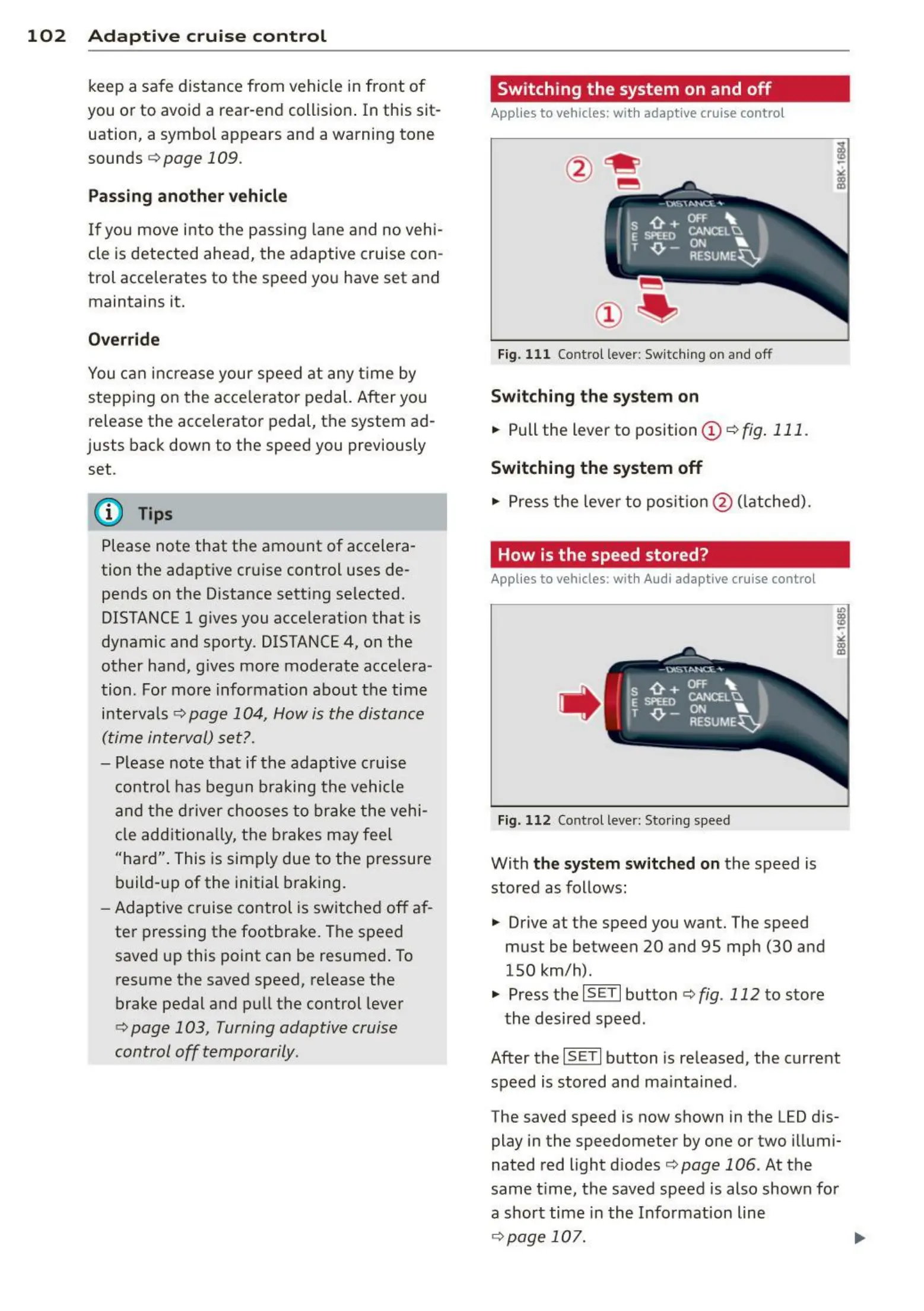
Fig. 1 11 Control lever : Switching on and off
Sw itching the system on
.,. Pull the lever to position (D c::> fig. 111 .
Switching the system off
.,. Press the lever to pos it ion @ (latched).
How is the speed stored?
Applies to vehicles: wit h Audi adaptive cruise control
,' ts ~:_"';;;",' ,
E Sl'EEO CANCELU
. T ,0. - ON ...
. RESUME~
Fig. 11 2 Control lever: Sto ring s peed
With the system switched on the speed is
stored as follows:
• Drive at the speed you want. The speed
must be between 20 and 95 mph (30 and
150 km/h).
.,. Press the
~I S-ET~I button c::> fig. 112 to store
the desired speed .
After the
I SET I button is released, the current
speed is stored and ma intained .
The saved speed is now shown in the LED dis-
play in the speedometer by one or two illumi-
nated red light diodes ¢
page 106 . At the
same t ime, the saved speed is also shown for
a short time in the Information line
¢ page 107. ...,



 To Next Page