Page 13
10: Wi-Fi Connection Using the APP
For Andriod users:
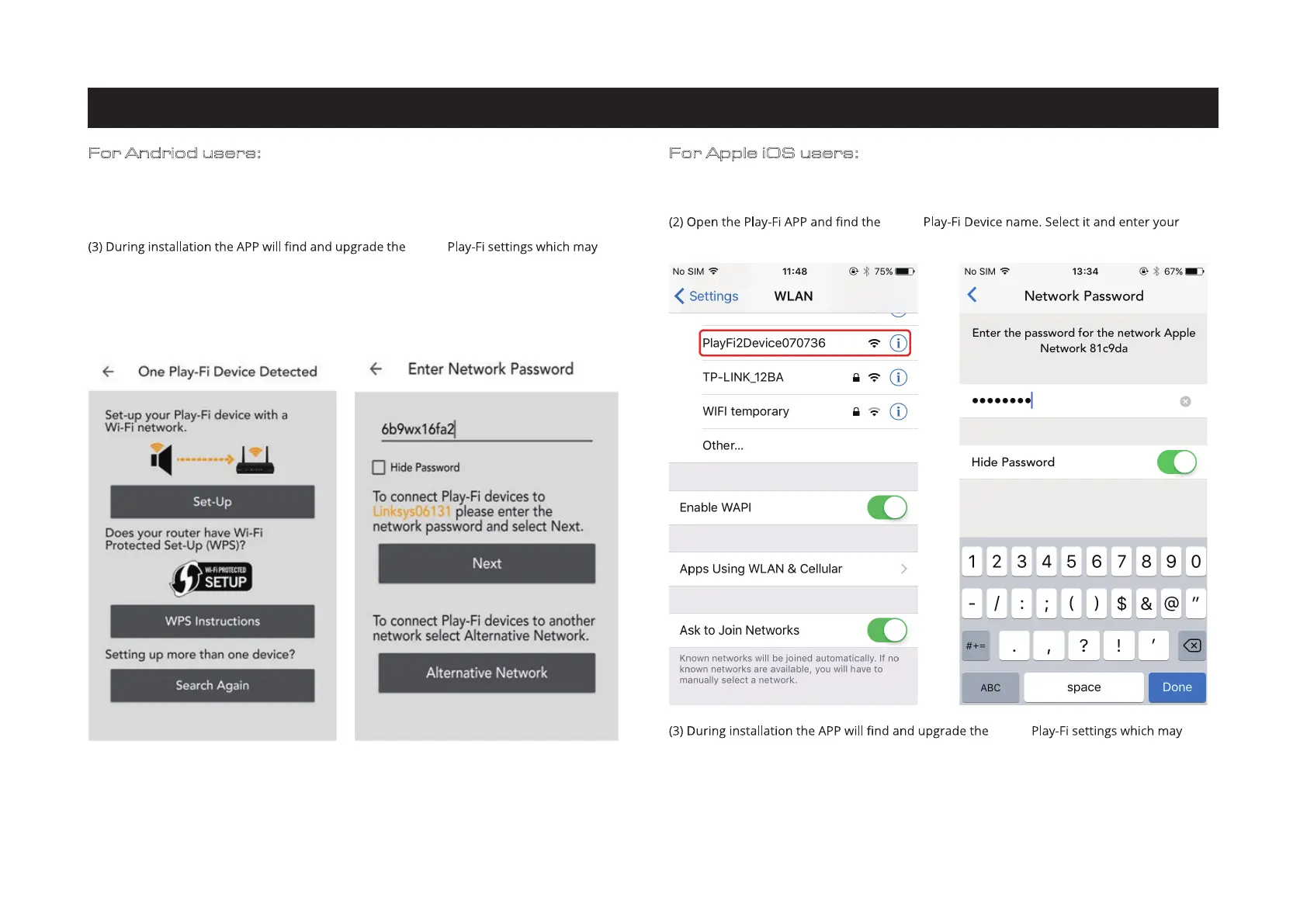
(1) Open the DTS Play-Fi APP, then click the 'Set-up your Play-Fi device' button.
(2) When it has found the 6000A Play click the 'Set-Up' button. Next input the Wi-Fi password for
your wireless network. Then click the 'Next' button.
a few minutes.
(4) After completing the network setup and u pgrading you can s et a n ame for your 6000A Play
Device and use it.
For Apple iOS users:
(1) Download the Play-Fi APP. Before opening the APP please switch to the Settings - Wi-Fi
menu on your smartphone or tablet and select 'PlayFiXDeviceXXXXXX' from the options.
wireless network password.
take a few minutes.
(4) After completing the network setup and upgrading you can set a name for the 6000A Play
Device and use it.
6000A
6000A
6000A
take


 To Next Page