EasyManua.ls Logo

Audiolab 6000A Play - User Manual

Audiolab 6000A Play
24 pages
Print Icon
To Next Page IconTo Next Page
Loading...
User Manual
6000A Play
6000A Play
Question and Answer IconNeed help?

Do you have a question about the Audiolab 6000A Play and is the answer not in the manual?

Summary

Important Safety Information

Electric Shock and Enclosure Warnings

Crucial warnings about electric shock risks, not opening the unit, and proper servicing.

Environmental and Usage Precautions

Instructions to prevent fire or shock by avoiding moisture and ensuring proper ventilation.

Electrical Specifications and Grounding

Details on mains voltage, fuse types, and the Class II insulation status of the appliance.

Getting Started with Audiolab 6000 A Play

Product Overview and Features

Introduces the 6000A Play, its key features, inputs, and outputs.

Unpacking and Placement Guidelines

Provides instructions for unpacking the device and guidance on its physical placement.

Controls and Functions Overview

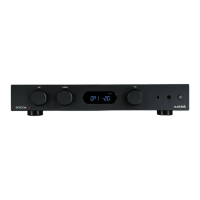
Front Panel Controls and Indicators

Identifies and describes the controls and indicators on the front panel of the 6000A Play.

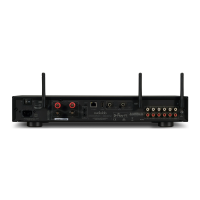
Rear Panel Connections and Ports

Details the various input, output, and connection ports found on the rear panel.

Device Status LED Indicators

Explains the meaning of different LED states for Wi-Fi and power.

Remote Handset Operation

Remote Control Battery Installation

Instructions for fitting the AAA batteries into the remote control handset.

Remote Control Usage and Range

Guidance on how to use the remote handset effectively, including range and positioning.

Connecting the Audiolab 6000 A Play

Analogue and Phono Input Connections

Connecting analogue audio sources and turntables to the appropriate inputs.

Digital, Bluetooth, and Ethernet Connectivity

Connecting digital sources, Bluetooth devices, and network via Ethernet.

Audio Outputs, Triggers, and Power Input

Details on audio outputs, 12V trigger connections, and mains power input.

System Operations - Part 1

Powering On, Off, and Standby Modes

Instructions for switching the amplifier on, off, and managing standby modes.

Source Selection and Volume Adjustment

How to change audio input sources and adjust the volume level.

Mute Function and Display Settings

Operations for muting audio and controlling the front panel display.

Digital Filter Selection for DAC

How to choose between different digital filters for the DAC.

System Operations - Part 2: Operating Modes

Understanding Amplifier Operating Modes

Describes the different operational modes: Integrated, Pre-Power, and Pre.

Using Pre-Power and Standalone Pre Modes

Using the unit as a stand-alone power amplifier or pre-amplifier.

System Operations - Part 3: Menu Navigation

Accessing and Navigating the Menu System

Guide to entering and using the device's menu system for configuration.

Understanding the Menu Tree Structure

Overview of the menu structure and its selectable options.

DTS Play-Fi Wireless Streaming Technology

Key Features of DTS Play-Fi

Highlights the main advantages of DTS Play-Fi technology, including multi-speaker support.

Multi-Room Audio and App Usage

How DTS Play-Fi enables multi-room audio and how to use the mobile app.

Wi-Fi Technology and OS Compatibility

Details on Wi-Fi streaming and compatibility with various operating systems.

Downloading and Using the DTS Play-Fi App

DTS Play-Fi App Download Sources

Information on where to download the DTS Play-Fi application for different devices.

Wired and Wireless Network Setup

Guides for setting up wired Ethernet and wireless Wi-Fi connections.

Wireless Connection Modes (WPS;Standard)

Step-by-step instructions for connecting via WPS or Standard Wi-Fi modes.

Wi-Fi Connection Setup via Mobile App

Android Wi-Fi Setup Guide

Detailed steps for connecting to Wi-Fi using the Play-Fi app on Android devices.

iOS Wi-Fi Setup Guide

Detailed steps for connecting to Wi-Fi using the Play-Fi app on iOS devices.

Wi-Fi Connection Setup via PC or Mac

Connecting via Web Browser Interface

Guide to using a web browser on PC/Mac for Wi-Fi setup.

Network Selection and Password Entry

Steps to select the Wi-Fi network and enter the password during setup.

DTS Play-Fi App Operations - Part 1

Device and Area Management in App

How to select and manage devices and areas within the DTS Play-Fi app.

Overview of Supported Music Services

Information on various music streaming services supported by DTS Play-Fi.

Internet Radio and On-Device Music Streaming

Using the app for internet radio and streaming local music files.

DTS Play-Fi App Operations - Part 2

Streaming from Media Servers and Services

Using services like Napster, Pandora, Spotify, Tidal, and media servers.

Specialty Music and Radio Services

Information on QQMusic, SiriusXM, and SoundMachine services.

DTS Play-Fi App Operations - Part 3

Line In Mode for Input Streaming

Streaming audio from the 6000A Play's inputs to other DTS Play-Fi devices.

Managing Speaker Groups for Multi-Room Audio

How to group Play-Fi devices for synchronized multi-room audio.

DTS Play-Fi App Operations - Part 4

Spotify Grouping and Windows Application

Setting up Spotify groups and using the DTS Play-Fi app on Windows.

System Updates and Surround Sound Support

Information on updating the system and limitations of Surround Sound.

Warranty and Service Information

Warranty Terms, Conditions, and Exclusions

Outlines the conditions, duration, and exclusions of the product warranty.

How to Claim Warranty Service

Step-by-step guide on how to initiate a warranty claim or contact support.

Technical Specifications

Connectivity and Input;Output Specifications

Details on DTS Play-Fi, analogue, digital inputs, and outputs.

Amplifier and DAC Performance Metrics

Technical performance data for the pre-amplifier, power amplifier, and DAC sections.

General and Physical Device Specifications

Includes general info like power consumption, dimensions, weight, and finish.

Summary

Important Safety Information

Electric Shock and Enclosure Warnings

Crucial warnings about electric shock risks, not opening the unit, and proper servicing.

Environmental and Usage Precautions

Instructions to prevent fire or shock by avoiding moisture and ensuring proper ventilation.

Electrical Specifications and Grounding

Details on mains voltage, fuse types, and the Class II insulation status of the appliance.

Getting Started with Audiolab 6000 A Play

Product Overview and Features

Introduces the 6000A Play, its key features, inputs, and outputs.

Unpacking and Placement Guidelines

Provides instructions for unpacking the device and guidance on its physical placement.

Controls and Functions Overview

Front Panel Controls and Indicators

Identifies and describes the controls and indicators on the front panel of the 6000A Play.

Rear Panel Connections and Ports

Details the various input, output, and connection ports found on the rear panel.

Device Status LED Indicators

Explains the meaning of different LED states for Wi-Fi and power.

Remote Handset Operation

Remote Control Battery Installation

Instructions for fitting the AAA batteries into the remote control handset.

Remote Control Usage and Range

Guidance on how to use the remote handset effectively, including range and positioning.

Connecting the Audiolab 6000 A Play

Analogue and Phono Input Connections

Connecting analogue audio sources and turntables to the appropriate inputs.

Digital, Bluetooth, and Ethernet Connectivity

Connecting digital sources, Bluetooth devices, and network via Ethernet.

Audio Outputs, Triggers, and Power Input

Details on audio outputs, 12V trigger connections, and mains power input.

System Operations - Part 1

Powering On, Off, and Standby Modes

Instructions for switching the amplifier on, off, and managing standby modes.

Source Selection and Volume Adjustment

How to change audio input sources and adjust the volume level.

Mute Function and Display Settings

Operations for muting audio and controlling the front panel display.

Digital Filter Selection for DAC

How to choose between different digital filters for the DAC.

System Operations - Part 2: Operating Modes

Understanding Amplifier Operating Modes

Describes the different operational modes: Integrated, Pre-Power, and Pre.

Using Pre-Power and Standalone Pre Modes

Using the unit as a stand-alone power amplifier or pre-amplifier.

System Operations - Part 3: Menu Navigation

Accessing and Navigating the Menu System

Guide to entering and using the device's menu system for configuration.

Understanding the Menu Tree Structure

Overview of the menu structure and its selectable options.

DTS Play-Fi Wireless Streaming Technology

Key Features of DTS Play-Fi

Highlights the main advantages of DTS Play-Fi technology, including multi-speaker support.

Multi-Room Audio and App Usage

How DTS Play-Fi enables multi-room audio and how to use the mobile app.

Wi-Fi Technology and OS Compatibility

Details on Wi-Fi streaming and compatibility with various operating systems.

Downloading and Using the DTS Play-Fi App

DTS Play-Fi App Download Sources

Information on where to download the DTS Play-Fi application for different devices.

Wired and Wireless Network Setup

Guides for setting up wired Ethernet and wireless Wi-Fi connections.

Wireless Connection Modes (WPS;Standard)

Step-by-step instructions for connecting via WPS or Standard Wi-Fi modes.

Wi-Fi Connection Setup via Mobile App

Android Wi-Fi Setup Guide

Detailed steps for connecting to Wi-Fi using the Play-Fi app on Android devices.

iOS Wi-Fi Setup Guide

Detailed steps for connecting to Wi-Fi using the Play-Fi app on iOS devices.

Wi-Fi Connection Setup via PC or Mac

Connecting via Web Browser Interface

Guide to using a web browser on PC/Mac for Wi-Fi setup.

Network Selection and Password Entry

Steps to select the Wi-Fi network and enter the password during setup.

DTS Play-Fi App Operations - Part 1

Device and Area Management in App

How to select and manage devices and areas within the DTS Play-Fi app.

Overview of Supported Music Services

Information on various music streaming services supported by DTS Play-Fi.

Internet Radio and On-Device Music Streaming

Using the app for internet radio and streaming local music files.

DTS Play-Fi App Operations - Part 2

Streaming from Media Servers and Services

Using services like Napster, Pandora, Spotify, Tidal, and media servers.

Specialty Music and Radio Services

Information on QQMusic, SiriusXM, and SoundMachine services.

DTS Play-Fi App Operations - Part 3

Line In Mode for Input Streaming

Streaming audio from the 6000A Play's inputs to other DTS Play-Fi devices.

Managing Speaker Groups for Multi-Room Audio

How to group Play-Fi devices for synchronized multi-room audio.

DTS Play-Fi App Operations - Part 4

Spotify Grouping and Windows Application

Setting up Spotify groups and using the DTS Play-Fi app on Windows.

System Updates and Surround Sound Support

Information on updating the system and limitations of Surround Sound.

Warranty and Service Information

Warranty Terms, Conditions, and Exclusions

Outlines the conditions, duration, and exclusions of the product warranty.

How to Claim Warranty Service

Step-by-step guide on how to initiate a warranty claim or contact support.

Technical Specifications

Connectivity and Input;Output Specifications

Details on DTS Play-Fi, analogue, digital inputs, and outputs.

Amplifier and DAC Performance Metrics

Technical performance data for the pre-amplifier, power amplifier, and DAC sections.

General and Physical Device Specifications

Includes general info like power consumption, dimensions, weight, and finish.

Audiolab 6000A Play Specifications

General IconGeneral
TypeIntegrated Amplifier
Standby Power Consumption<0.5W
Frequency Response20Hz - 20kHz (+/-0.5dB)
Total Harmonic Distortion<0.003% (1kHz, 80% Power)
Outputs1 x Pre-Out, 1 x Headphone Out
DACESS Sabre32 ES9018K2M
WirelessWi-Fi
Input Impedance10K (Line Inputs), 47K / 100pF (Phono MM)
Supported Streaming ServicesSpotify Connect, Tidal, Qobuz, Deezer, Internet Radio
BluetoothYes
Power Output50W per channel (8Ω), 75W per channel (4Ω)
Inputs3 x Line Level, 1 x Phono (MM), 2 x Optical, 2 x Coaxial, 1 x USB

Related product manuals