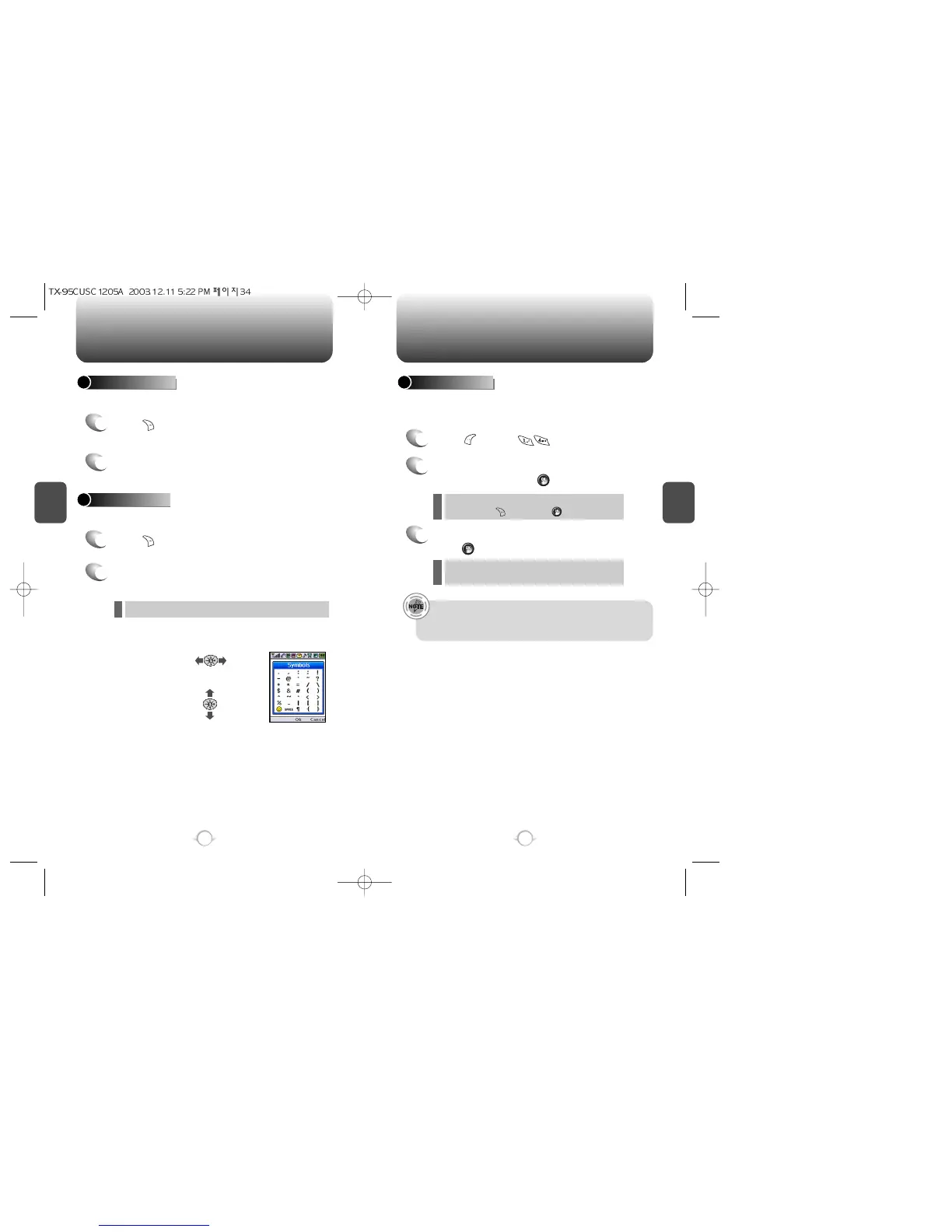
ENTERING LETTERS, NUMBERS & SYMBOLS MAKING A CALL THROUGH THE PHONE BOOK
C
H
3
NUMERIC MODE
1
Press [MODE] until the
“Symbols (Symbol mode)” appears.
35
C
H
3
34
1
Press [MODE] until the current input mode
changes to the “NUM (Numeric mode)”.
2
To enter a number, press a digit key.
Press [ ],
or
Press [ ].
2
Select symbol you want to enter with the
Navigation Key.
l Use the Navigation Key to view a different line of symbols.
SYMBOL MODE
Allows you to enter numbers.
Allows you to enter symbols.
Dials a number simply by pressing and holding its Speed Dial location
number. For a 2-digit location number, press the first number then
press and hold the second number. To store a number in Speed Dial:
SPEED DIALING
• “Unassigned” appears if the location is available.
• A phone number that is set to secret will not be displayed
when called from Speed Dial.
1
Press [MENU] .
2
To assign a phone number to a location, select
the location and press [SET].
3
Select the entry with the Navigation Key and
Press [OK].
If a phone number is already assigned to the
location, press [ERASE] and [OK] to delete.
l
If the entry is set to secret, you will be asked for your
passwoed.
l



 To Next Page