- 11 -
USING THE COUNTERTOP LIGHT
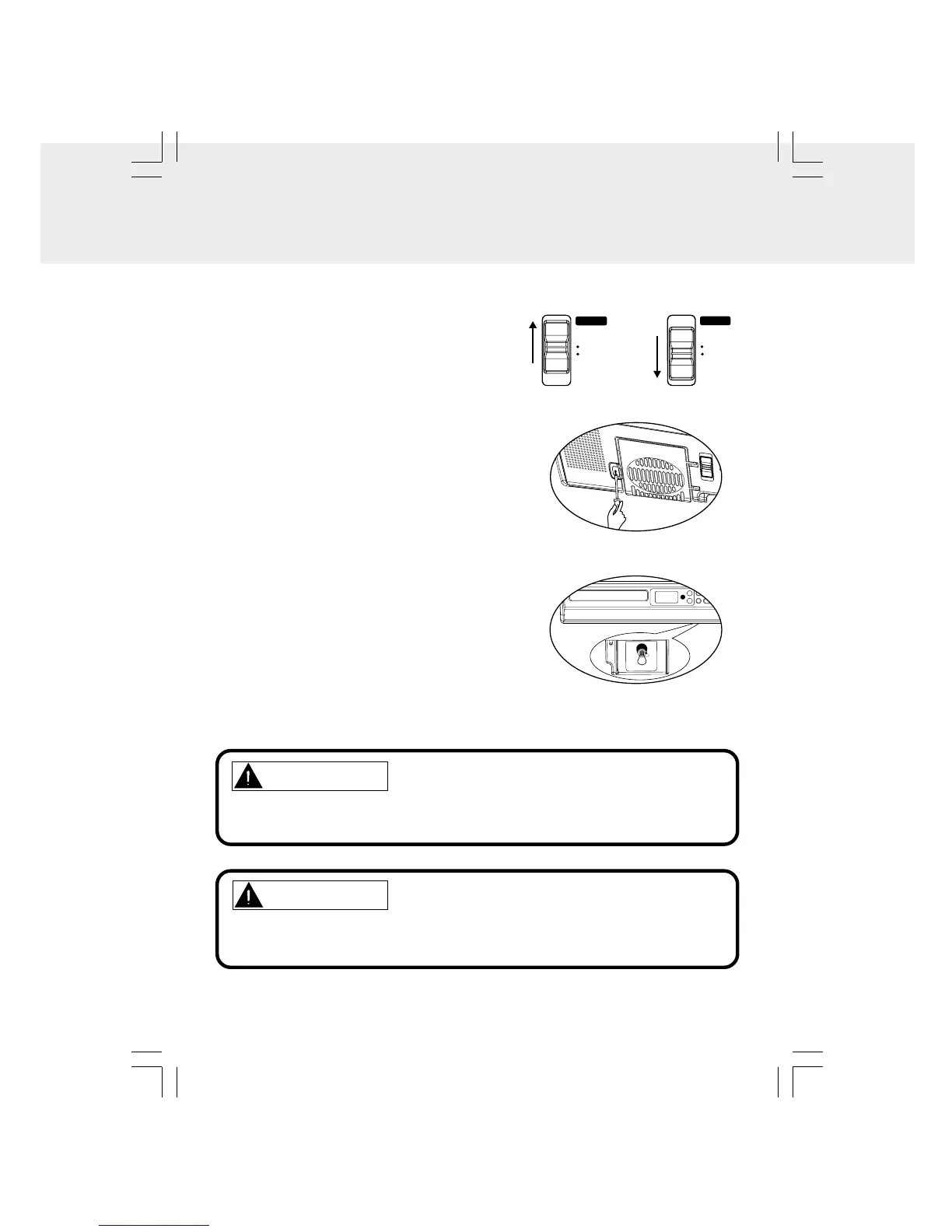
Replacing the light bulb
1. Unplug the power cord from the wall outlet.
2. Use a screwdriver to unscrew the lamp cover.
3. Open the lamp cover.
4. Unscrew and remove the old light bulb.
5. Install a new light bulb and close the cover.
6. Replace the screw and tighten it.
7. Plug the power cord back into the wall outlet.
8. Slide the light switch to ON.
The countertop light and its ON/OFF switch are located on the bottom of the unit.
1. Turning on the light.
• Slide the LIGHT switch to ON.
2. Turning off the light.
• Slide the LIGHT switch to OFF.
LIGHT
OFF
ON
LIGHT
OFF
ON
Notes for replacing the bulb:
• Turn off the light, then unplug the power cord.
• Be sure to use S-type 25W bulb for replacement.
Figure 2
Figure 1
WARNING
DO NOT PUT YOUR FINGER INTO THE BULB HOLDER TO AVOID
ELECTRICAL SHOCK.
CAUTION
WAIT FOR THE LIGHT BULB TO COOL BEFORE TOUCHING IT TO AVOID
BURNS.


 To Next Page