- 12 -
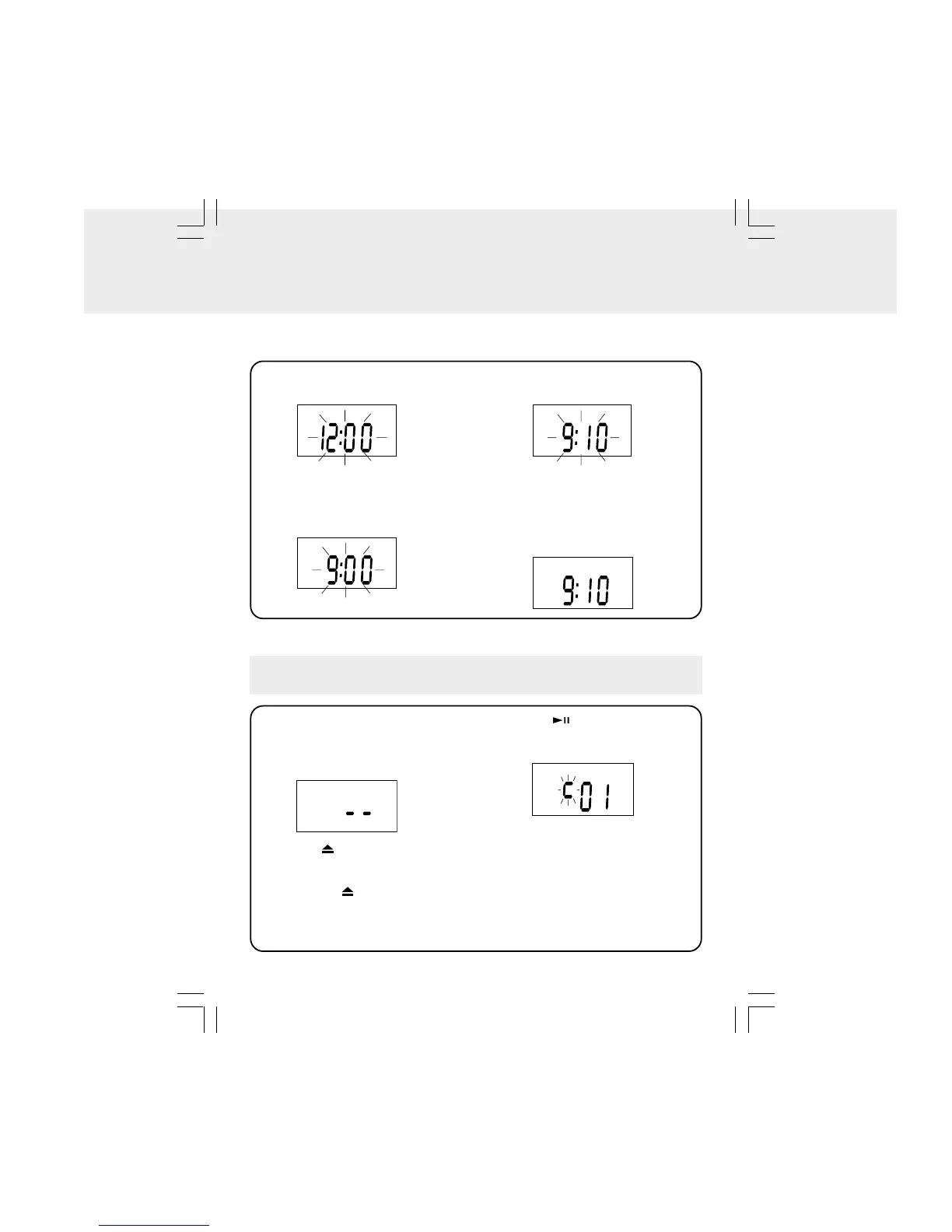
The unit must be in standby mode. To enter standby mode, make sure that the unit is
plugged in, but not turned on.
2. Press the TUNING • SKIP/TIMER-
button to set the current hour.
3. Press the TUNING • SKIP/TIMER +
button to set current minutes.
1. Press the CLOCK SET/MEMORY
button until the TIME blinks.
4. Press the CLOCK SET/MEMORY
button to start the clock.
The clock will be started automatically
if no button is pressed within 10
seconds.
SETTING THE CLOCK
1. Press the POWER button to turn ON
the unit.
2. Press the CD · RADIO FUNCTION
button to select CD mode.
3. Press the OPEN/CLOSE button to
open the CD drawer. Place a CD onto
the CD tray with the label side up and
then press the OPEN/CLOSE button
to close it. The CD will be scanned by
the unit and the total # of tracks will be
displayed.
4. Press the PLAY/PAUSE button to
start playing the CD. The current track
appears in the display.
Note: During playback, the number of
the current track will disappear and the
clock will be shown if no button is
pressed within 10 seconds.
• Adjust volume by pressing the
VOLUME +/- buttons.
CD PLAYBACK
Note: Do not push the CD drawer to
close it.
Note:12-hour system "AM 12:00" = midnight.
AM
AM


 To Next Page