
 Need help?
Do you have a question about the Audiovox Pursuit Series and is the answer not in the manual?
Step-by-step guide to arm the security system using the transmitter lock button.
How to arm the system without audible chirps or horn beeps.
Procedure to disarm the system using the transmitter's unlock button.
Disarm the system without a transmitter using the PBLED switch.
How to disarm the system using a programmed custom override code.
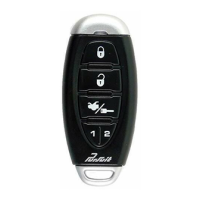
This document describes the PRO 9644i Model Owner's Manual, a 3-button remote security system with starter disable.
The PRO 9644i is an advanced automotive security system designed to protect your vehicle from theft and intrusion. It features a 3-button remote control for arming, disarming, and panic functions, along with a starter disable feature to prevent unauthorized starting. The system incorporates code hopping technology to enhance security against code grabbers, ensuring that the signal from your transmitter changes with each press, making it difficult for thieves to capture and re-transmit.
The system offers selectable manual override circuitry, which is crucial if your transmitter is lost or its battery fails. This allows you to bypass the security system to operate your vehicle. The manual provides instructions for both Valet Switch manual override (pre-selected from the factory) and Custom Code override options.
Arming the System - Active: To actively arm the system, turn off the engine, exit the vehicle, and ensure all doors, hood, and trunk lids are closed. Press and release the Lock button on your keychain transmitter. The red dash-mounted LED will begin to flash slowly, parking lights will flash once, and the siren will sound one chirp. If the siren sounds three chirps, it indicates an open entry point (door, trunk, or hood lid), which you should close for full protection. The system also offers optional features like vehicle horn beeps (one beep for arming, three for open entry points) and headlight illumination for approximately 30 seconds as you leave the vehicle.
Silent Arming - Active: For silent arming, follow the same steps as active arming, but press and hold the Lock button on the keychain transmitter for 2 seconds. The LED will flash slowly, parking lights will flash once, but the siren will not sound. If an entry point is open, the system will still detect it, but without an audible alert.
Arming the System - Passive (Automatic): To use passive arming, turn off the engine, exit the vehicle, and close and lock all doors, hood, and trunk lids. The red dash-mounted LED will flash rapidly for 30 seconds, indicating the passive arming cycle has begun. Opening any protected entry point during this cycle will suspend automatic arming, which will restart once all doors are closed. At the end of the cycle, the LED will flash slowly, parking lights will flash once, and the siren will sound one chirp (or the horn will beep once). Door locking during passive arming is a selectable feature; it can be programmed to lock doors only when arming with the keychain transmitter, not automatically during passive arming.
Protection While the System is Armed: When armed, opening any protected door, hood, or trunk lid will trigger the alarm immediately. The alarm will sound for 30 seconds, then stop and continue to monitor all entry points. If a door remains open, the alarm will sound for six 30-second cycles, remain armed, and ignore that triggered zone. The red dash-mounted LED will slowly flash as a visual deterrent. The system also bypasses the vehicle's starting circuit to prevent the engine from being started if the alarm is triggered. Optional features include parking lights flashing, horn beeping, and interior courtesy lights flashing for the full 30-second alarm cycle when triggered.
Disarming the System: To disarm, press and release the Unlock button on the keychain transmitter. The red dash-mounted LED will turn off. If passive arming was selected, the LED will flash rapidly, indicating re-arming, which can be suspended by opening any door. Parking lights will flash twice, and the siren will sound two chirps (or the horn will beep twice). If the parking lights flashed three times or the siren sounded four chirps, it indicates an intrusion attempt occurred in your absence. The LED will help identify the triggered zone (refer to "Intrusion Warning Signals"). Optional features include two-step door unlock (drivers door unlocks first, all others unlock with a second press) and headlight illumination for 30 seconds.
Silent Disarming: To silently disarm, press and hold the Unlock button on the keychain transmitter for 2 seconds. The LED will turn off, parking lights will flash twice, but the siren will not sound. Intrusion alerts will still be indicated by parking light flashes (three times) or horn beeps (four times).
While the System is Sounding: If the alarm is sounding, you can turn off the siren without disarming the system by pressing and releasing any transmitter button other than the disarm button. This keeps the vehicle fully armed and protected, useful for accidental triggers.
Intrusion Warning Signals: The system informs you of intrusion attempts while you were away. Upon disarming, the siren will chirp four times, and parking lights will flash three times. The red dash-mounted LED will then indicate the triggered zone:
Pushbutton LED/Valet/Override/Programming Switch (PBLED): The PBLED switch allows temporary bypass of alarm functions (Valet Mode). In Valet Mode, alarm functions are bypassed, but remote panic and door locks remain operational. To activate Valet Mode, disarm the system, turn the ignition key to ON, then press and hold the PBLED switch until the LED turns solid. To exit Valet Mode, press and release the PBLED switch while the ignition is ON.
Manually Overriding Your System - Using the PBLED Override Switch: If your system is set for Valet Switch manual override (as indicated on the last page of the manual), you can disarm it without the transmitter. Open the vehicle door (alarm will sound), turn the ignition key to ON, and within 5 seconds, press and release the PBLED override switch. The alarm will stop, and the system will enter bypassed mode, allowing normal vehicle operation.
Programming Your Custom Override Code: This system allows you to program a personalized override code for enhanced security. The factory default code is 11. To change it:
Eliminating the Normal Arm/Disarm Chirps: You can temporarily eliminate chirps by holding the transmitter button slightly longer when arming or disarming. To permanently eliminate them:
Remote Panic Operation: Press and hold the Lock or Unlock button on the keychain transmitter for 3 or more seconds to activate panic mode (alarm sounds). To stop, press and hold the Lock or Unlock button again for 3 seconds, or press and release any other transmitter button. If no action is taken, the alarm will stop automatically after 30 seconds. In panic mode, pressing Lock or Unlock buttons will lock/unlock doors (if installed), but the panic feature will continue for 30 seconds.
Optional Device Output (Channel 3, 4, 5): The system has additional outputs (channels 3, 4, and 5) that can be connected to various optional accessories, such as:
The manual emphasizes the importance of understanding the manual override procedures, especially in cases of lost or inoperative transmitters due to battery failure. It also notes that if the transmitter button is pressed more than fifty times out of range, it will need to be re-aligned to the receiver by pressing the Lock button twice within one second.
The system's LED indicator is designed to be low current, preventing battery drain even when left unattended for extended periods. The intrusion warning indicators are stored in the system's memory and are erased when the ignition key is turned on, simplifying the process of checking for new intrusions.
The ability to program a custom override code provides a higher level of security compared to easily found override switches, requiring the user to manage their personalized code. The manual also details how to permanently eliminate arm/disarm chirps, although it notes that battery disconnection will reset this setting, requiring the user to re-apply the procedure.
 General
| Type | Car Alarm |
|---|---|
| Installation | Professional installation recommended |
| Series | Pursuit |
| Remote Range | 1, 500 feet |
| Security Features | Shock Sensor, Starter Kill |
| Compatibility | Most 12V vehicles |



 To Next Page
