>20<
DRM Register - Continued
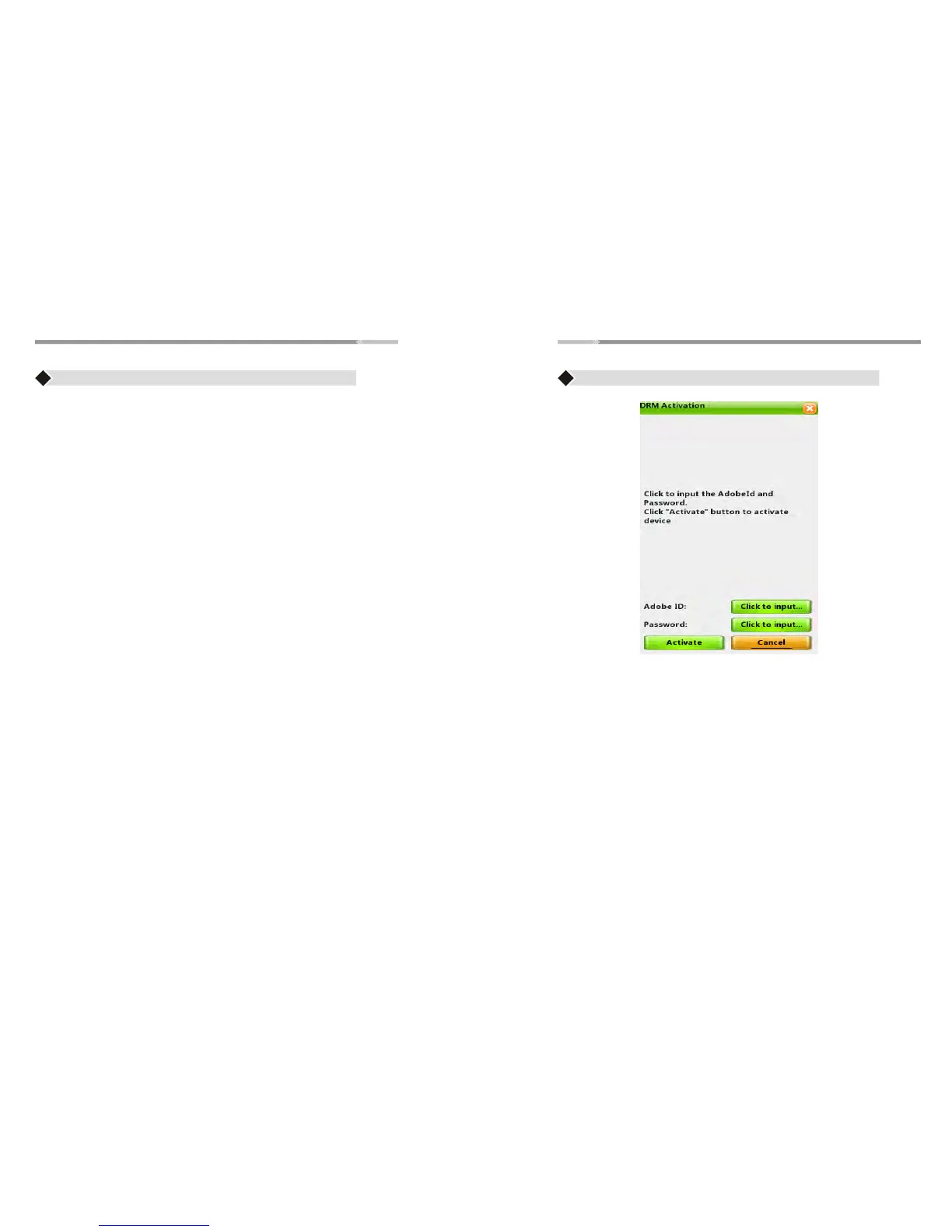
Once you activated the DRM, it will display “Device has been
activated”. If you want to deactivate it, you must do hard reset.
Step 4: eReader is now ready to download DRM ebooks. You can
visit ebooks sites to purchase and download DRM ebooks.
Step 5: Downloaded files will be saved into Digital Editions folder
under Library
Note: Once you downloaded the DRM ebooks to the eReader. You will
not be able to copy it from another device.
DRM Hard Reset
Step 1: Please press z, y, j, Number “3” key consecutively. The Testing
window will appear, please select "DRM Hard Reset", then press
“Enter” button
Step 2: On screen Keyboard will pop up, please input the code "8299",
press OK. Press the “Back” button and you can now input or
activate a different Adobe ID
>21<
Buy Books
♦ Select this option to go to buy books website directly
(ebooksmedia.com)
♦ Use " Joystick" to highlight " Buy books" option
♦ Press" Enter" button to open this option
♦ Press " Home" button to go back to the Main Menu.
Note:It needs to connect to Wi-Fi first,then this option will work.
DRM Register
♦ There are two ways for you to read the DRM file:
1. Using Adobe Digital Edition:
For details on how to install and use the Digital Edition Software,
please visit the link below:
http://www.adobe.com/products/digitaleditions/help
Note: Please create an Adobe ID before downloading the Adobe
Digital Edition Software.
2. Using your eReader:
Prior to downloading ebooks, you need to create an Adobe ID and
register the device.
Step 1: Please Create an Adobe ID.
Visit the link: www.adobe.com
Click the “Your account” link on the upper right hand corner
of the website and click “Create an Adobe Account” button
in the next page. A registration form will show.
Please provide all necessary information and submit.
Step 2: On the eReader, Connect to Wi-Fi
Step 3: On the eReader’s Main Menu, Use the Joystick to highlight
“DRM Register” option and press “Enter”.
Input your Adobe ID and password and select “Activate”.
press Enter.
Note:If you are experiencing issues with creating a new Adobe ID go to
support and search for "Adobe account, password, and login FAQ"


 To Next Page