Need help?
Do you have a question about the auris audifi and is the answer not in the manual?
Download and install the free 4STREAM app from the Apple App Store for iOS or from Google Play for Android.
Guidance on connecting the audifi device to your stereo system, via WiFi, LAN, or Bluetooth.
Details on using the app for device settings, playing local music, and managing music sources.
Information on how to use integrated online streaming services like Spotify, Tidal, Qobuz, and Deezer.
Information on how the application notifies users about new firmware versions and the importance of updating.
Instructions for setting up foobar2000 with a DLNA/UPnP plugin to stream music from a Windows PC.
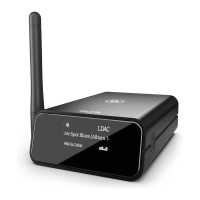
The Auris Audifi is a versatile WiFi music streamer designed to integrate with any amplifier or active speakers, offering access to a wide array of music streaming services and internet radio stations. It delivers high-resolution audio, streaming in 24-bit Hi-Res, and can function as a standalone streamer or be grouped with other players to create a multi-room listening experience.
The Audifi primarily functions as a network music player, allowing users to stream audio wirelessly from various sources. It supports streaming via WiFi without distance limitations and also includes Bluetooth 5.0 for local wireless connections up to 15 meters. The device is equipped with Qualcomm® aptX™ HD technology, ensuring true high-resolution music playback.
It supports a comprehensive range of streaming protocols, including Spotify Connect, AirPlay, Qplay, DLNA, and UPnP, making it compatible with a broad ecosystem of devices and services. Music sources can be diverse, encompassing online streaming services, content stored on smart devices, USB pen drives, Network Attached Storage (NAS), Bluetooth connections, and external devices connected via its line-in input.
For audio output, the Audifi provides both digital and analog options. It features stereo analog RCA outputs, a dedicated subwoofer output for external active subwoofers, and digital optical and coaxial outputs. This flexibility allows it to connect to a variety of audio systems, from traditional stereo setups to home theater receivers and digital processors.
The device also includes multiple audio inputs, such as analog RCA, digital optical, and digital coaxial, enabling it to act as a central hub for various external audio sources like TVs, CD players, or other compatible devices. A USB (Type A) host port is available for connecting USB pen drives, with a limit of 1024 tracks.
The Audifi is designed for ease of use, controlled primarily through a dedicated mobile application, "4stream App," available for free on both iOS and Android platforms. This app facilitates setup, configuration, and daily operation.
Users begin by connecting the Audifi to their stereo system or powered speakers using either RCA or digital optical/coaxial cables. After powering on, the device enters setup mode, indicated by an LED and voice prompts. The mobile app guides users through connecting the Audifi to their WiFi network. The device operates on 2.4GHz WiFi networks. Alternatively, it can be connected via a wired Ethernet (LAN) port for a stable network connection, or directly paired via Bluetooth. The app allows for renaming the device and selecting the desired input source (Wi-Fi, Line In, Bluetooth, Optical).
The Audifi supports playing music from various sources:
A key feature is its multiroom and multizone capability. Users can group multiple Audifi units (or other compatible players) within the same network to play synchronized music across different rooms or create separate zones with different music playing simultaneously.
The device offers EQ adjustment (Bass and Treble control) via the app or remote controller. It also supports left and right channel selection, allowing users to configure devices for stereo playback by assigning one device to the left channel and another to the right, then grouping them.
A full-function IR remote controller is included, providing control over power, volume, mute, play/pause, previous/next track (in WiFi mode), input mode selection (USB, AUX IN, Optical, WiFi, Bluetooth), and treble/bass adjustments. It also features preset buttons (1-6) for one-button playback of pre-configured playlists. A "Deep Bass" button is available for enhanced bass.
An OLED display panel shows device status and information, enhancing usability without requiring constant interaction with the mobile app. The brightness of the LED display can be controlled via the remote.
The Audifi can stream music from Windows PCs and Mac computers.
For advanced control or alternative access, a web player interface is available by entering the device's IP address into a web browser. This interface allows control over volume, playback functions (play/pause, previous/next, repeat, shuffle), access to preset songs/stations, and changing the input source. The web interface also provides access to device settings, including network configuration and firmware updates.
The Audifi supports over-the-air (OTA) firmware updates. The 4STREAM app will notify users when a new firmware version is available. Regular updates are recommended to correct bugs, improve security, and add new features or services.
There are two methods to restore the device to its factory settings:
The app provides access to various device settings for maintenance and personalization:
For initial WiFi setup or troubleshooting, users can connect their mobile/PC WiFi to the device's SSID (SoundSystem_XXXX) and access a web interface by entering a default IP address (10.10.10.254). From there, they can connect to their home router, enter the WiFi password, and configure network settings. This method is particularly useful if the app-based setup encounters issues. The web interface also allows for changing the admin password for security.
 General
| Bluetooth Version | 5.0 |
|---|---|
| SNR | 112 dB |
| THD+N | 0.001% |
| Frequency Response | 20Hz - 20kHz |
| Signal-to-Noise Ratio | 112 dB |
| Output | RCA, Optical |
| Bluetooth Range | 30m (100ft) |


 To Next Page