4
5. Interface
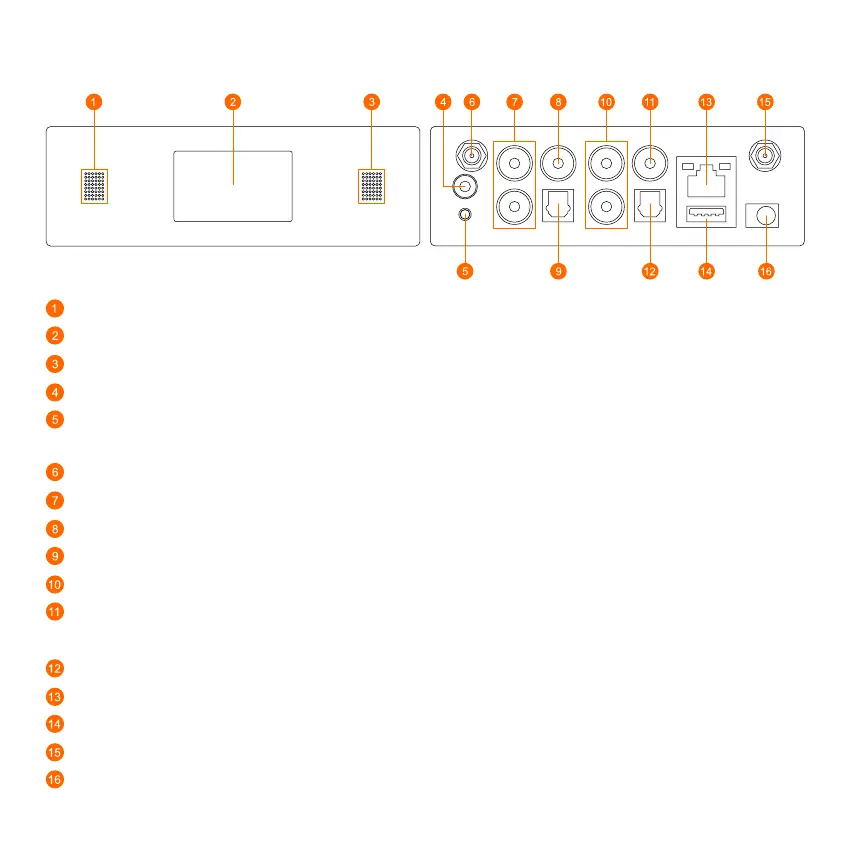
LED: To show the device status.
Display Panel: Display status info.
IR receiver: Infrared sensor for remote control.
Trigger Out: 12V trigger output used to control or activate other external devices.
Reset Button: Short press to reset the device WiFi, long press to restore the device to factory setting (only
works in WiFi mode). Please change to WiFi mode when the device is in Bluetooth or Line In mode.
WiFi antenna: External WiFi antenna for better signal strength.
Line In: For external audio sources from TV, CD player and so on.
SubW Out: To connect to any powered (“active”) subwoofer.
Opt In: Digital Optical input to connect to the digital optical output of other compatible devices.
Line Out: To connect to the corresponding analog audio input of any amplifier, receiver or stereo system
Coax Out: Digital Coaxial output to connect to the coax input of compatible devices such as receivers,
computer soundcards or other digital processors.
Opt Out: Digital Optical output to connect to optical input of other compatible amplifiers or receivers.
LAN: The LAN port to connect to your ethernet broadband router with an ethernet cable.
USB (Type A) : Connect a USB pen drive to the USB input. (1024 tracks limit)
BT Antenna: External Bluetooth antenna for better Bluetooth signal strength.
DC In: 12V/1A DC input.



 To Next Page