10
8.2.3 Option 2 - Connecting audifi via LAN
1. To setup audifi using the LAN port, a wired Ethernet connection is required. Connect one end of the Ethernet
cable to the LAN port of your Ethernet broadband router and the other end to the audifi's LAN port. The device
will show on the app in about 10 seconds.
(Note: Your smartphone and audifi must be on the same WiFi network)
8.2.4 Option 3 - Connecting audifi via Bluetooth
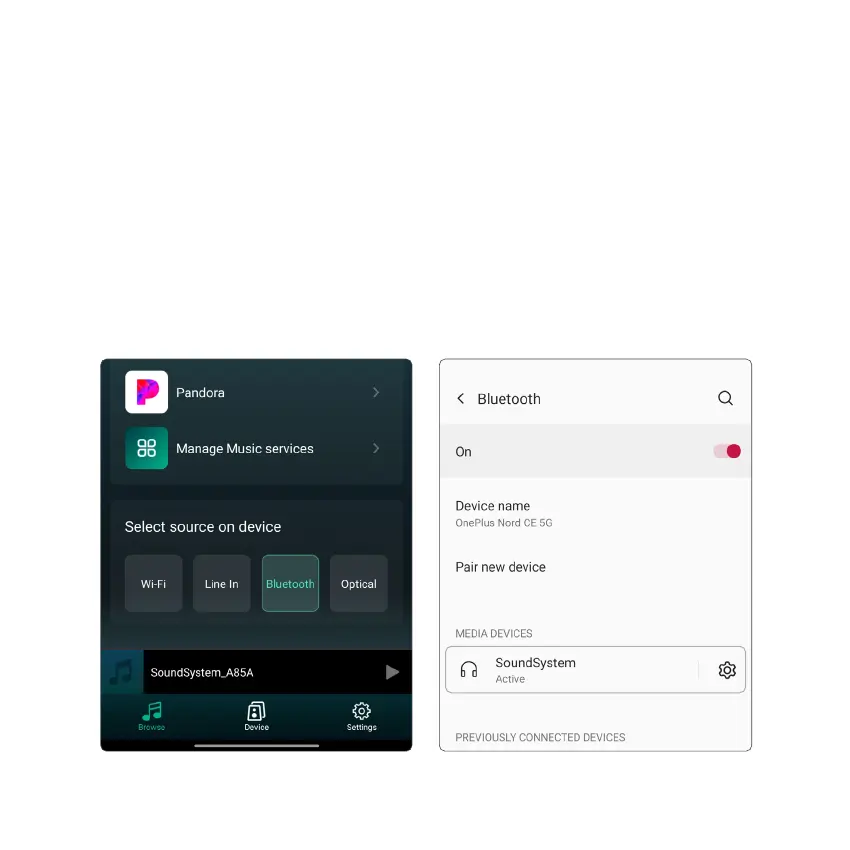
1. Select Bluetooth from the App (at the bottom of the music Browse page) or simply press “BT” button on the
Remote Control.
2. The audifi display will show the “Bluetooth icon” indicating that the device is now ready to be paired.
3. Turn “ON” Bluetooth on your device and go to Bluetooth preferences.
4. Scan listed Bluetooth devices and select “SoundSystem” to pair and connect.



 To Next Page