16
8.8 Source Mode Change
Method 1: Change on App
Users can change play mode on the application - WiFi, Bluetooth, Line Input, Optical Input and USB. To change
from Bluetooth/Line Input/Optical Input/USB to WiFi, you only need to choose the online streaming services
such as Spotify, Qobuz or your smartphone local storage music or any music via DLNA / UPnP streaming.
Method 2: Change with Remote control.
Users can use the remote control to change the play modes - WiFi, Bluetooth, Line Input and USB.
Method 3: Press the Reset button
User can press the reset button once to switch source mode - WiFi, Bluetooth, Line Input and USB.
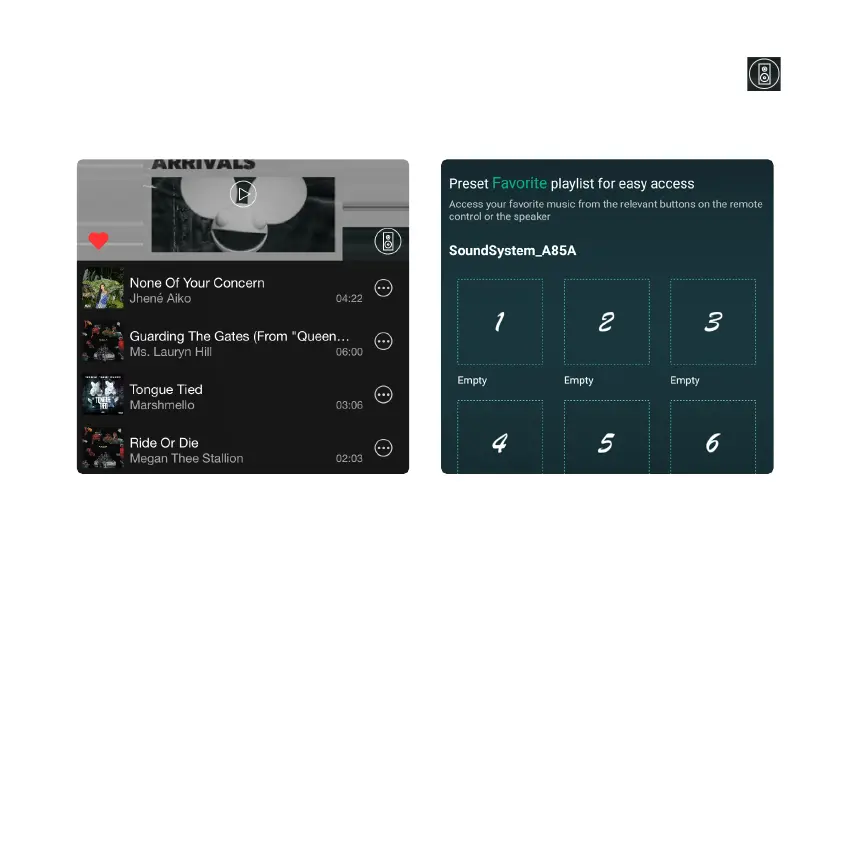
There are 6 buttons on the remote control, users can preset play lists (only the lists with speaker icon
can preset) on the application from 1~6 for example, then when you press button 1 on the remote, the preset list
1 will play. (Users can preset 10 playlists on the application, but the remote control can only save from 1-6).
8.7 Preset



 To Next Page