20
9.3 To play music from Windows PC via MusicBee
Seamlessly stream music from your Windows PC to audifi with the powerful MusicBee music player.
1. Download the free MusicBee music player from https://www.getmusicbee.com and install it.
2. Download the DLNA/UpnP plugin for the MuiscBee player from
https://www.getmusicbee.com/addons/plugins/11/upnp-dlna-device-support/
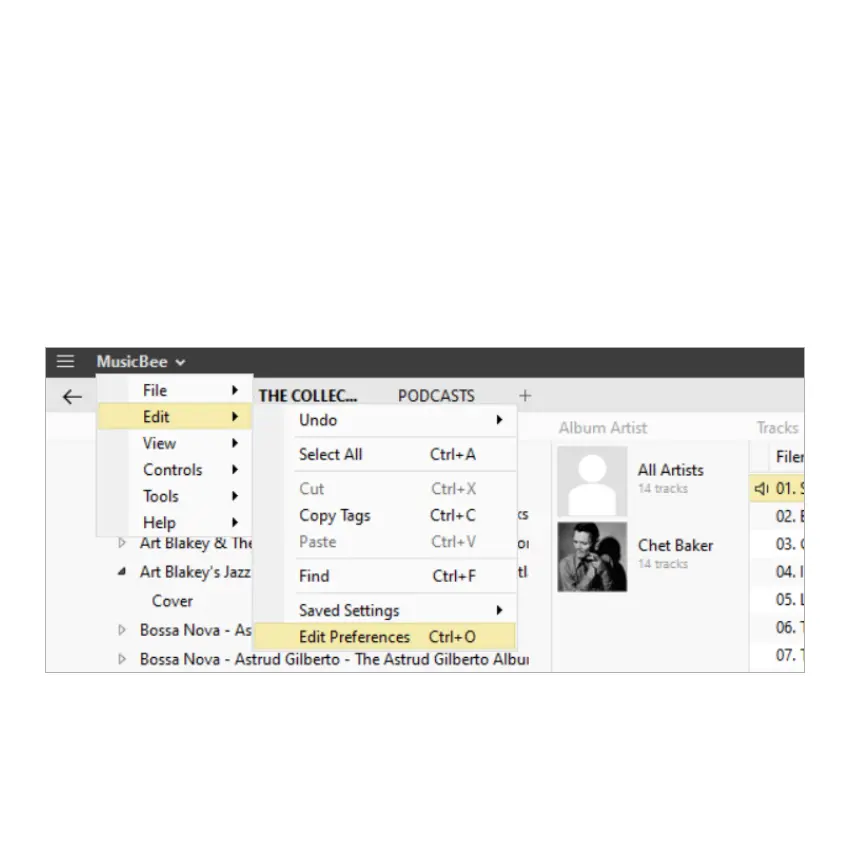
3. Open the MusicBee player and go to Edit>Edit Preferences(Ctrl+O)>Plugins>Add Plugin. Select the
downloaded DLNA/Upnp plugin file. The musicbee upnp plugin is now installed and will show in the plugin
section.
4. Now go to Edit>Edit Preferences(Ctrl+O)>Player. Under the audio player section, go to output and select the
"audifi" device. Click "Apply" and "Save".
5. You are now ready to stream your favorite tracks from your Windows PC to your stereo system.



 To Next Page