english 12
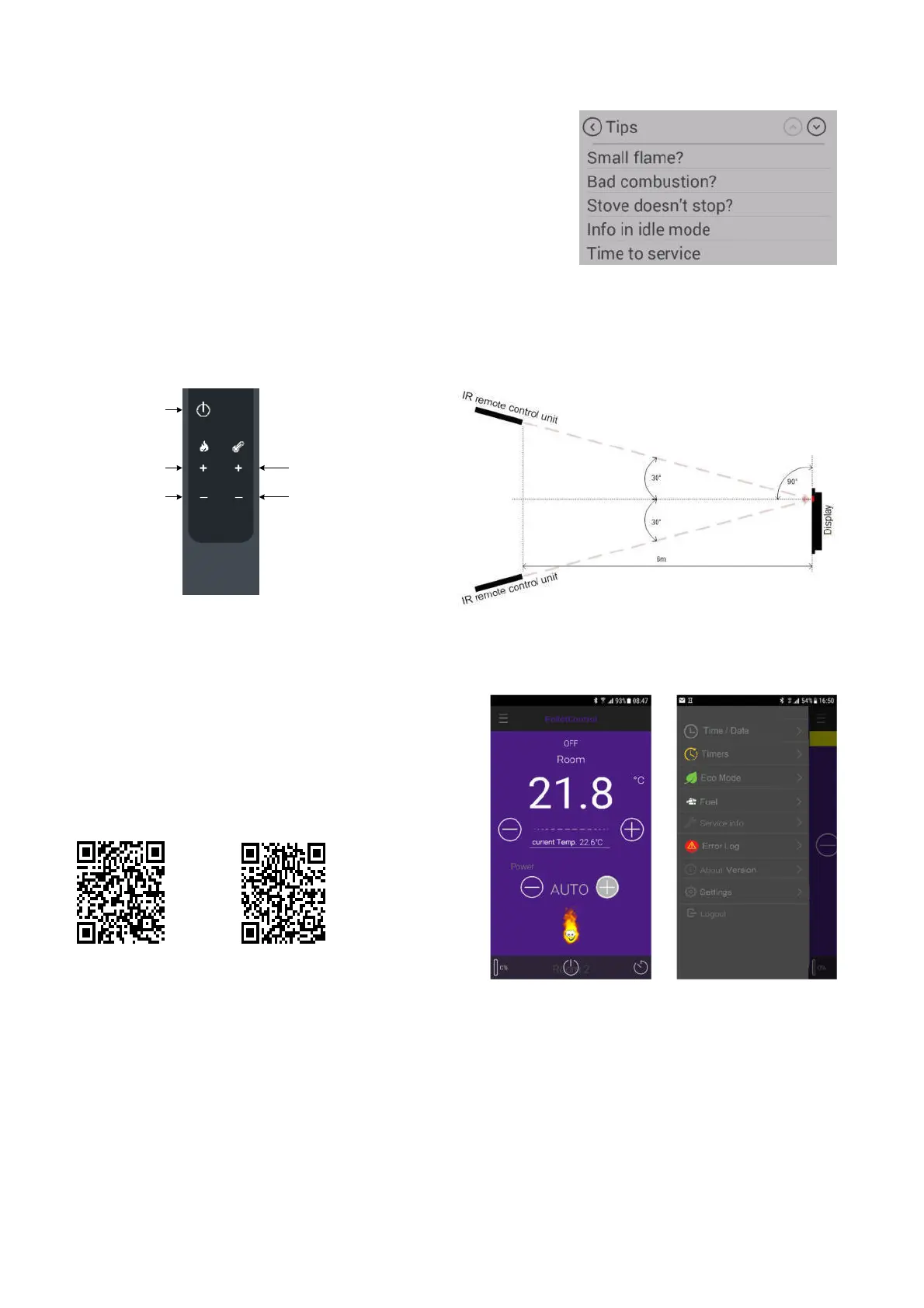
Menu item: Tips
Here you will find important "tips" for operating your stove correctly, and
answers to questions relating to possible problems.
3.2 Operating the stove using the IR remote control
Stove models with an upright display are supplied with an IR remote control. This can be used to perform the
functions illustrated below. Make sure there is "visual contact" between the remote control and the control panel.
ON/OFF
Power UP
Power DOWN
Desired temperature UP
Desired temperature DOWN
Operating angle
3.3 Operating the stove using the APP and smart phone
To install or set up the data connection, please refer to the
instructions for your WLAN module, or follow the installation
instructions of the Austroflamm PelletControl app.
Download the required "Austroflamm PelletControl" app
here and then start it:
Apple iOS Google Play / Android
On / Off
Power level +
Power level -
Set temperature +
Set temperature -


 To Next Page