89
In-vehicle Test
In-vehicle Test is used for testing batteries that are installed in a vehicle. An in-vehicle
test includes battery test, starter test, and generator test. These tests help determine the
health status of the battery, the starter, and the generator, respectively.
IMPORTANT
Before using the diagnostic functions, download the desired vehicle software on the
Update screen.
NOTE
The complete in-vehicle test includes battery test, starter test, and generator test, in
sequence.
Battery Test
To perform the in-vehicle battery test
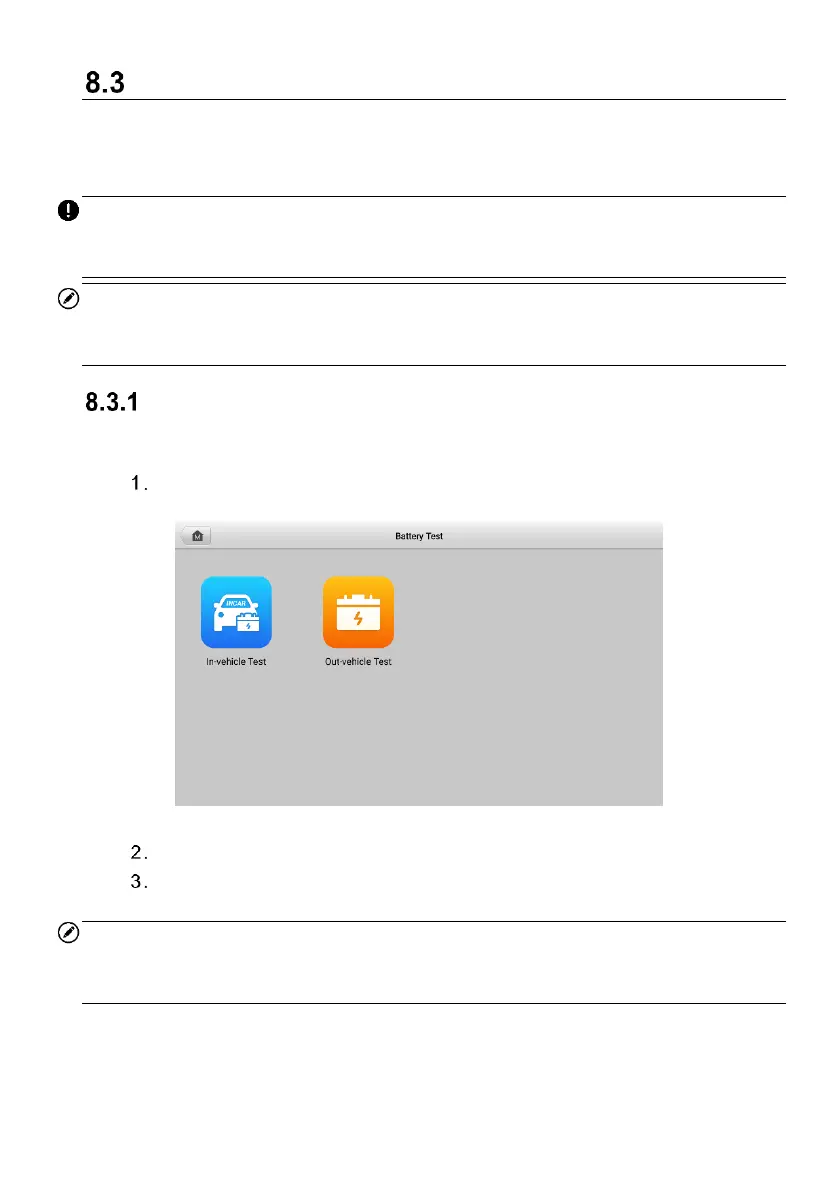
Tap the Battery Test application on the MaxiCOM Job Menu. The Battery
Test screen appears.
Figure 8-3 Battery Test Screen
Tap In-vehicle Test.
(Optional) Establish communications between the VCI and vehicle by
following the on-screen instructions on the OBD connect screen.
NOTE
OBD connect is recommended and is used for automatically obtain battery type and
location.



 To Next Page