EasyManua.ls Logo

Auto Meter BCT-468 - Page 18

Auto Meter BCT-468
47 pages
Print Icon
To Next Page IconTo Next Page
To Previous Page IconTo Previous Page
Loading...
18
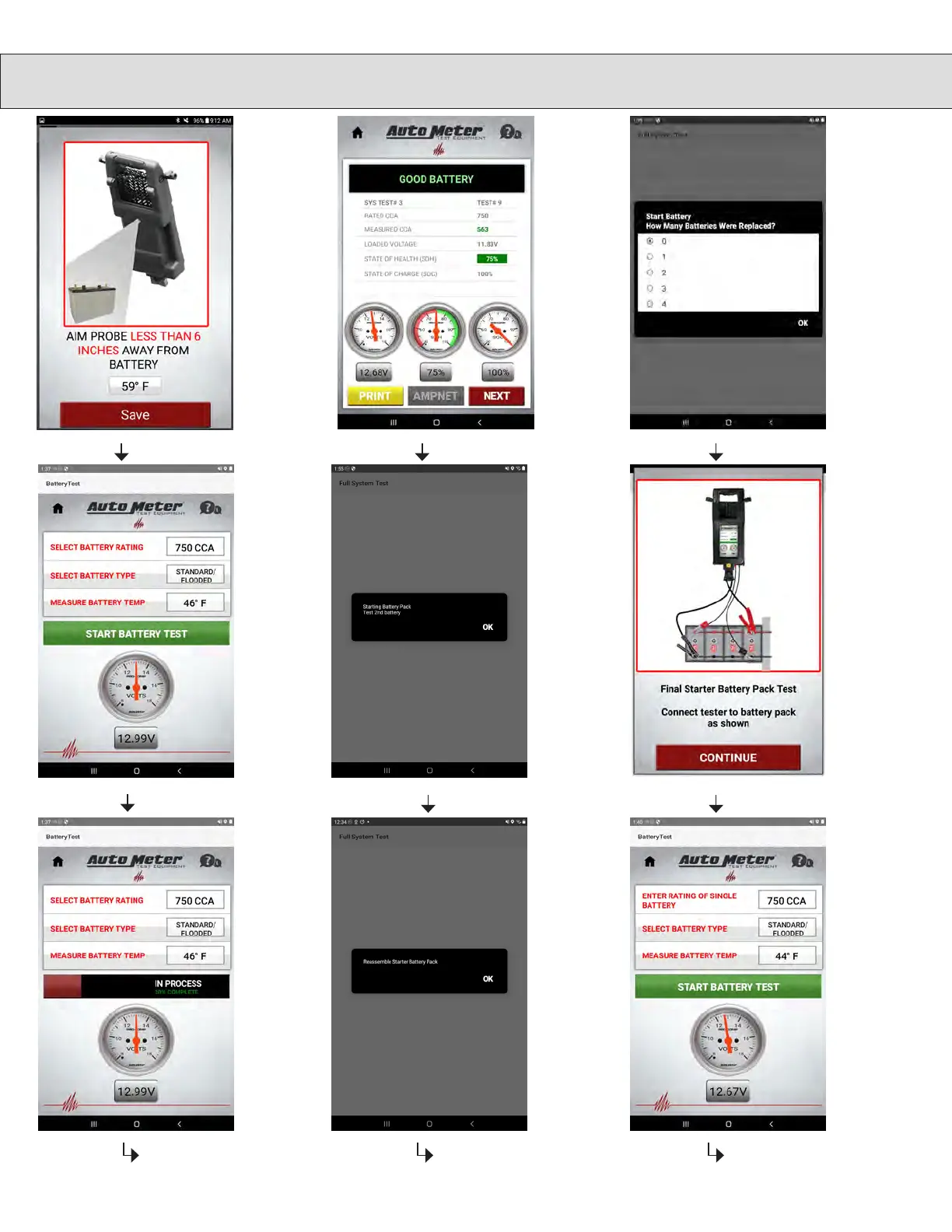
FULL SYSTEM TEST
Connect
both sets
of leads
as shown,
then touch
Continue.
Touch Start
Battery Test
If earlier you
chose that
the vehicle is
equipped with
more than 1
battery, you will
now repeat test
for all batteries.
Once selec-
tion and
temperature
have been
chosen,
touch Start
Battery Test
to continue.
The battery
test will
begin, and be
in Process.
Please Wait
When all
batteries have
been individ-
ually tested,
you will now
reassemble the
battery pack,
then touch OK.
12 15
18
13 16
19
Choose how
many batteries
were replaced
then touch OK.
17
Here are
your battery
results.
Touch next to
continue.
14
Follow
prompt and
touch Save
11

Related product manuals