9
SET UP
SET DATE/TIME & TIME ZONE
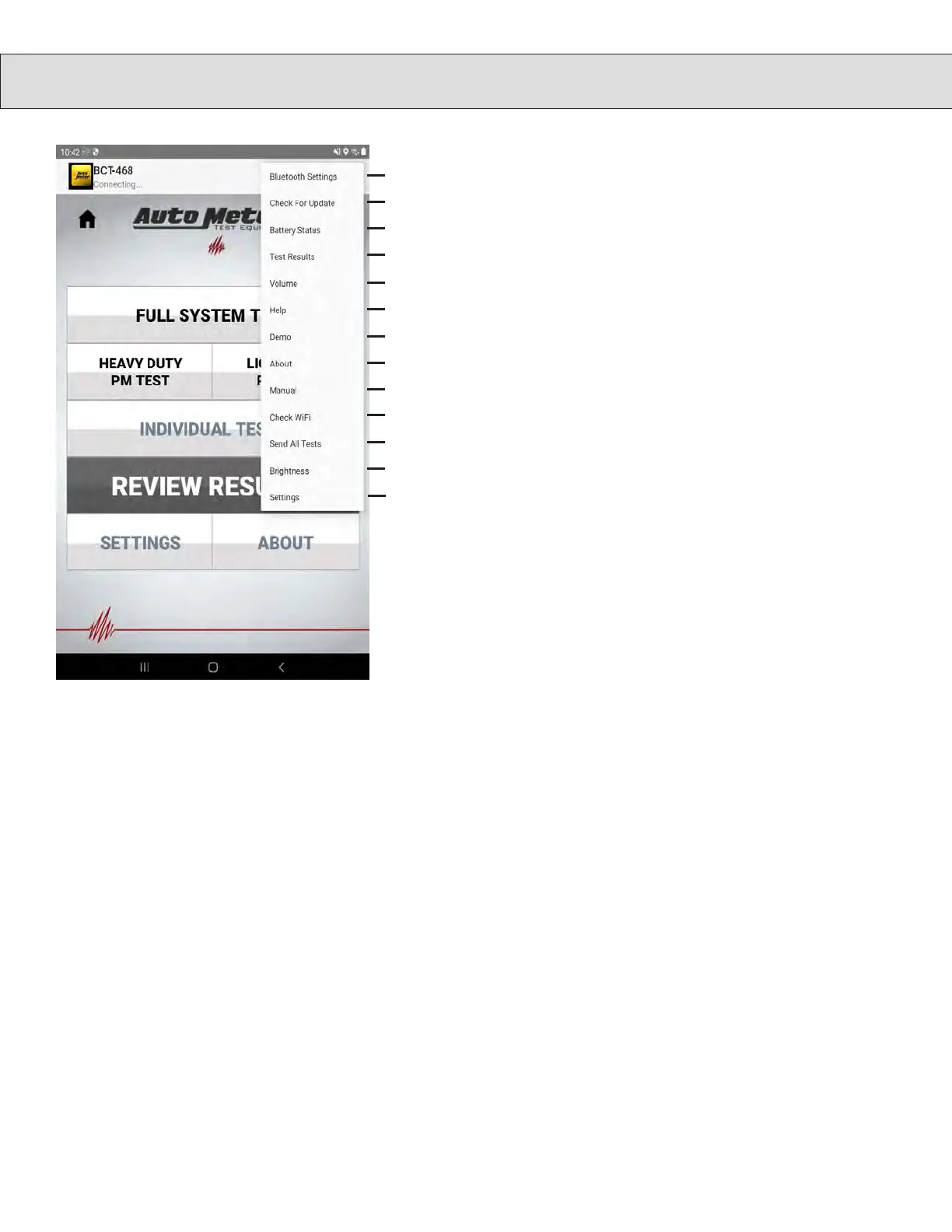
OPTION MENU DETAILS
Time Zone
• From Main Menu press SETTINGS.
• Scroll down and press Set Date and Time
• From Date & Time menu press Set Time Zone
• From resulting list choose your local time zone
Date and Time
• If the tester will have a Wi-Fi connection to the Internet leave
Automatic date & time selected (check mark)
• If there will be no Internet connection press Automatic date & time
to deselect option and continue to set the local date and time.
Date
• Press Set date and enter today’s date in the resulting setting box.
Time
• Press Set time and enter the local time in the resulting setting box.
• Press the Back Arrow < twice to return to the main menu.
Setup Wi-Fi
• From Main Menu press SETTINGS.
• Scroll down and press Wi-Fi Setup
• Select your local Wi-Fi from resulting list
• Enter password for your local Wi-Fi in resulting setting box
• Once password has been entered press Connect
• Press the Back Arrow < twice to return to the main menu
1. Allows pairing to Bluetooth Devices.
2. Update Control Module and Load Module software.
3. Check Battery Status.
4. Show list of Test Results.
5. Adjust Control Module volume.
6. Quick Main Menu help.
7. Starts Demo Mode (if demo mode files are present)
8. About the Tester.
9. Opens Owner’s Manual Viewer
10. Check WiFi and Server Connection.
11. Force upload of individual and complete system tests.
12. Screen Brightness.
13. Opens Tester Configuration Screen.
1
2
3
4
5
6
7
8
9
10
11
12
13
Touch the 3 dots in the upper right corner
to open the menu shown.


 To Next Page