AutoStop Maxi User Manual Version 8.18 Page 6
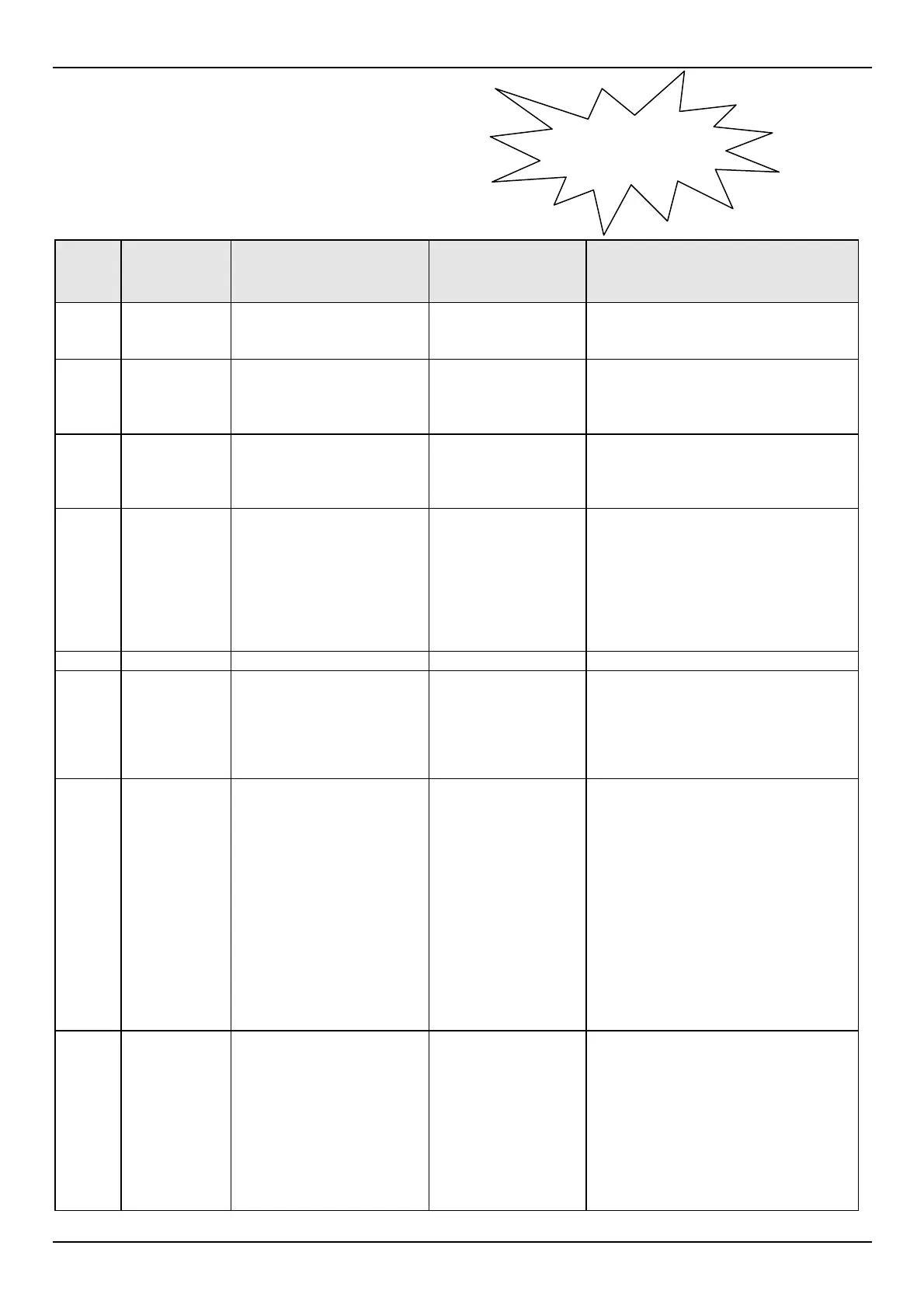
2.6 Test Instructions Summary
Step Initial
Screen
Display
Instruction Keys to Press Final Screen Display
1 Blank
Screen
Switch On.
“On/Off” AutoTest MAXI Brake Test Unit
Software Version No.- Cal Due
Date- Examiner ID? Y/N
2 Examiner
ID? Y/N
To retain ID (identification
of examiner) as listed,
press YES or “Y”
To alter the ID, press “N”
“Y” or “N” If N is pressed the meter will prompt
New ID: (Step 3), if Y is pressed the
meter will move on to Sensor Check
(Step 4)
3 NEW
Examiner ID
To change ID: Enter your
personal Examiner ID
(any alpha/numeric key
entry up to 19 digits).
Press the digits of
your examiner ID
(max 19 digits) then
press “Yes”.
Scrolling message regarding pedal
sensor Auto Zero. Sensor Check-
Take Foot off Pedal Sensor and
Press Any Key.
4 Sensor
Check
Remove all pressure from
the pedal sensor. Upon
pressing the enter key the
unit measures and then
compensates for the
slope of the vehicle and
the 0 Newton point of the
pedal sensor.
“Yes” Ready>
5 Ready>
“R” Reg No?
6 Reg. No?
Enter the vehicle ID
Number. Up to 19
alpha/numeric characters
may be entered. Example
VIN No. - Company ID
No. - License Plate No.
Press the digits of
the vehicle
registration, VIN, or
other designated
numbers and then
press “Yes”
Srvc/Emrg? S/E
7 Srvc/Emrg?
S/E
Enter “S” if the service
brakes are to be tested, or
enter “E” if the emergency
brakes are to be tested.
Entering “E” bypasses the
pedal sensor and no
brake pedal pressure will
be recorded or printed. “E”
is also used when testing
parasitic braking devices
such as retarders. Note:
An emergency test is
similar to a pendulum type
brake test.
Press “S” or “E” Start, Abort? S/A
8 Start/Abort?
S/A
Start or Abort the test. At
this point there should not
be any load on the pedal
sensor. Pressing “S“ will
begin measurements and
unit will await start
criterias such as
deceleration and pedal
pressure. Pressing “A“ will
abort the test.
Press “S” or “A” Prelude (if the S key is pressed).
Ready> (if A key is pressed).
If the Brake tester is not sufficiently
level after pressing “S”, the following
message will flash onto the screen,
together with several warning beeps:
Slope too large, adjust unit. The
LCD will then return to Ready>
Please hold down
ON/OFF key


 To Next Page