Chapter 2: Basic Operation 13
2 Basic Operation
Note: If you have set up the RESPONSE screen as a default data page
(see page 104) you can also access it by pressing
disp and then
scrolling through the data pages.
2. Press
-1 or +1 to change the response level.
3. Press
disp or wait for 5 seconds to return to the previous display.
Changing the rudder gain
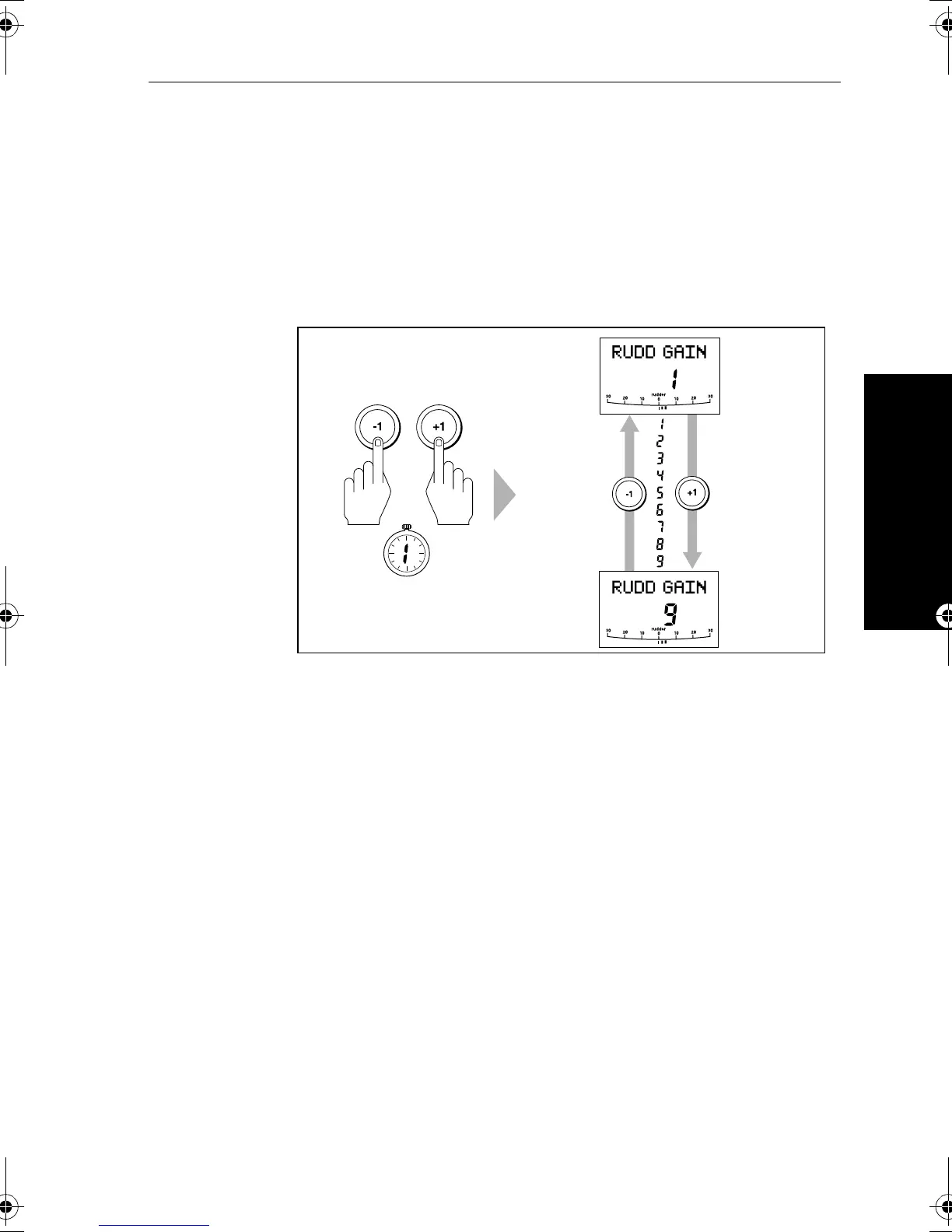
To make a temporary change to the rudder gain:
1. Press the
-1 and +1 keys together for 1 second to display the
rudder gain (
RUDD GAIN) screen
Note: If you have set up the
RUDD GAIN screen as a default data page
(see page 104) you can also access it by pressing
disp and then
scrolling through the data pages.
2. Press
-1 or +1 to change the rudder gain.
3. Press
disp or wait for 5 seconds to return to the previous display.
Note: See page 96 for instructions on how to check that the rudder
gain is set correctly.
D5400-1
Increase
rudder gain
Decrease
rudder gain
SECOND
81131_6.book Page 13 Wednesday, August 22, 2001 2:26 PM



 To Next Page