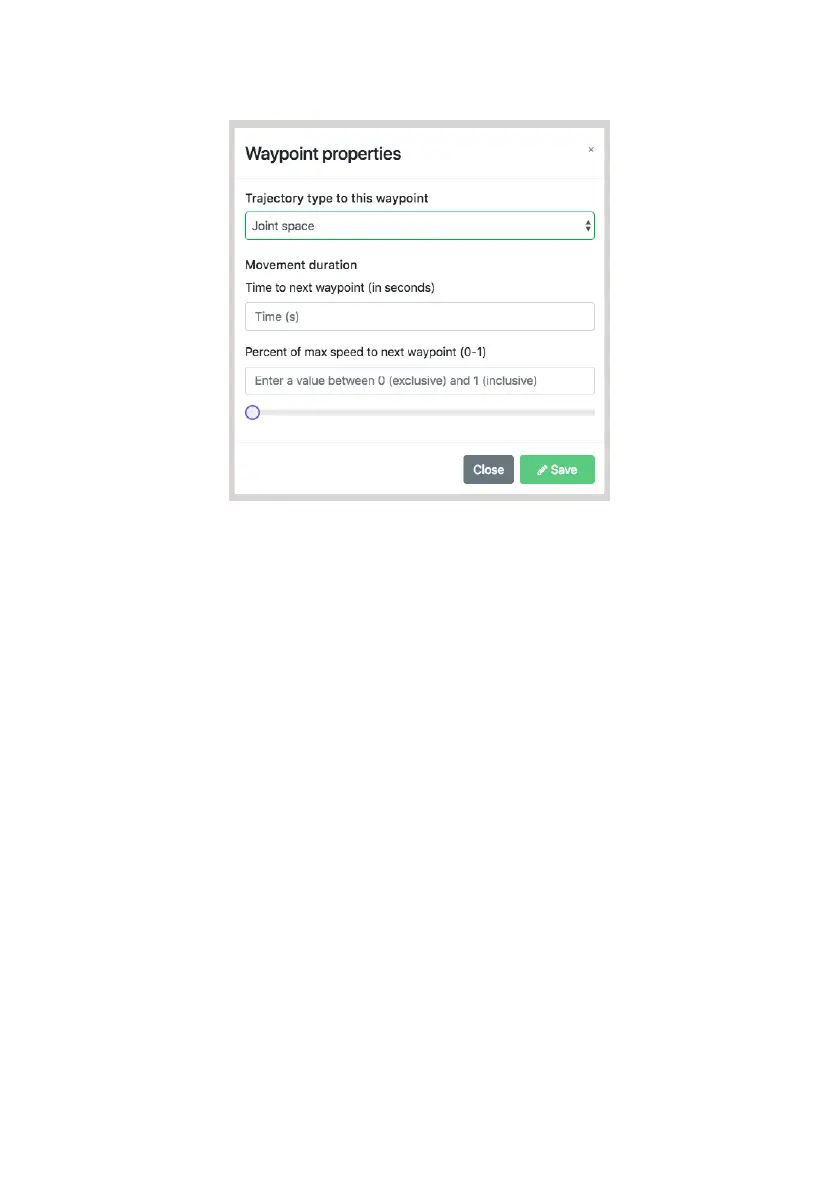
Right click on any waypoint in the timeline to change its properties:
There are three types of trajectories between waypoints:
The speed of a single trajectory can be defined in one of two ways:
a.
b.
c.
a.
b.
Joint Space trajectories - represented by circles on the timeline - instruct
the robot to move to the waypoint in a way that is ‘natural’ for the joints
Linear trajectories - represented by squares on the timeline - instruct the
robot to move its end-effector to the waypoint in a straight line. This re-
sults in cartesian motion
Pass Through trajectories - represented by triangles on the
timeline - instruct the robot to pass through a waypoint without stopping.
This results in cartesian motion
By defining a duration for the trajectory, in seconds.
By assigning a scale factor in relation to maximum robot speed.
(note: individual trajectory speeds override global speed. Setting a scale
factor greater than 0.33 may result in speeds greater than 250 mm per
second. This kind of motion is not considered safe for desktop operations.
Consult the Safety Manual for more information.)
Special waypoints have their own set of properties to define, some of which do
not relate to movement trajectories.
13


 To Next Page