Electronic Interfaces
Base Interface Overview
03
The main robot computer is stored in the base. Physical controls are available
on the rear.
Power Button
The robot power button is found above the Input/Output panel.
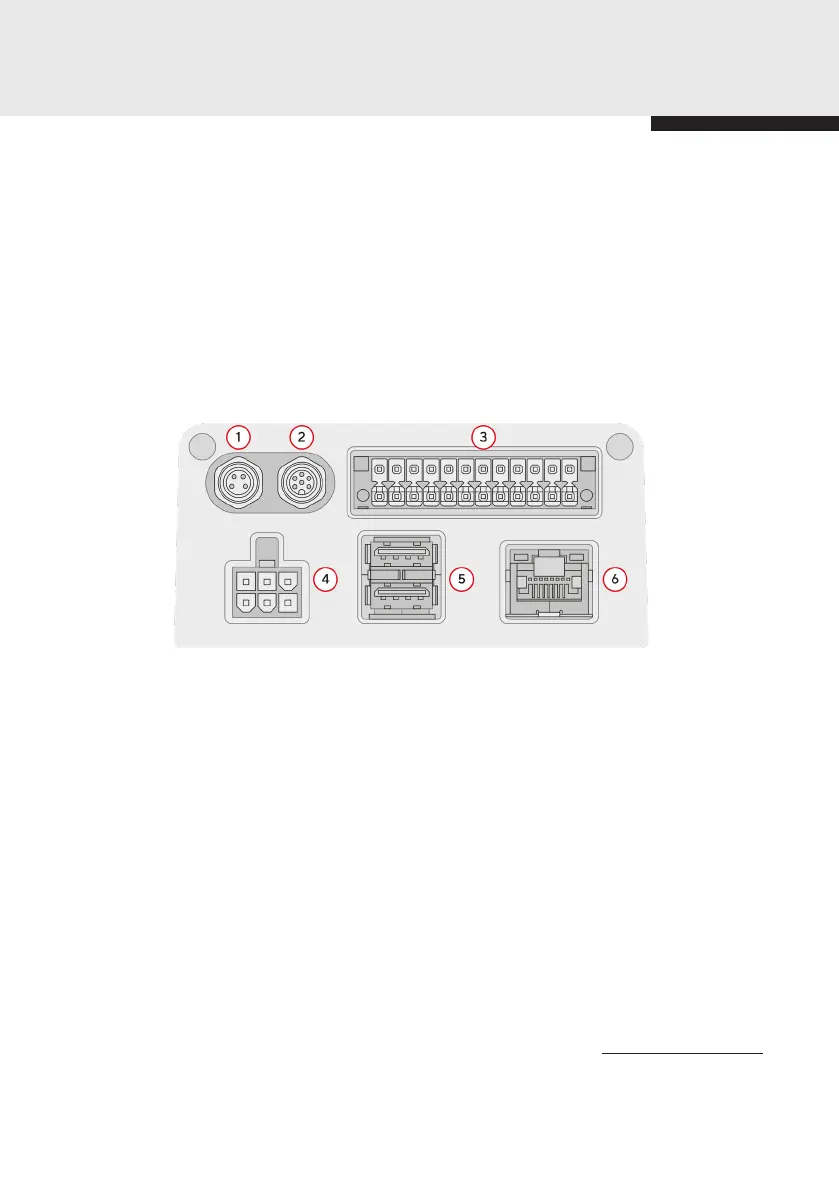
Input/Output Panel
Key:
1. Emergency Stop Connection
Emergency Stop Connection
Unused (reserved for future expansion)
Base I/O
Power Input
USB x 2
Ethernet
Please consult the safety manual for information about the appropriate instal-
lation of Eva’s emergency stop function.
This port is designed for a DPDT, 2NC e-stop push button switch conforming to
IEC 60947-5-5, such as the button provided with Eva, or the ABB CEPY1-1001.
The interface is a standard A-coded circular M8 female connector (IEC 61076-
2-104). The pinout can be seen below
1.
2.
3.
4.
5.
6.
18


 To Next Page