ATS Series Installation Manual24
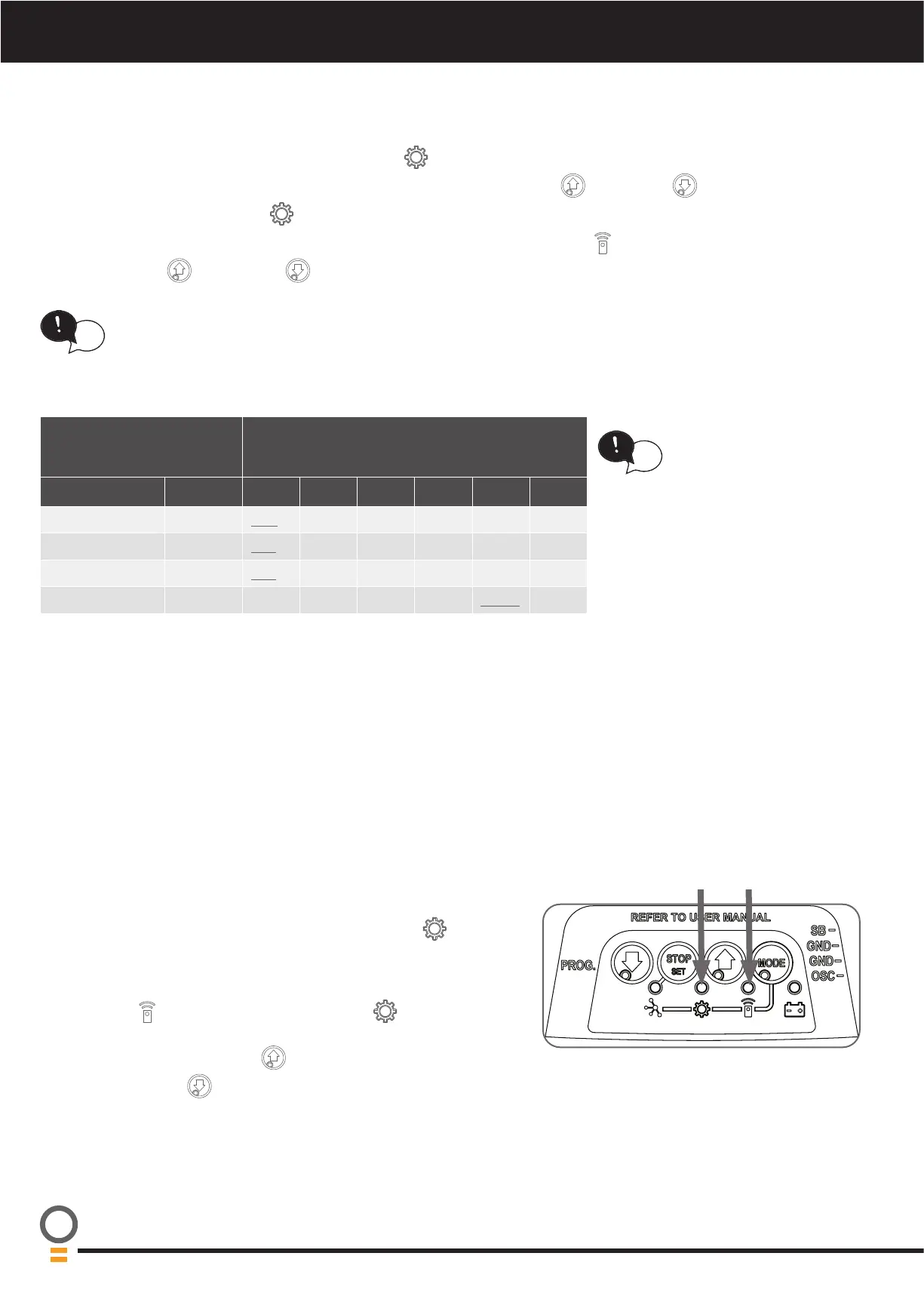
Parameter Value options = Indicated by brightness
of main light
(DEFAULT parameter underlined)
Name Flashes 1 2 3 4 5 6
MARGIN* 1 1.0A 1.2A 1.4A 1.6A 2.0A -
PE AUTO-CLOSE 2
OFF 15sec 30sec 60sec 90sec -
AUTO-CLOSE 3
OFF 15sec 30sec 60sec 90sec 120sec
LIGHT TIMER 4 30sec 60sec 90sec 120sec
180sec 240sec
B - Adjustment Mode Instructions
a. Press the MODE button repetitively until the GEAR LED starts flashing
b. Referring to the table below, select the desired parameter using the OPEN
and CLOSE buttons and observing the
number of flashes on the GEAR
LED. The selected parameter’s value is indicated by the main light’s brightness.
c. Press STOP / SET button to start editing the parameter’s value. The TRANSMIT
LED will turn on when editing is active.
d. Use the OPEN
and CLOSE buttons to step through the available options. The light’s brightness will change
accordingly.
Adjusting Safety Obstruction Force
The Safety Obstruction Force is calculated automatically during
setup. Adjusting this is normally only necessitated by environmental
conditions such as windy or dusty areas, and areas with extreme
temperature changes.
To Increase / Decrease Force Pressure
a. Press the MODE button repetitively until the GEAR LED is
flashing.
b. The LED will start flashing with one flash every second.
c. Press the STOP / STEP button and the MODE button LED and the
TRANSMIT
LED will be lit and the GEAR LED will flash
once every second.
d. By pressing the OPEN button
will increase the force pressure
and CLOSE button
will decrease the force - Main light will dim
or brighten as the pressure is decreased or increased.
e. Press STOP / SET button to save the new value. (Refer to
Appendix B for margin settings)
f. Test the force again as per Testing Close Cycle and Testing Open
Cycle.
C - Adjusting Force Margins
* only available with firmware 55 onward
Pressing the MODE button when a parameter is
being adjusted will load the default value.
tip
e. Press STOP / SET button to save the parameter’s new value or press MODE to leave the value unchanged.
f. Continue from a. above to select another parameter or press MODE to exit adjustment mode.
When parameter edit mode
is active, if any button other
than MODE is pressed, then
when MODE is pressed
again, operating mode will
be selected instead of the
NETWORK adjustment mode.
tip








 To Next Page