Chapter 5: Control Modes
SOLO Basic Temperature Controller User Manual
5–2
The SOLO Basic controller can be configured for any of the following control modes.
• PID control
• On / Off control
• Manual control
PID Control
Auto Tuning
The SOLO Basic controllers support an Auto Tuning feature to set up the
following PID parameters automatically.
p
Proportional Band
i
Integral Time
d
Derivative Time
pdof
Integral Offset
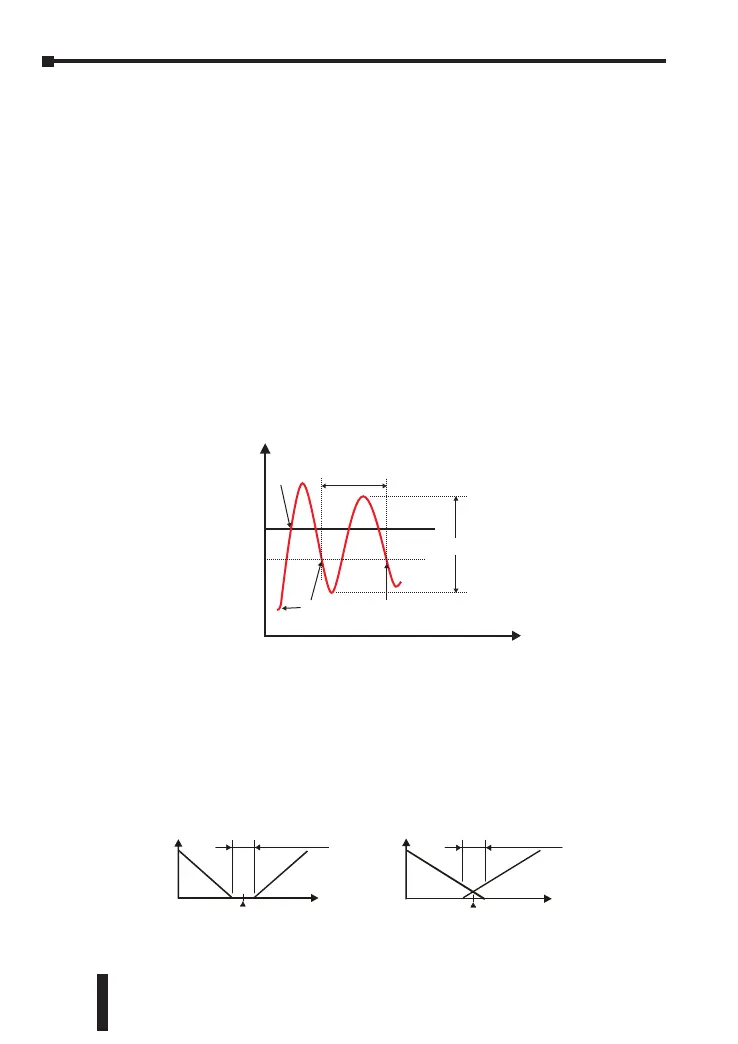
To start the Auto Tuning, set the parameter Auto Tuning (
AT
) to On. The
controller automatically controls the output to change the PV as shown below.
Amplitude
Cycle
Control output
turns off
Control output
turns on
The Auto Tuning ends and
the PID control starts
Temperature
SV
SV- 2
Once the Auto Tuning process is completed, the SOLO Basic controller
calculates the above PID parameters and starts the PID control with the new
parameter values immediately.
Deadband
The range around the PV in which the heating/cooling outputs remain off. A
negative deadband has the opposite effect allowing both outputs to be on in the
area around the PV.
PV
0
Output
Dead band: dead
band width=positive
HeatingCooling
Dual control with PID
positive deadband
PV
0
Output
Dead band: dead
band width=negati
Set point
Heating
Cooling
dead
Dual control with PID
negative deadband


 To Next Page