Autostacker™ Parking Lift 36 P/N 5900248 — Rev. B — May 2021
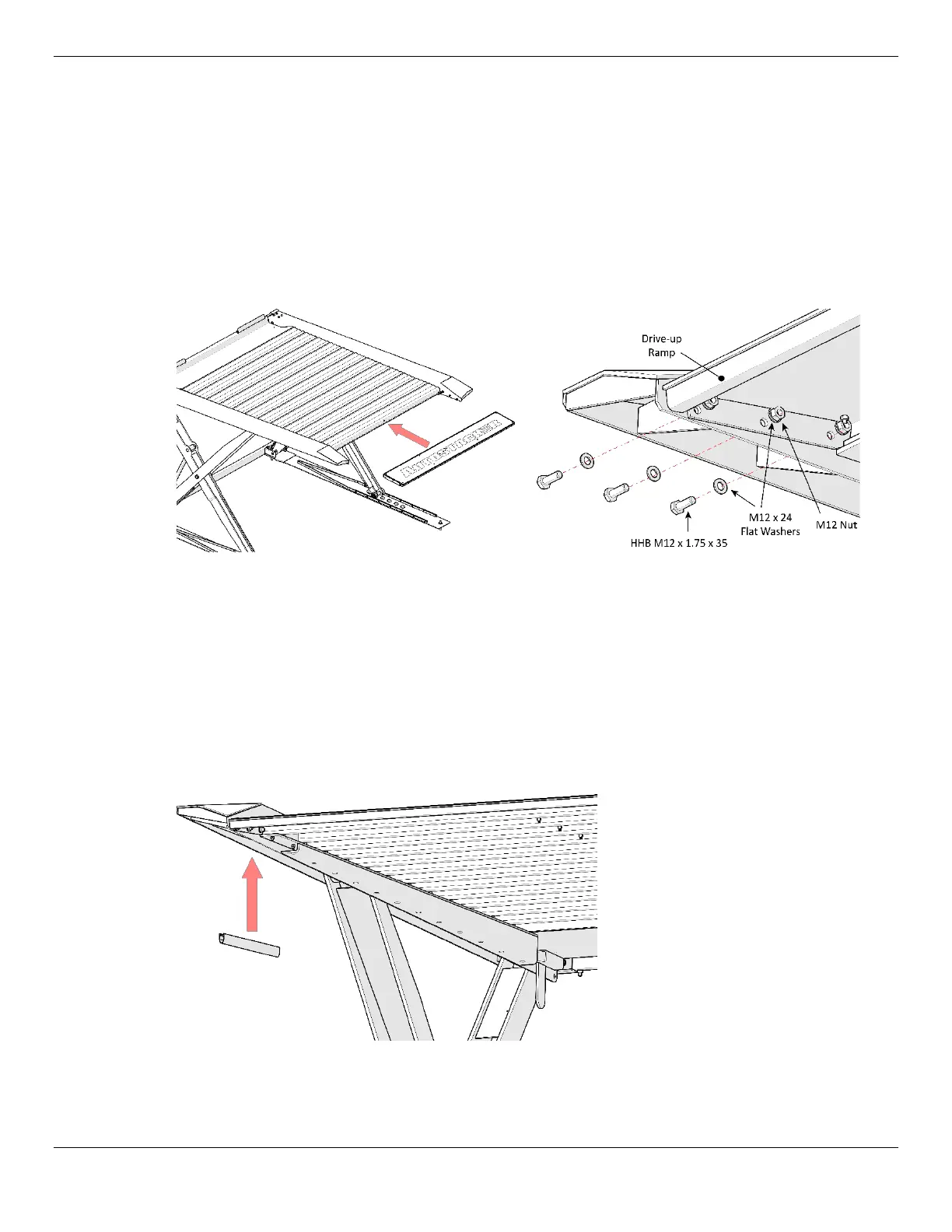
4. When the last Platform section is in place, move the Drive-Up Ramp into place.
If it makes installation easier, you can lower the lift to a more appropriate height.
⚠ WARNING The Drive-Up Ramp is heavy. Move it into position using a lifting device such as a
forklift or crane. If this is not an option, use at least two people to move it.
Do not
allow just one person to move the Drive-Up Ramp
; they could be injured.
The end of the last Platform section and the top of the Drive-Up Ramp need to overlap.
5. When the Drive-Up Ramp is correctly oriented, connect it to the Platform Arm using three Bolts,
Washers, and Nuts on each side, as shown below.
Left drawing shows the Drive-up Ramp being put into position, the right shows how to connect the
Ramp to each Platform Arm.
6. Make sure all of the Platform pieces and the Drive-Up Ramp are correctly positioned.
7. Put in the rest of the Nuts and Bolts that attach the Platform sections to each other.
8. Push the Rubber Edge up into place along the outside Rail of each Leg, at the Rear of the Lift, one
Rubber Edge per Leg.
The Rubber Edges help in case you bump your head when passing underneath the Platform; they
come in the Parts Box and are about 38 inches long.
View is from the approach side of
the Lift, underneath the Platform.
One Rubber Edge per Leg.
Not all components are shown.



 To Next Page