21
5.2 CHARGER NAMES AND INFORMATION
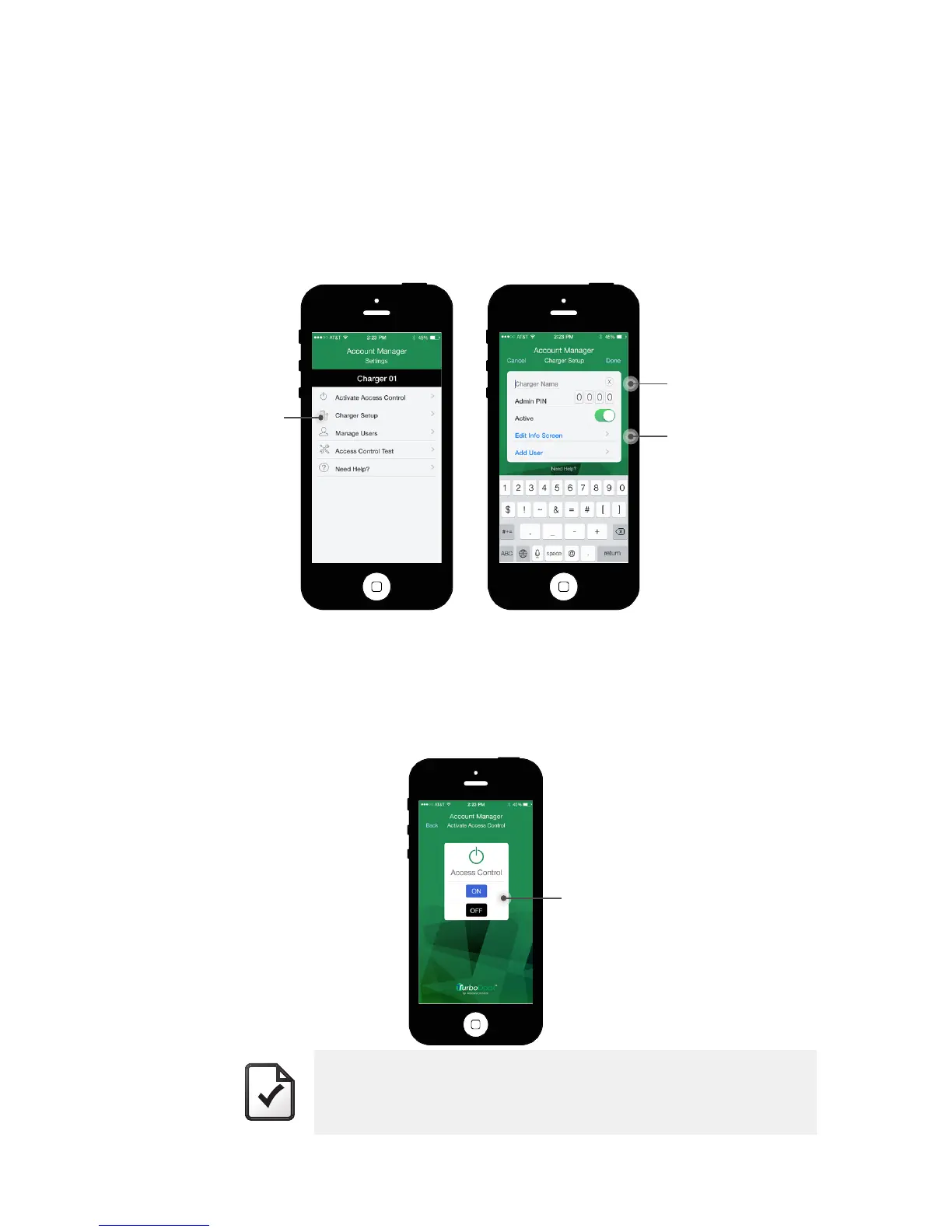
You can change a charger’s name, or the Information content associated with it
on the “Account Manager: Settings” screen.
• To change the charger name, select “Charger Setup” and simply overwrite
the existing charger name.
• To modify the Company name, Contact name or phone number, select
“Edit Info Screen”. Click “Done” when you want to return to the “Charger
Setup” screen.
5.3 ACCESS CONTROL
To turn Access Control on or off for the currently connected charger, on the
“Account Manager: Settings” screen select “Activate Access Control”.
Check the box “ON” to activate it, or “OFF” to deactivate. An audible beep
will indicate when access control is turned on.
NOTE
Turning off Access Control does not delete any User information
saved in the charger. In fact, you can add or change User
information while Access Control is off; the changes will have no
effect until it is reactivated.
“Charger Setup”
“Charger Name”
“Edit Info”
“On/Off Access contol”


 To Next Page