User Manual
4
Opera plus
EN
Button Functions
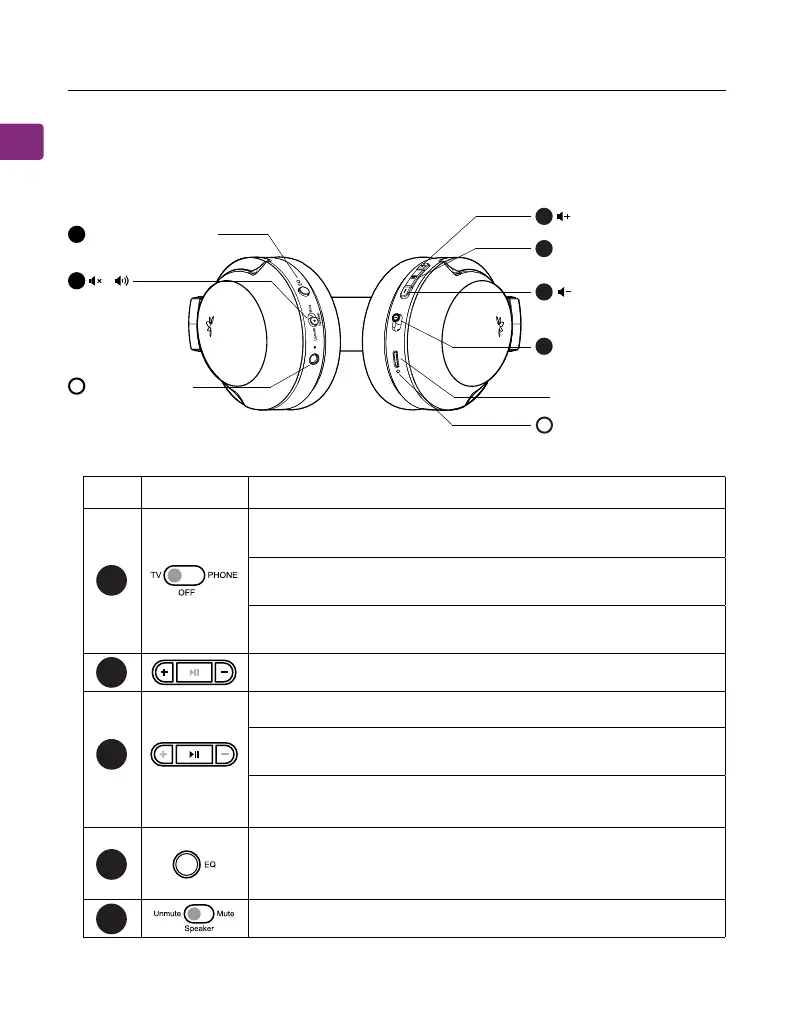
Switch to “TV” to connect to the transmitter, you will hear
“ TV mode”
Product Introduction (Headphones)
Product Overview
5
4
3
2
1
No. Button Functions
Switch to “PHONE” to connect to one’s phone / tablet,
you will hear “Phone mode”.
Switch to “OFF” to turn o the headphones, you will hear
“Goodbye”.
If the headphones fail to reconnect, press once to reconnect.
Press and hold to manually enter pairing mode, you will hear
“pairing”.
Press once to play / pause audio (when being used with
phone / tablet).
Switch to mute / unmute audio from the headphones.
Press once to switch between balanced / clear voice / cinema
sound modes, you will hear “balanced / clear voice / cinema
sound”.
Click or hold to adjust volume.
11
22
33
22
EQ Mode Button
Pair / Reconnect /Play /
Pause
O / TV mode /Phone
mode
LED lndicator
Charging Port
LED lndicator
/
A
44
55
B
P
H
O
N
E
O
F
F
T
V


 To Next Page