Need help?
Do you have a question about the Avaya B100 Series and is the answer not in the manual?
Procedure to navigate phone menus and select the appropriate region setting for operation.
Procedure to set the flash hook time on B149/B159 phones to match IP Office system settings.
Procedure to configure caller ID method on B149/B159 phones to match the IP Office system.
Procedure to set conference codes on phones to match IP Office system short codes for conferencing.
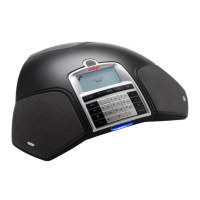
The Avaya B100 Series phones are a line of high-quality audio conference devices designed for use with IP Office systems. This series includes analog models like the B149 and B159, as well as the SIP-based B179. These phones are engineered to facilitate clear and efficient conference calls, offering a range of features to ensure seamless integration and operation within an existing IP Office environment.
The primary function of the Avaya B100 Series phones is to provide robust audio conferencing capabilities. They are designed to handle multiple participants in a conference call, offering clear audio transmission and reception. The analog models (B149, B159) connect to the IP Office system via analog lines, while the B179 utilizes Session Initiation Protocol (SIP) for network-based communication. This allows for flexible deployment in various office setups.
A core aspect of their functionality involves managing calls, including initiating, holding, and conferencing. The phones are equipped with intuitive menu systems that allow users to navigate through settings and features easily. For instance, the ability to set the region ensures that the phone operates correctly within local telecommunication standards, which is crucial for proper call routing and signaling. The flash hook time setting, specifically for analog models, is vital for correctly interpreting signals from the IP Office system, enabling features like call hold and toggling between calls. Similarly, configuring the caller ID method ensures that incoming call information is displayed accurately, aligning with the IP Office system's settings.
The conference codes feature is central to the device's conferencing capabilities. By setting specific codes, users can easily add participants to an ongoing call or manage multiple calls simultaneously. This functionality is particularly useful in dynamic business environments where quick and efficient communication is paramount. The phones are designed to integrate with the IP Office's short codes, allowing for streamlined actions such as adding a conference participant with a simple key sequence.
The Avaya B100 Series phones are designed with user-friendliness in mind, offering several features that enhance the conferencing experience.
To ensure optimal performance, users can easily configure the phone's region. This involves pressing the Menu button, navigating to "SETTINGS," then "REGION," and selecting the appropriate region from the available options. This step is fundamental for aligning the phone with local telecommunication standards, which impacts call quality and feature availability. Once the region is selected, pressing OK confirms the choice, and the user can exit the menus by pressing Menu again or exit the current option with the back arrow.
For analog models, the flash hook time is a critical setting for managing calls. This feature allows the phone to correctly interpret signals from the IP Office system for actions like holding a call or switching between calls. Users can access this setting by pressing the Menu button, going to "SETTINGS," then "FLASH," and selecting a value that matches the IP Office configuration for their extension. A simple test involves making a call and pressing the flash hook button; if configured correctly, the call should toggle between hold and active states. Exiting the menus is done by pressing Menu again or using the back arrow.
Accurate caller ID display is essential for identifying incoming calls. The B149 and B159 models allow users to set the caller ID method to match the IP Office system's settings. This is achieved by pressing the Menu button, navigating to "SETTINGS," then "CALLER ID," and selecting the method that corresponds to the IP Office system. This ensures that caller information is displayed consistently and correctly. Exiting the menus follows the same procedure as other settings.
The ability to manage conference calls efficiently is a hallmark of the B100 Series. Users can configure specific conference codes to streamline the process of adding participants or managing held calls. This involves pressing the Menu button, going to "CONF GUIDE," then "SETTINGS." From there, users can enter codes for various actions. For example, at the "ENQUIRY" prompt, entering 'F' and pressing OK allows for specific inquiries. At the "CONFERENCE" prompt, entering 'F' followed by the IP Office conference add short code (e.g., F*47) and pressing OK configures the phone to use that short code for adding participants. The 'F' key is typically accessed by pressing a dedicated key, and backspacing is available for corrections. The analog models also require configuration for hook flash codes to hold/unhold calls. After setting the codes, users can return to the main menu by entering 'F' at the "RETURN" prompt and pressing OK, then exiting the menus.
While the manual primarily focuses on initial setup and usage, the design of the Avaya B100 Series phones inherently includes features that contribute to their ease of maintenance and long-term reliability.
The phones are designed for seamless integration with the IP Office system. This means that many maintenance tasks, such as firmware updates or system-wide configurations, can be managed centrally through the IP Office platform. This reduces the need for individual device-level maintenance, simplifying administration for IT personnel. The B179 SIP model, in particular, benefits from network-based management, allowing for remote configuration and troubleshooting.
The manual references the "IP Office Locale Settings Reference" manual, which is crucial for understanding how the IP Office system's default values impact the phone's operation. This documentation serves as a valuable resource for troubleshooting and ensuring that the phone's settings align with the broader system configuration. By understanding these locale settings, administrators can proactively address potential compatibility issues and maintain optimal performance.
The ability to configure individual extensions separately, as highlighted in the context of "Extension | Analogue | Flash Hook Pulse Width," provides granular control over each phone's settings. This allows administrators to tailor configurations to specific user needs or environmental requirements without affecting the entire system. This flexibility is a key maintenance feature, enabling targeted adjustments and problem-solving.
The consistent and clear menu navigation across all settings (e.g., Menu button, SETTINGS, OK, back arrow) simplifies the process of making adjustments or troubleshooting. Users and administrators can easily find and modify settings without extensive training, contributing to the overall maintainability of the devices. The logical flow of the menus reduces the likelihood of misconfigurations and makes it easier to verify settings.
The existence of comprehensive documentation, such as the "Installing and Administering the IP Office B179 SIP Conference Phone" manual and the "IP Office Locale Settings Reference," is a significant maintenance feature. These resources provide detailed instructions and context for setting up, configuring, and troubleshooting the phones, empowering users and administrators to resolve issues independently and ensure the devices operate correctly over time.
In summary, the Avaya B100 Series phones are robust audio conferencing devices designed for seamless integration with IP Office systems. They offer a range of user-friendly features for setting up regions, managing call handling parameters like flash hook time and caller ID, and efficiently conducting conference calls through configurable codes. Their design emphasizes ease of use and system-wide manageability, supported by clear documentation and flexible configuration options, ensuring reliable performance in diverse business environments.
 General
| Microphone | Built-in |
|---|---|
| Speaker Volume | 90 dB SPL at 0.5 m (all models) |
| Speakerphone | Yes |
| Power Supply | Power over Ethernet (PoE) or AC adapter |
| Compatibility | Avaya IP Office |
| Display | LCD |
| Networking | Ethernet |
| Supported Protocols | SIP |

 To Next Page