Avcom of Virginia – 7729 Pocoshock Way – Richmond – Virginia - 23235 – USA
www.avcomofva.com – PHONE 1.804.794.2500 – FAX 1.804.794.8284
- 16 -
7. MANAGING SPECTRUM ANALYZER LIST PROFILES
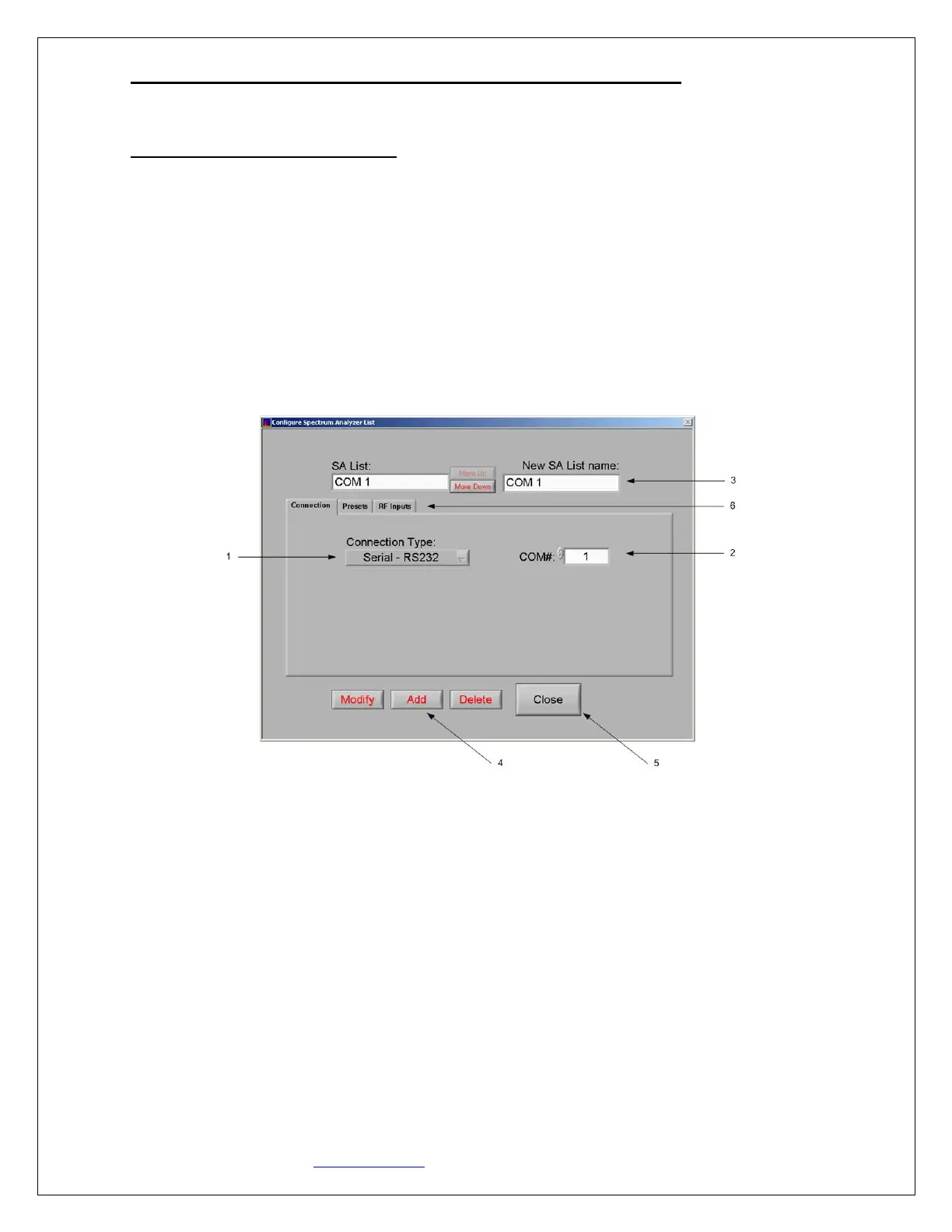
To add additional spectrum analyzer profiles, select Configure>Spectrum Analyzer List from the Main Menu.
7.1 SERIAL CONNECTION PROFILE
1. Select “Serial” from the Connection Type drop down menu.
2. Enter the appropriate COM port.
3. Type in a name for the new serial profile.
4. Click “Add” to add the new profile name to the saved profiles list.
5. Click “Close” to return to the Main GUI.
6. Presets and RF Inputs may be customized in those tabs if desired.
NOTE – “Modify” can be used to change an existing profile



 To Next Page