- 23 -
Note: The “low battery status” is also signalled by a dedicated output (terminal 23).
RETE / POWER
INSERITO / ON
TAMPER
ON
UNITA' CENTRALE / CENTRAL UNIT
AF997
EXCLUDE
ON
1 2 3 4
sw
sw
sw
sw
ZONE
A1
ZONE
A2
ZONE
A3
ZONE
B1
ZONE
B2
ZONE
C1
ZONE
C2
RETE / POWER
INSERITO / ON
TAMPER
ON
UNITA' CENTRALE / CENTRAL UNIT
AF997
EXCLUDE
ON
1 2 3 4
sw
sw
sw
sw
ZONE
A1
ZONE
A2
ZONE
A3
ZONE
B1
ZONE
B2
ZONE
C1
ZONE
C2
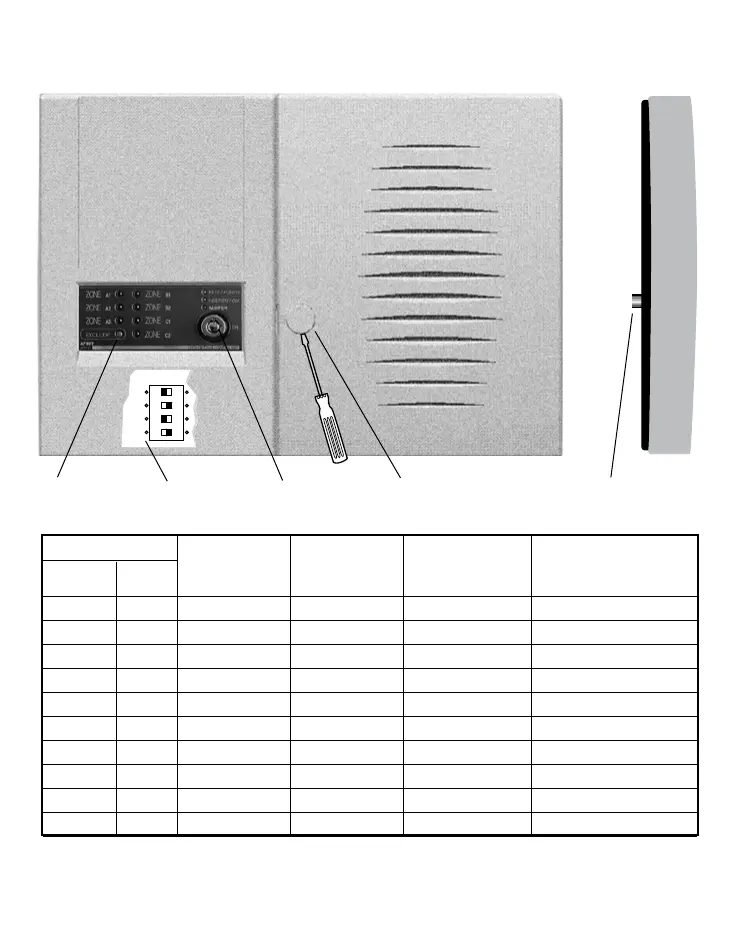
Mechanical key
Closing screw
(under the plastic plug)
Anti-removal
tamper pushbutton
Timer
microswitches
Zone exclusion
pushbuttons
Front view Side view
LED
ON OFF Flashing Flashing
Function Colour fast slow
Mains Green Main present Main absent
ON Green Contrl panel ON Contrl panel OFF Under testing
Tamper Red Tamper open Tamper closed Tamper alarm stored
Zone A1 Red Zone A1 open Zone A1 closed Zone A1 excluded Zone A1 alarm stored
Zone A2 Red Zone A2 open Zone A2 closed Zone A2 excluded Zone A2 alarm stored
Zone A3 Red Zone A3 open Zone A3 closed Zone A3 excluded Zone A3 alarm stored
Zone B1 Red Zone B1 open Zone B1 closed Zone B1 excluded Zone B1 alarm stored
Zone B2 Red Zone B2 open Zone B2 closed Zone B2 excluded Zone B2 alarm stored
Zone C1 Red Zone C1 open Zone C1 closed Zone C1 excluded Zone C1 alarm stored
Zone C2 Red Zone C2 open Zone C2 closed Zone C2 excluded Zone C2 alarm stored
Note: The alarm indication LEDs are always OFF when the control panel is ON.
The fast flashing indication prevails over the slow flashing mode.


 To Next Page