- 24 -
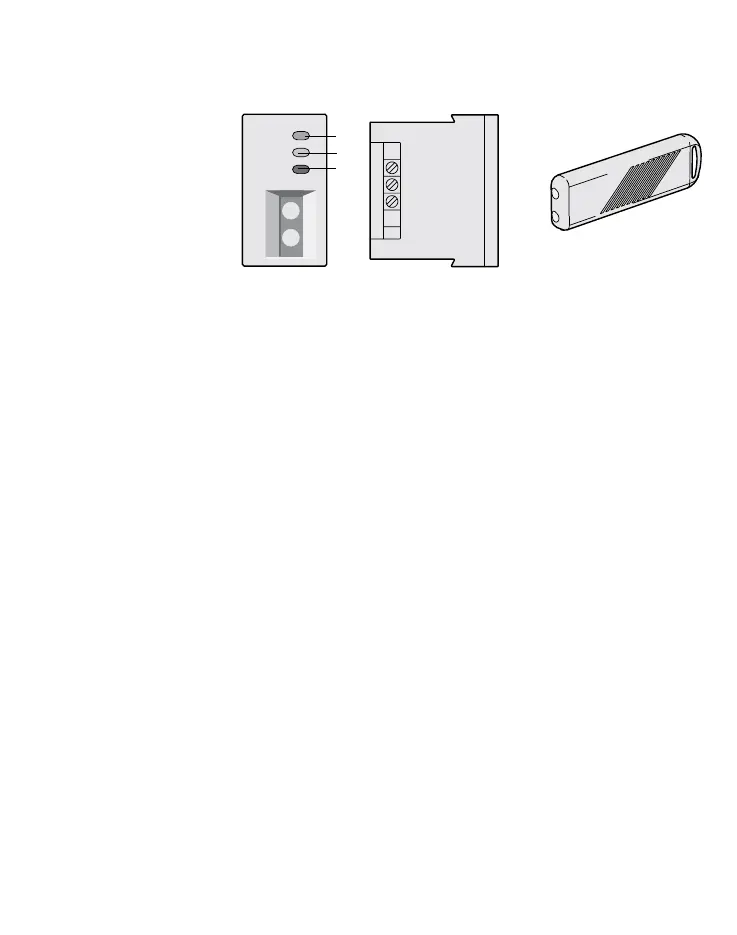
DESCRIPTION OF THE FRONT PANEL AND INDICATIONS (Fig. 2)
REMOTE ACTIVATION POINT
Use
The Activation Point (AP)
permits the connection,
disconnection and zoning
of the AF997 control panel
using the electronic key
AF45339. It is manufactu
-
red in a System 45 modu-
le. The front part has three
LED indicators and two
contact points for the key.
The rear part has three
terminals permitting connection to the AF997 control panel, as shown in the application diagram.
Through the two front contact points, it powers the key at the time of the operation and receives its pre-set
code. It converts the key code into the one suitable for the control panel and transfers it through the serial
line. It receives the status signals from the control panel to then control the LEDs located on the front.
The system activation code is stored in the control panel through the "Learning" procedure and can only
be changed by cutting the power supply to the control panel. Once the control panel has learned the code,
other additional Aps, programmed as the former, are automatically able to operate. The signals sent by the
control panel are repeated to all the Aps in the same way.
Technical data
• Power supply: 10 ÷ 14Vdc from the control panel
• Rating: 7mA at rest, with the LEDs off;
11 mA max. in "connected" mode, LED L1 on.
• Indications: 3 multi-function LEDs; L1 green, L2 yellow, L3 red.
• Connections: terminal 1 = negative power supply
terminal 2 = serial signal
terminal 3 = positive power supply
Note: the connection cable to the control panel must be screened with the screening connected to the
negative power supply potential at the control panel and not be connected to the AP.
Code customisation and learning
To customise the electronic key code, proceed as follows:
• unscrew the screws of the two half shells to access the internal programming zone composed of 12
pits which are numbered from 1 to 12, as shown in fig. 3.
• Programming consists of randomly positioning a maximum of 9 conductive discs (supplied with the
key) into their seats. Programming permits up to 4017 combinations.
Once the key code has been customised, it must be stored in the control panel according to the fol-
lowing learning procedure.
1 –
2 line
3 +
Fig. 2
L1
L2
L3
AF45342
AF45339


 To Next Page