www.factorybuysdirect.com
M130004/5-018
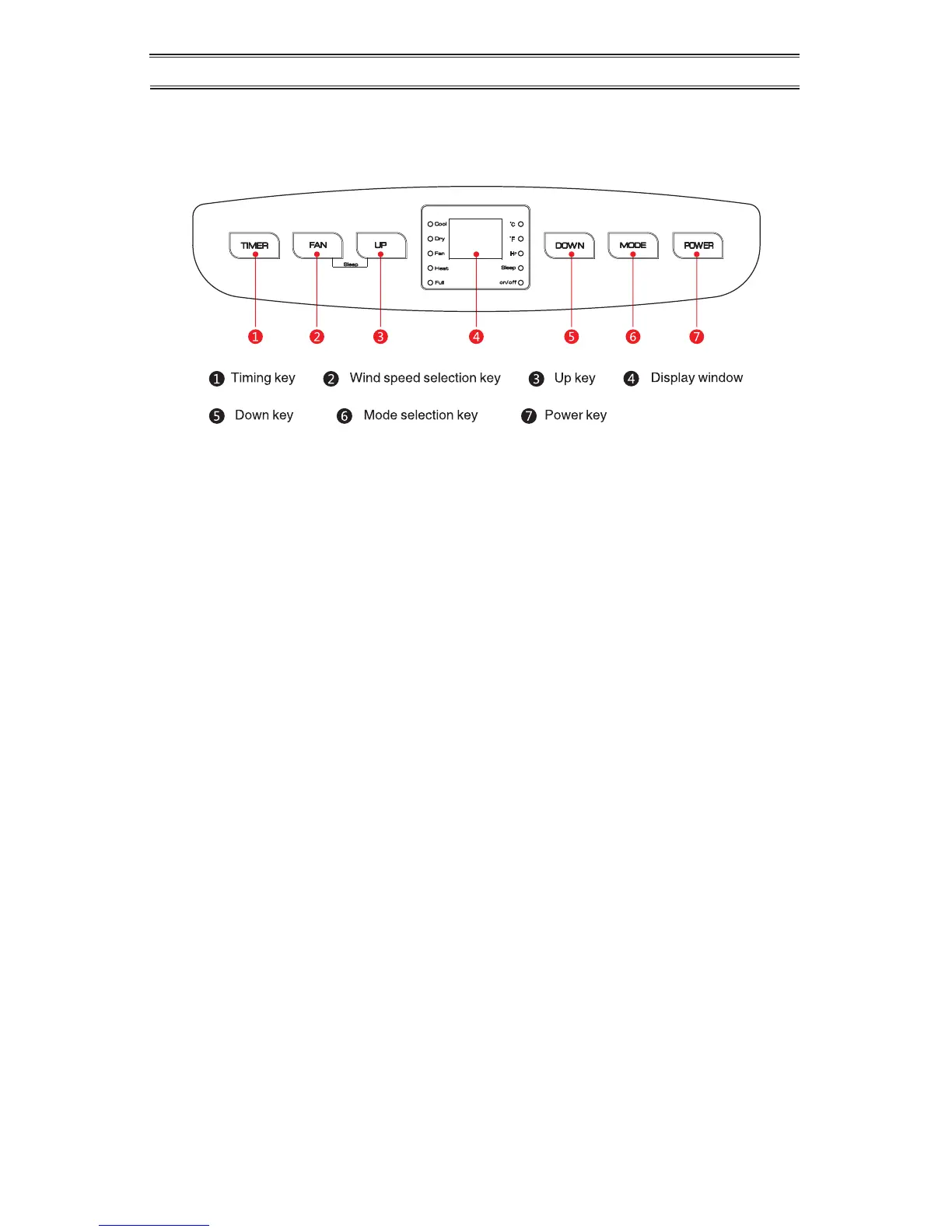
CONTROL SETTING
OPERATING INSTRUCTIONS:
1. When the machine is powered on for the rst time, the buzzer will play power-
on music, and then the machine will get into standby status.
2. Power Key: Press the key to turn on and turn off the appliance.
3. Mode Selection Key: Press the key to switch between cooling, air supply,
dehumidication, and heating (single cold with no such function).
4. Up Key and Down Key: Press the two keys to change the set temperature or
timing set value, operate as follows:
• While setting temperature, press up key or down key to select the required
temperature (not available in air supply or dehumidication mode).
• While setting timer value, press up key or down to select the required cycle
time.
• Simultaneously press both keys to switch between Celsius and Fahrenheit.
5. Fan Speed Selection Key:
• In cooling and air supply mode, press the key to select high, medium, or low
fan speed operation.
• In heating mode, press the key to select high, medium, and low fan speed
operation.
• In dehumidication mode, pressing the key is invalid, and the fan will auto-
matically choose low fan speed operation.
6. Timing Key:
• When power is on, press the key to close timing; when power is off, press
the key to open timing.
• Press the key, when the timing symbol ashes, press up and down key to
select the required cycle time.
• Timing values can be set within 1-24 hours and the cycle time is adjusted
upwards or downwards by one hour.
Figure 7


 To Next Page