Chapter 3 Using the AVerKey3 Plus
9
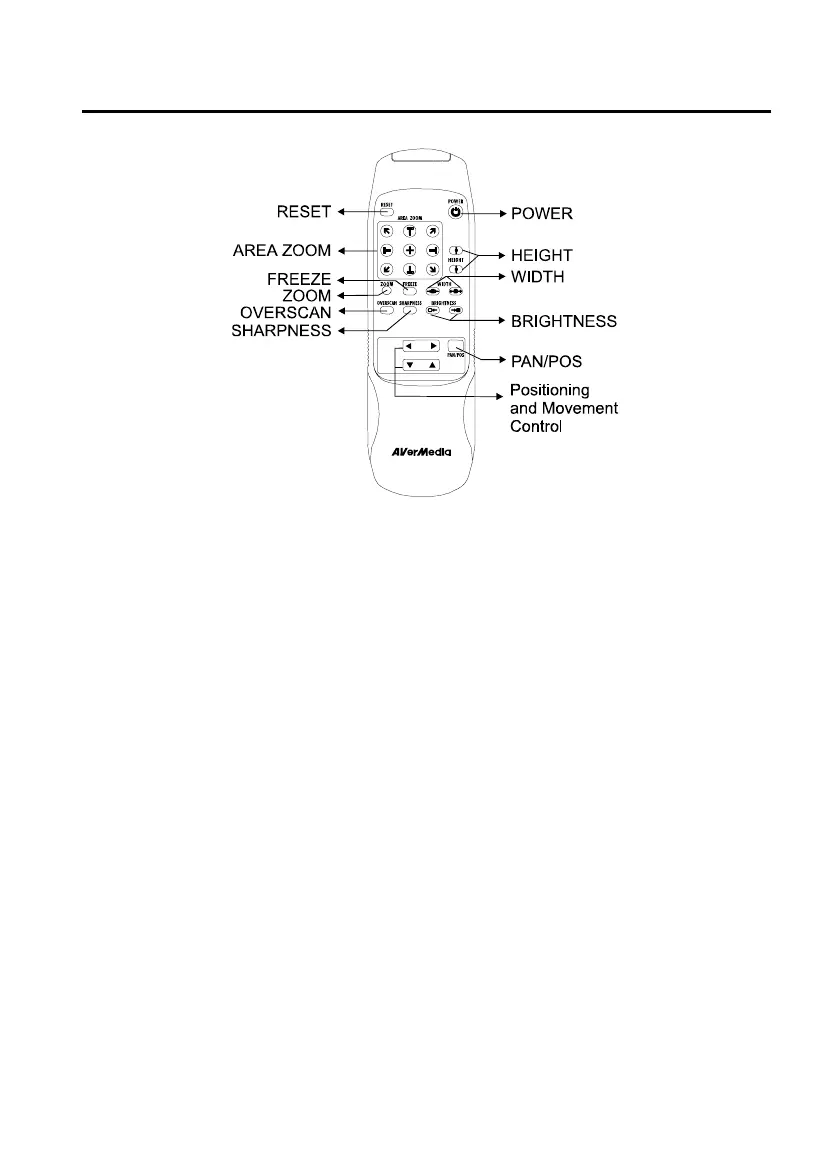
POWER : Switches the AVerKey3 Plus on/off.
RESET : Restores the AVerKey3 Plus to original factory settings.
AREA ZOOM : Provides quick selection of the screen area to magnify.
The Area Zoom function divides the computer image on
the TV into 9 parts and allows you to select the desired
part to zoom.
ZOOM : Press this button to zoom in or out of the computer image
on TV.
FREEZE : Press this button to freeze or unfreeze the computer image
on TV.
OVERSCAN : Toggles between Underscan and Overscan.
Overscan displays the computer image on TV to the
fullest. The image will be chopped off at the borders when
displayed this way.
When you switch to Underscan, the computer image will
be completely displayed on TV.
Note: Images will not be chopped off for resolutions up
to 1024 x 768 in underscan mode.



 To Next Page