AVerMedia AVerKey3 Plus User's Manual
6
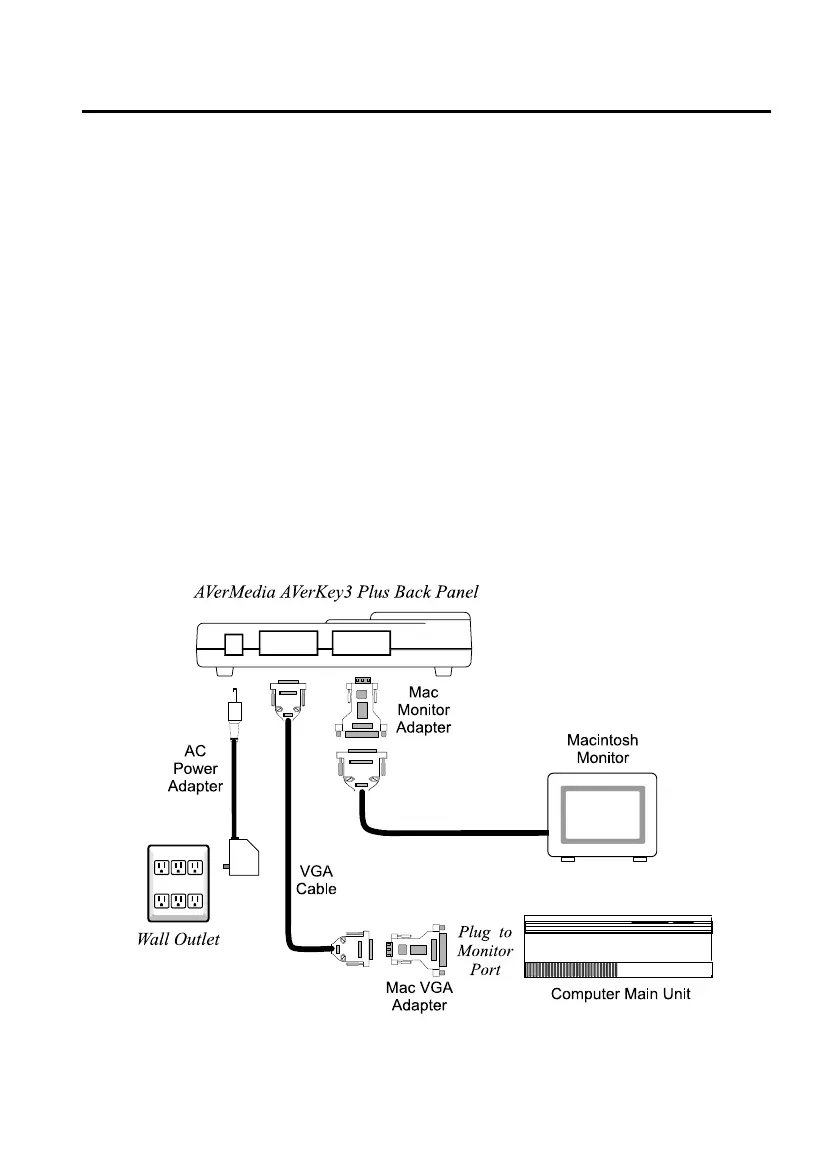
• Connect the VGA Cable with the attached Mac VGA Adapter to the
monitor port on the back panel of your Macintosh computer.
2. Connect your Macintosh monitor to the AVerKey3 Plus.
• Disconnect the monitor from the computer.
• Then, attach the Mac Monitor Adapter to the monitor cable.
• Connect the monitor cable with the attached Mac Monitor Adapter to the
AVerKey3 Plus “VGA OUT” port.
3. If you do not intend to use a computer monitor with your Macintosh computer,
you will need to connect a dummy terminator to the AVerKey3 Plus “VGA
OUT” port. In general, a 14” terminator is used. A 12” terminator is only used
with software that requires it.
Terminators are used with Macintosh and laptops when no external monitor is
used.
4. Plug the supplied AC Power Adapter into the AVerKey3 Plus “POWER” port.



 To Next Page