12 7821 User Instructions
Modes of Operation
5 Modes of Operation
5.1 Accessing the Menu
The 7821 powers up in normal weighing mode ready for weighing operations. Access
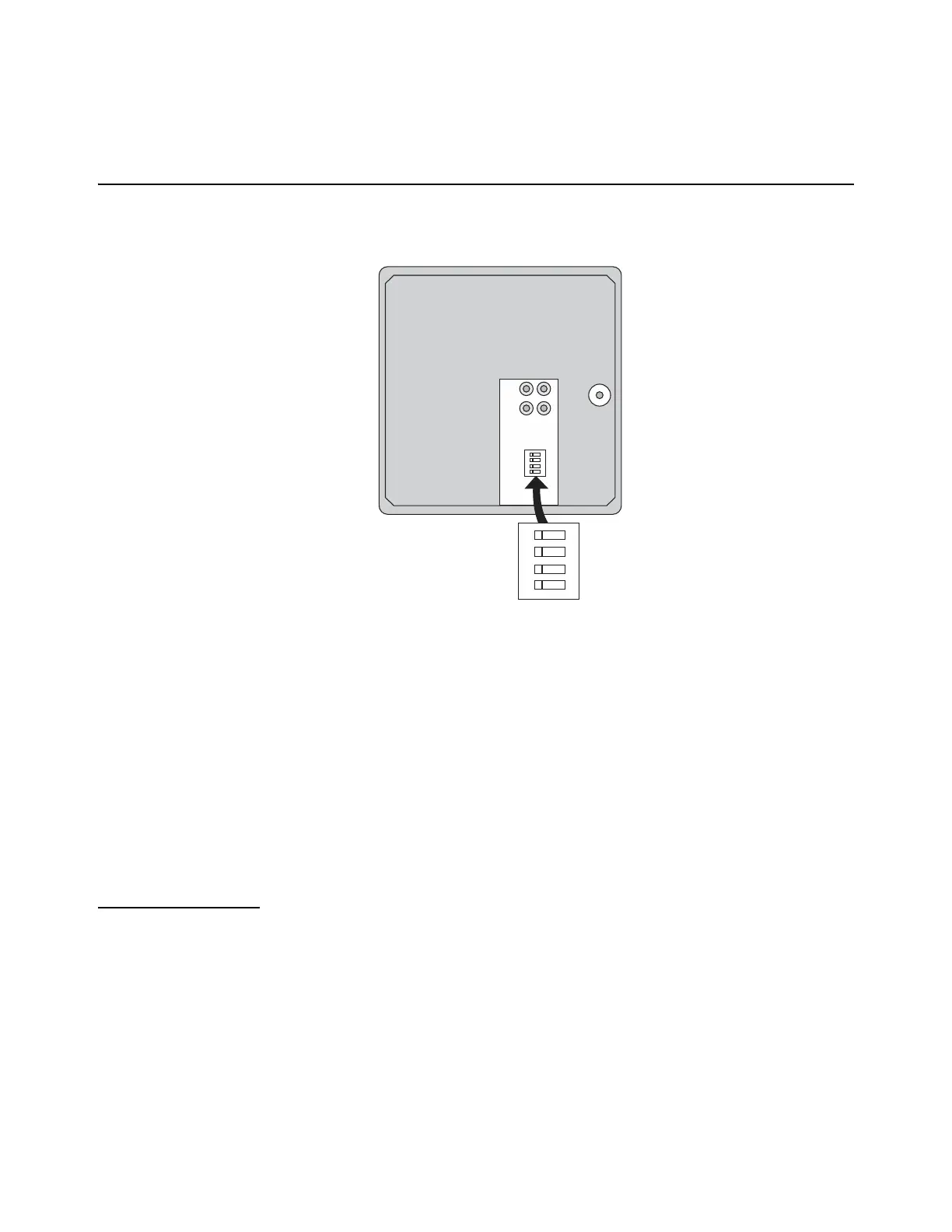
the Menu Mode by setting Switch 1 shown in Figure 5.1 to the OPEN or MENU Mode
position.
Figure 5.1 7821 Switch Location
There are three modes available to you with Switch 1 in the MENU Mode or OPEN
position. They are as follows:
Diagnostic Mode Used to test areas of the scale’s function
Configuration ModeUsed to configure the scale for your application
Calibration Mode Used when calibrating the scale
The structure for these menus is shown in Figure 5.2. The following pages have specific
information about each mode and step-by-step instructions for accessing them.
5.1.1 Zero and Units Key
The ZERO key zeros the scale, and UNITS key changes the unit of measure between
lb and kg.
1
1
2
2
OPEN
OPEN
3
3
4
4
N/A
Internal/External Keys
Gravity Setting
Menu
Top view of 7821 with
platter removed.





 To Next Page