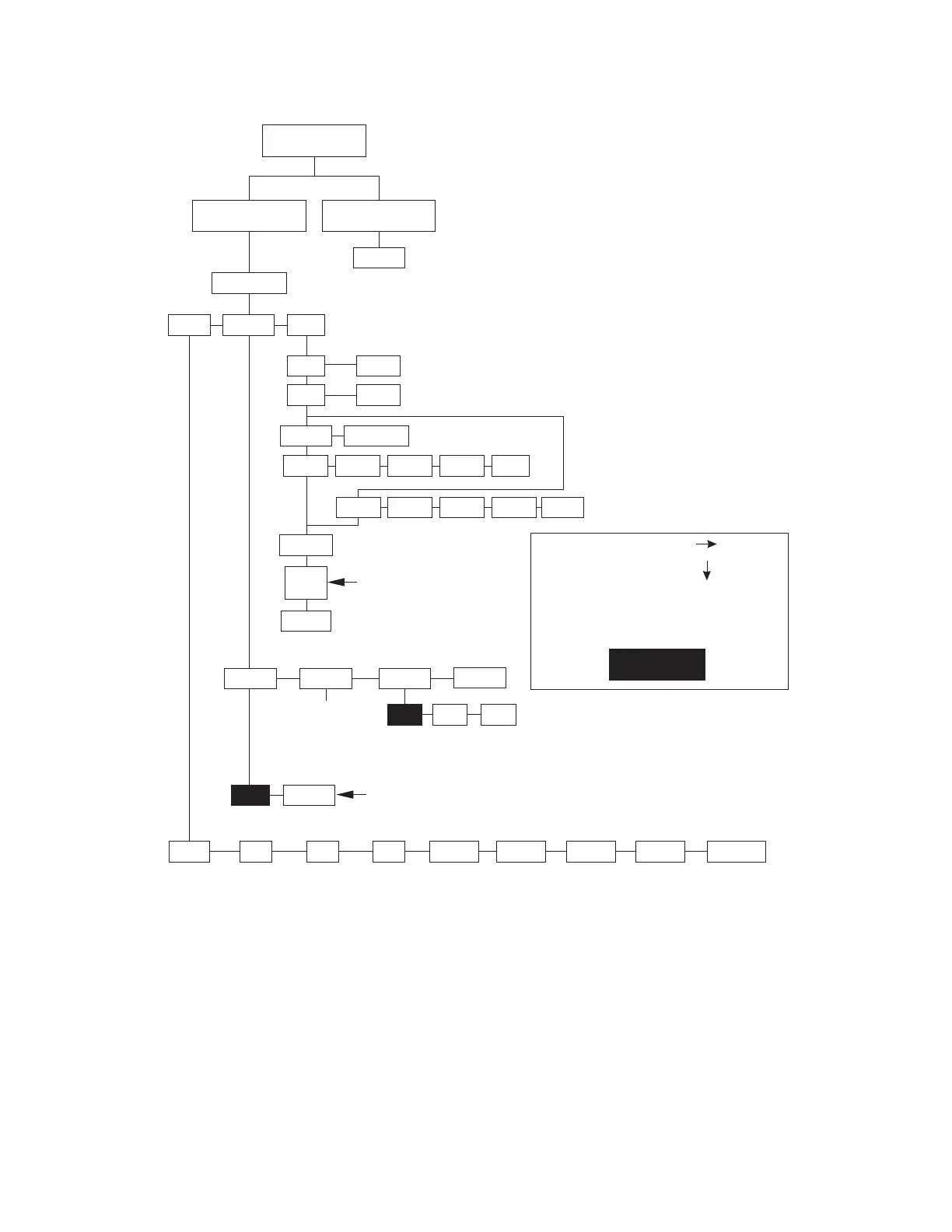
Figure 5.2 Menu structure
weights. The following tables show alternative weights that can be used to calibrate the
Normal Weighing
Mode
Set Switch 1 to
the OPEN Position
Set Switch 2 to
the O PEN Position
Menu Mode
DIAG CONF
9.xxxx
FILT
SLO
DISP RA RO I/0 HRESA HRESN LOC-G DONE
BAUD
Performs a
display test
Performs a
te s t of R AM
Performs a
te s t of R O M
Per fo r ms a
input/output
te s t
Performs a
division test
w/AZT
CAL-G
Displays the
c alibration
gravity value
Performs a
division test
w/o AZT
Displays the
current
gravity value
CAL
LBS
U ON
FAST
1000G
U OF F
CLASS
Scale capacit y is prompt ed.
See Table 5.1 for t he list of
alternative weight available
for different capacit ies.
If scale is placed in noisy
environment , set slow
filter to minimize the effects.
SCALE
LOAD 0
LOAD
(CAP)
DONE
To increase local gravit y set t ing,
press and hold key.ZERO
To decrease value, press and
hold the key.UNITS
Return Switch 2 to CLOSED posit ion when done.
150-1
60.02
150-2
70.02
150-3
75.02
150-4
75.01
200 lb
kg
100. 02
PROT
8213 3835NCI
DONE
Choose f rom a list
of 12 baud and
parit y opt ions
See Table 5.2
Indicates Factory
Default Settings
Press the key to move in the menuZERO
Press the key to move in the menuUNIT S
Af ter making a selection, t he display generally
moves to t he next parameter in the list .
Af ter choosing done, t he display shows DIAG.





 To Next Page