12
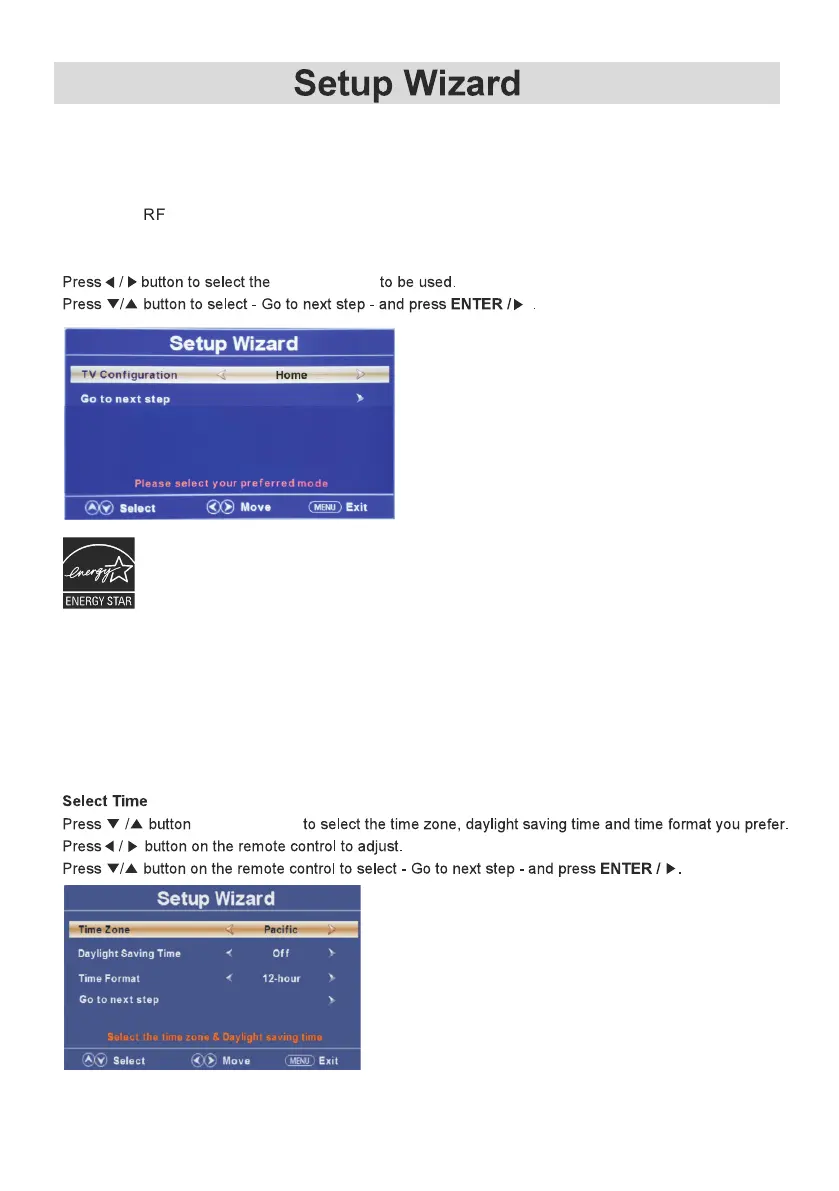
Select TV Configuration
TV Configuration
If your preferred language is French or Spanish, exit this Setup Wizard by pressing the Menu
button, and follow the instruction on page 19 to make your language selection and re-enter the
Setup Wizard from that Menu screen.
Setup Wizard
Connect a RF cable from your incoming antenna/cable jack to the TV’s input labeled “ANT”,
and/or a HDMI cable from your signal source to the HDMI input jack.
on the remote
Home Mode(Energy Saving):Select Home Mode to maximize energy efficiency.Please note if you select Home
Mode,the picture will be darker . This mode meets the requirements of ENERGY STAR® qualification .
Retail Mode: Select Retail Mode if you would like your picture to be brighter. At times this mode may use more
energy to operate the Volume/Sound Mode and the picture Mode.In this setting,the power consumption may
possibly exceed the limitted requirement of the ENERGY STAR® qualification .
ENERGY STAR® is a set of power-saving guidelines issued by the U.S. Environmental Protection Agency(EPA).
ENERGY STAR® is a joint program of U.S. Environmental Protection Agency and the U.S. Department of
Energy helping us all save money and protect the environment through energy efficiency products and
practices.
This product meets ENERGY STAR® guidelines for energy efficiency. ENERGY STAR® and
the ENERGY STAR® mark are registered U.S. marks . ENERGY STAR® is a registered mark
owned by the U.S. government.



 To Next Page