FlightMax EX5000 -26- 600-00105-000 Rev 01
Setup Pages - Declutter
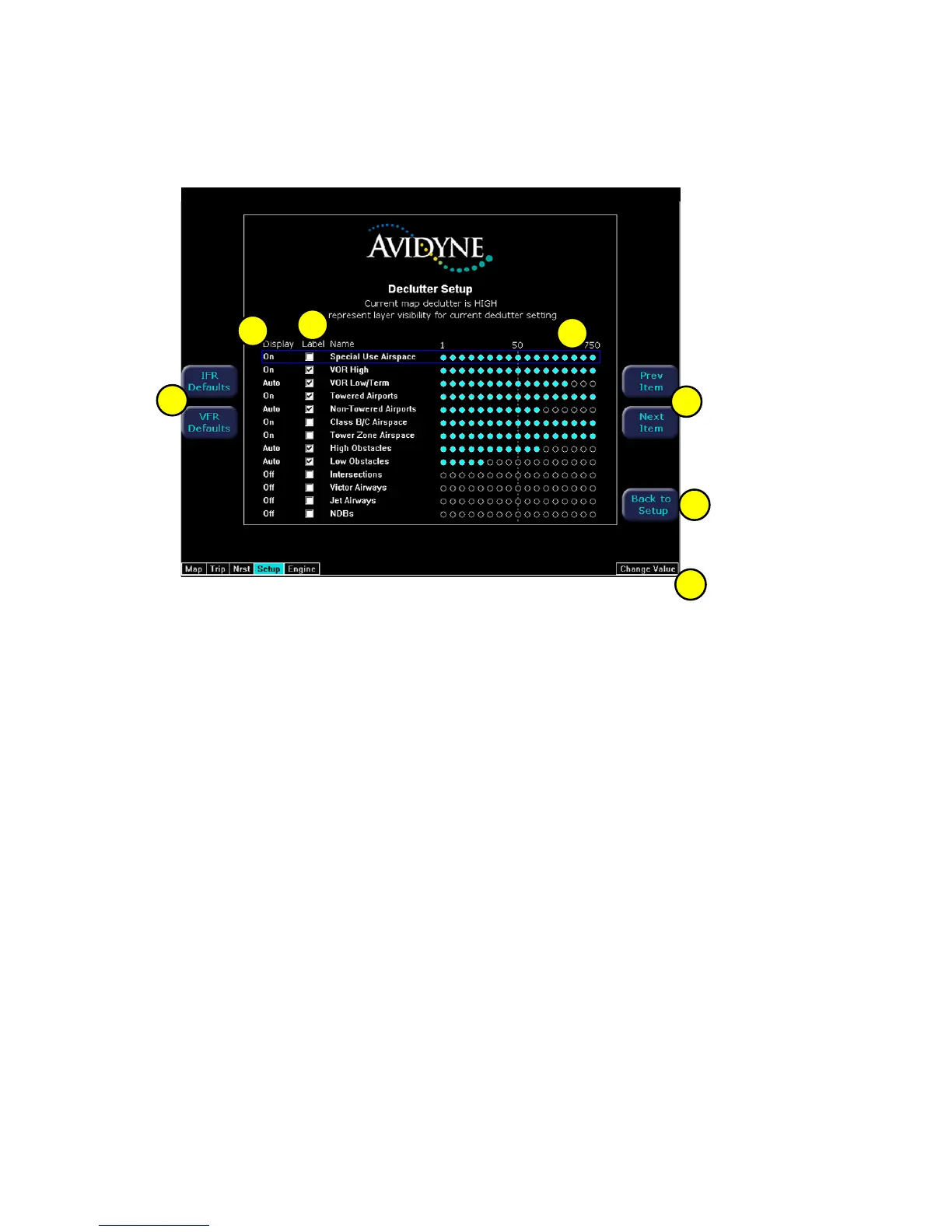
The Declutter page is used to define the navigation symbols and default display
settings for the Declutter button. Individual items can be selected for display or a
pre-defined group of items can be selected by choosing VFR or IFR defaults.
1) IFR & VFR Defaults - Sets the declutter settings to predefined
factory settings based on typical usage.
2) Display - Each navaid has three possible display settings:
On - The navaid is displayed all the time.
Auto - The navaid is displayed automatically and declutters automatically based
on pixel density of the display at a given range.
Off - The navaid is never displayed.
3) Label - A check in the label box indicates the navaid name is displayed
along with the symbol.
4) Range Dots - The circles represent the seventeen available map scales. A cyan
colored circle indicates that the navaid is displayed at that range. The vertical
dash line indicates the map current scale. (Note: The 1000NM and 1500NM
columns are not displayed because this data is never displayed at these ranges.)
5) Prev & Next Item Buttons - Press to move the selected field box.
6) Change Value - Rotate knob to change the value of the setting within the selected
field.
7) Back to Setup - Press to go back to the Main Setup menu.
1
2
3
4
5
6
7



 To Next Page