600-00105-000 Rev 01 -27- FlightMax EX5000
Setup Pages - Data Block Edit
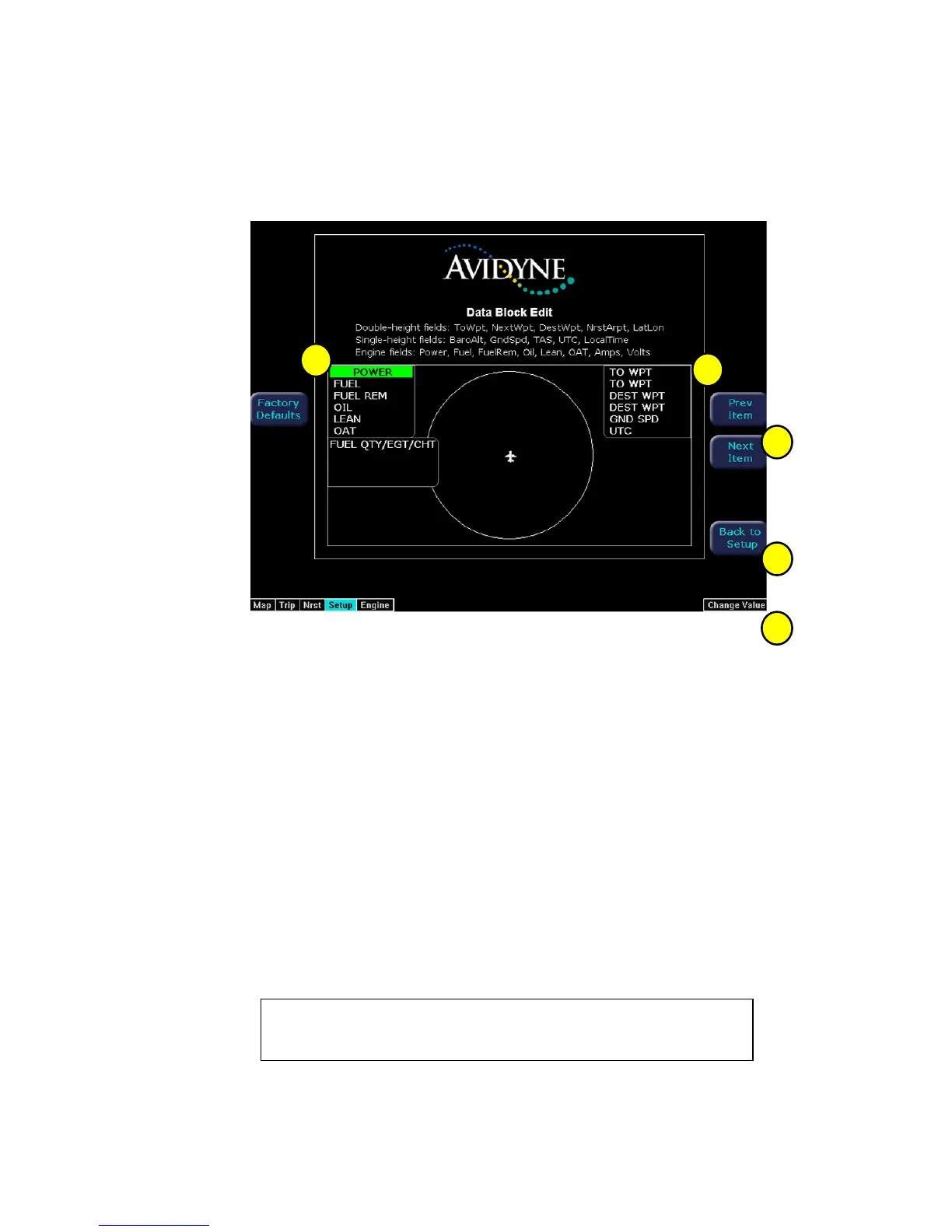
Data blocks in the upper corners of the Map Page can be edited to display information
from a list of available data types. A series of dashes represents data that is invalid or
unavailable.
See Table 7 (Page 36) for full description of Navigation data available for display in Data Blocks.
See Table 8 (Page 37) for full description of Engine data available for display in Data Blocks.
1) Left Data Block - Allows up to 6 lines of data for display and 4 slots for FUEL
QTY/TIT/CHT or FUEL QTY/EGT/CHT datablocks. Data block automatically
resizes based on number of lines selected. Data block disappears if all lines are
blank.
2) Right Data Block - Allows up to 6 lines of data for display. Data block
automatically resizes based on number of lines selected. Data block disappears if
all lines are blank.
3) Prev & Next Item Buttons - Press to move the selected field box.
4) Change Value - Rotate knob to change the value of the setting within the selected
field.
5) Back to Setup - Press to go back to the Main Setup menu.
1
2
3
4
5



 To Next Page