5 MicroZed IOCC Basic Setup and Operation
The operation of the IOCC is determined by the MicroZed module. The functionality of both the MicroZed
and the IOCC is determined by the application booted from the selected non-volatile memory on the
MicroZed itself. Therefore, it is not possible to ship the IOCC with any pre-configured design. This must be
loaded by the user into the MicroZed.
This Getting Started Guide offers system developers examples of how to do several things the MicroZed
and IOCC together:
1. Interact with GPIOs on the IOCC, including the eight LEDs and the four push buttons.
2. Control the brightness of the LEDs using either push button input or terminal input.
3. Boot the example design from SD Card
4. Program the QSPI Flash on the IOCC with the example design
In addition to the items included in the kit, you will also need a MicroZed module, a MicroUSB cable, and
a microSD card reader/adapter to complete the exercises in this tutorial.
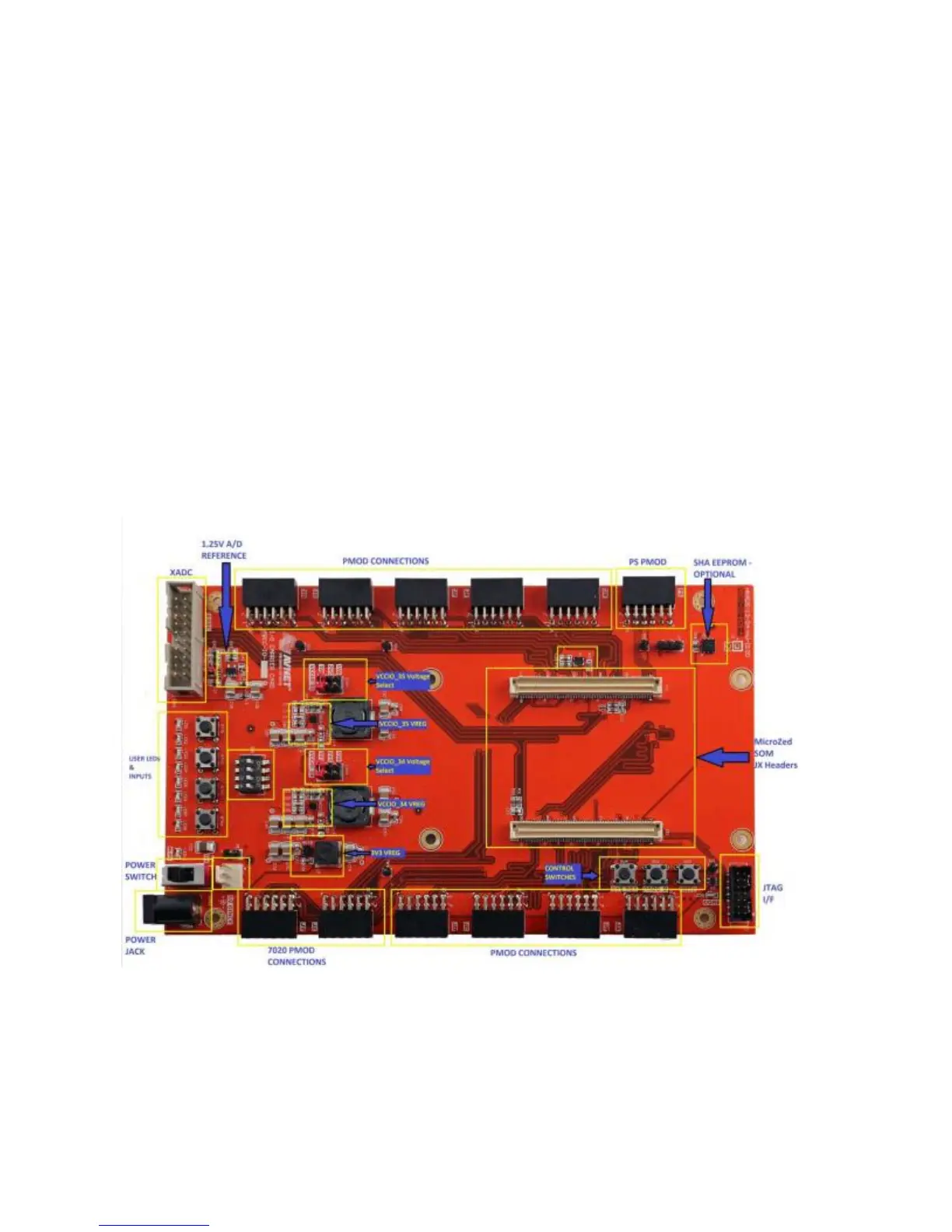
An image of the MicroZed IOCC in its expected out-of-box configuration is shown below along with the
locations of several key components.
Figure 2 – IOCC Topology


 To Next Page