30-Oct-2020, Rev. 1.1
2.7 JTAG Configuration
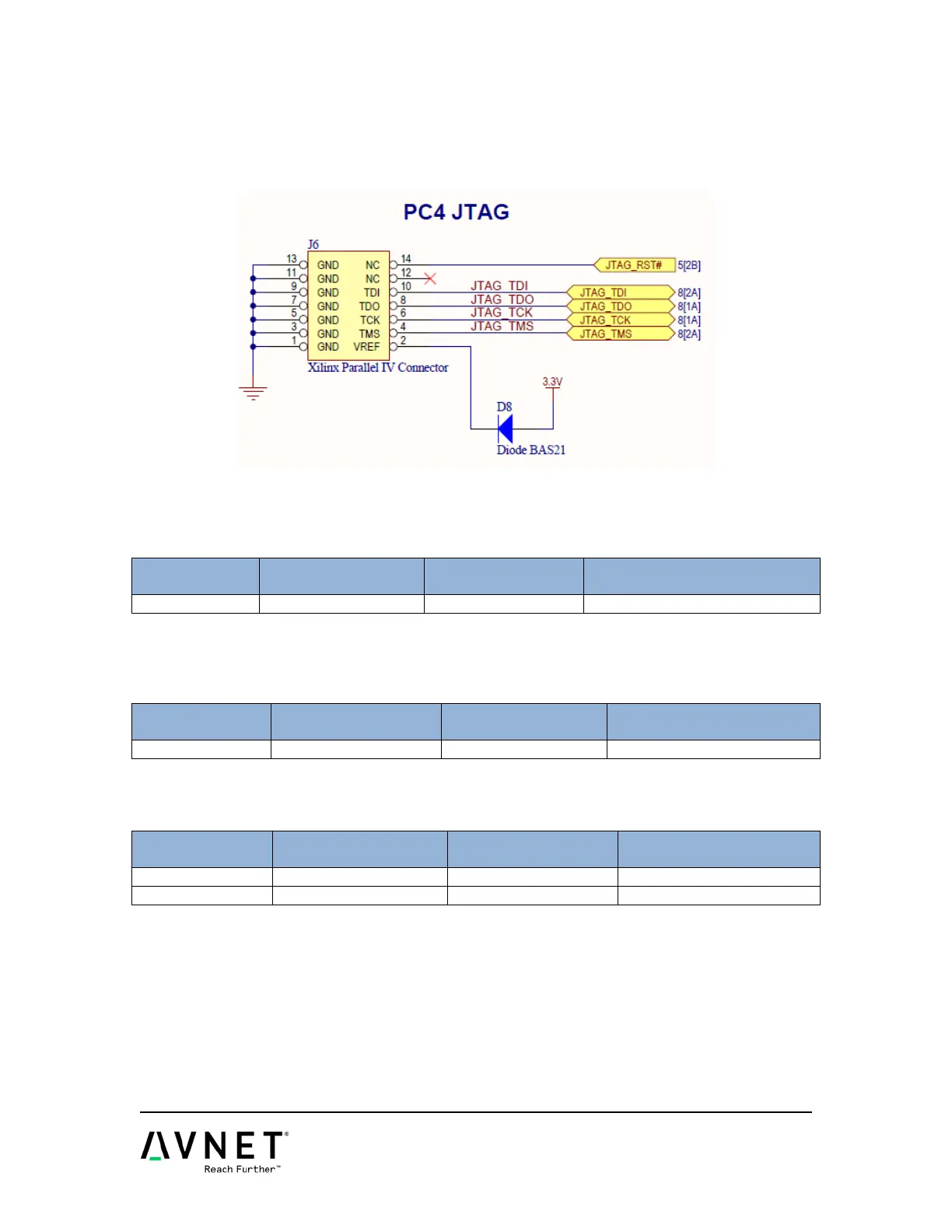
The Carrier provides a traditional Platform Cable JTAG connector for use with Xilinx
Platform Cables and Digilent JTAG HS1 or HS2 Programming Cables. When a MicroZed
is plugged onto the Carrier, the Carrier’s JTAG connector MUST be used. The JTAG
connector on-board the MicroZed SOM will no longer function.
Figure 8 – JTAG Connections
The Carrier has a 3-pin jumper connecting to PUDC_B. Default is???
Table 17 – PUDC_B Connections
Zynq AP SOC Pin
A blue DONE LED is connected to Zynq through the MicroHeader. When the PL is properly
configured, the DONE LED will light.
Table 18 – Done Connections
Zynq AP SOC Pin
INIT_B and POR are connected to pushbuttons on the Carrier.
Table 19 – Configuration Connections
Zynq AP SOC Pin


 To Next Page