Changing the OSD Language
The display OSD language is initially set to English, but can also display the menus in different
languages. To change the OSD language:
1.
Press MENU.
2.
Select Basic Settings from the Main Menu.
3.
Select OSD Language from the Basic Settings Menu.
4.
Press or to select the desired language and press ENTER. The change takes effect immediately
.
Enabling the Touch Screen
Before setting up your display to support touch screen capability, ensure that:
•
The touch screen controller host computer is turned off.
•
The display is turned on.
•
The video output from the computer is connected to a video input on the display. See Figure 3-4, Figure 3-5 or
Figure 3-6.
Connecting the Touch Screen Controller Host Computer to the Display
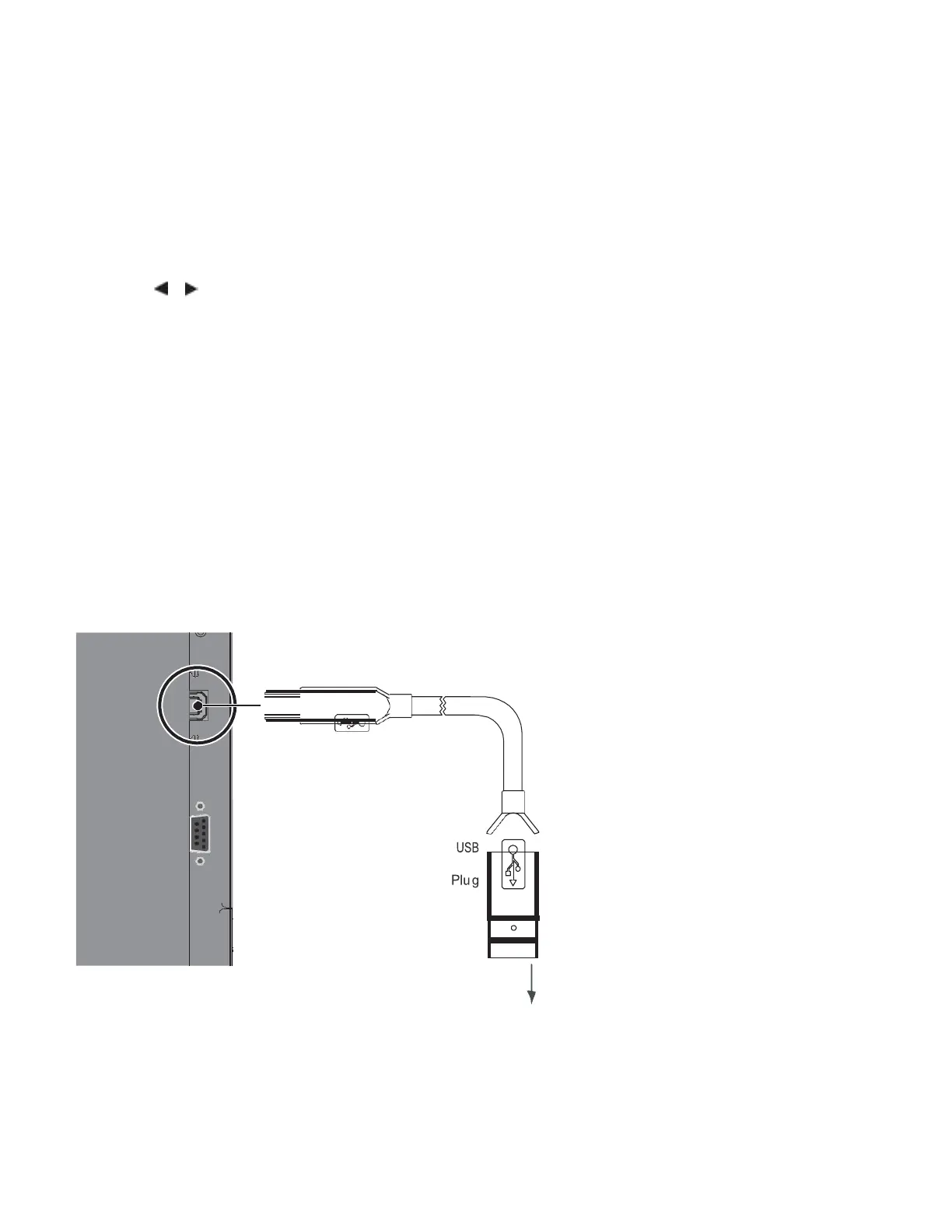
Use the provided USB cable to connect the touch screen controller host computer to the USB input as shown in Figure
3-7.
to PC or USB Hub
Figure 3-7. Touch Screen Controller (USB) Connection
After (and only after) making this connection, turn on your host computer.



 To Next Page