11
Connection
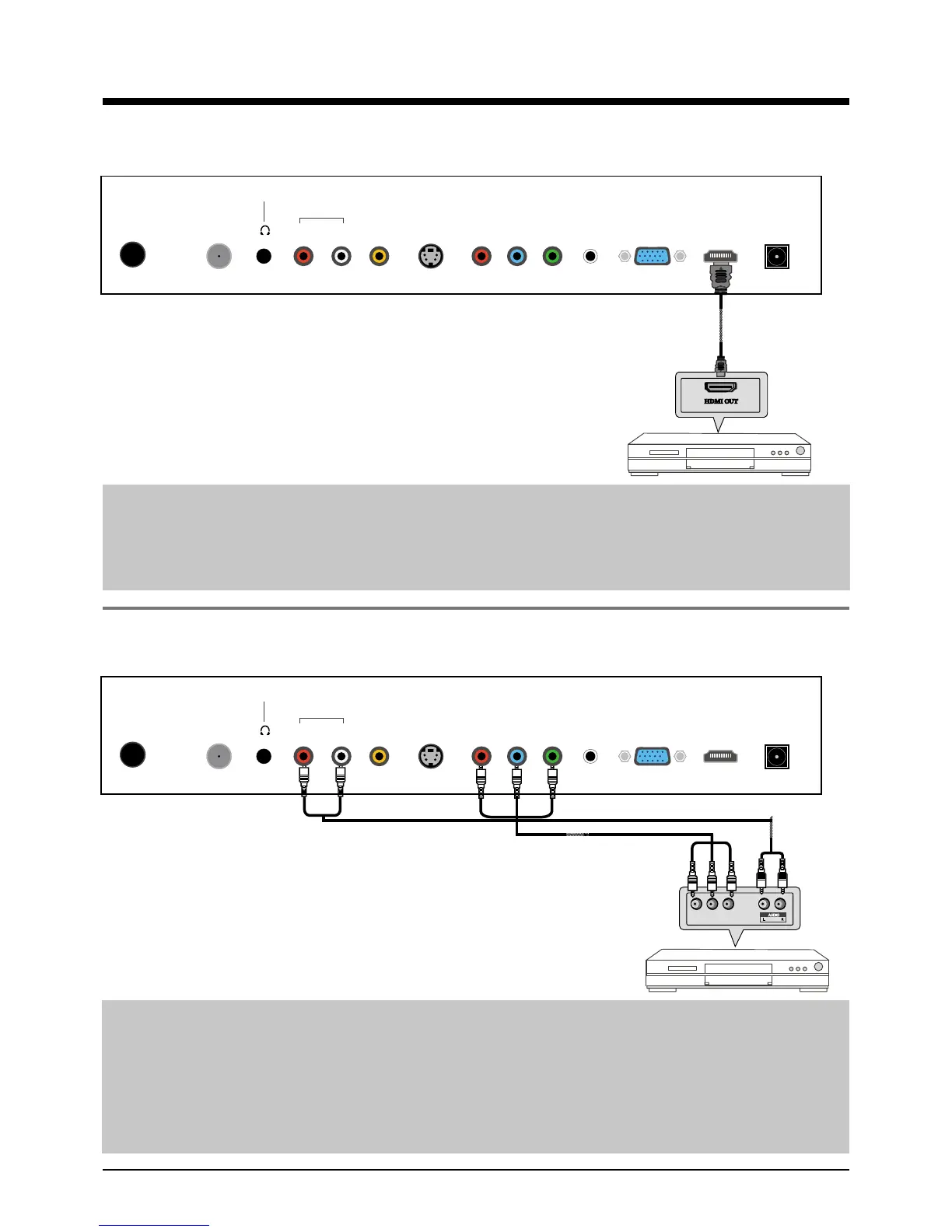
HDMI Connection
Note: All cables shown are not included with the TV.
DVD or VCR
- Connect the HDMI jack on the DVD to the HDMI jack on the TV set with a HDMI cable.
- Turn on the DVD, and select “HDMI” in the input source menu.
+'0,+LJK'H¿QLWLRQ0XOWLPHGLD,QWHUIDFHLVWKH¿UVWDOOGLJLWDOFRQVXPHUHOHFWURQLFVA/V
LQWHUIDFHWKDWVXSSRUWVXQFRPSUHVVHGVWDQGDUG2QHMDFNVXSSRUWVERWKYLGHRDQGDXGLR
LQIRUPDWLRQ
YPbPr Connection
Note: All cables shown are not included with the TV.
- Connect the YPbPr output jacks on the DVD or VCR to the YPbPr input jacks on the TV set
with a YPbPr cable. 7KHSLFWXUHTXDOLW\LVLPSURYHGFRPSDUHGWRDUHJXODU9&5WRWKHYLGHR
input.
- Match the jacks colors: Y=Green, Pb=Blue, Pr=red.
- Connect the audio output jacks on the DVD or VCR to the audio input jacks on the set with an
audio cable.
- Turn on the DVD/VCR, and select “YPbPr” in the input source menu.
DVD or VCR
YPbPr Cable
Y Pb Pr
RF1 R L9,'(269,'(23U3E Y PC-IN VGA+'0,32:(5
Headphone out
Audio in
RF2
RF1 R L9,'(269,'(23U3E Y PC-IN VGA+'0,32:(5
Headphone out
Audio in
RF2



 To Next Page