PAGE 13
USE
Adding extra water
If there is not enough water in the water
tank
4
to complete another brewing
process, the “Water tank empty” LED
10
will be illuminated. You cannot carry out
any more brewing processes until you
have relled the water tank.
1. Remove the water tank and ll with
water up to a maximum level of two
nger widths below the upper edge
of the water tank.
2. Replace the water tank again.
The “Water tank empty” LED will go
out.
If the water level is too low, you
should add fresh water before
the “Water tank empty” LED
lights up.
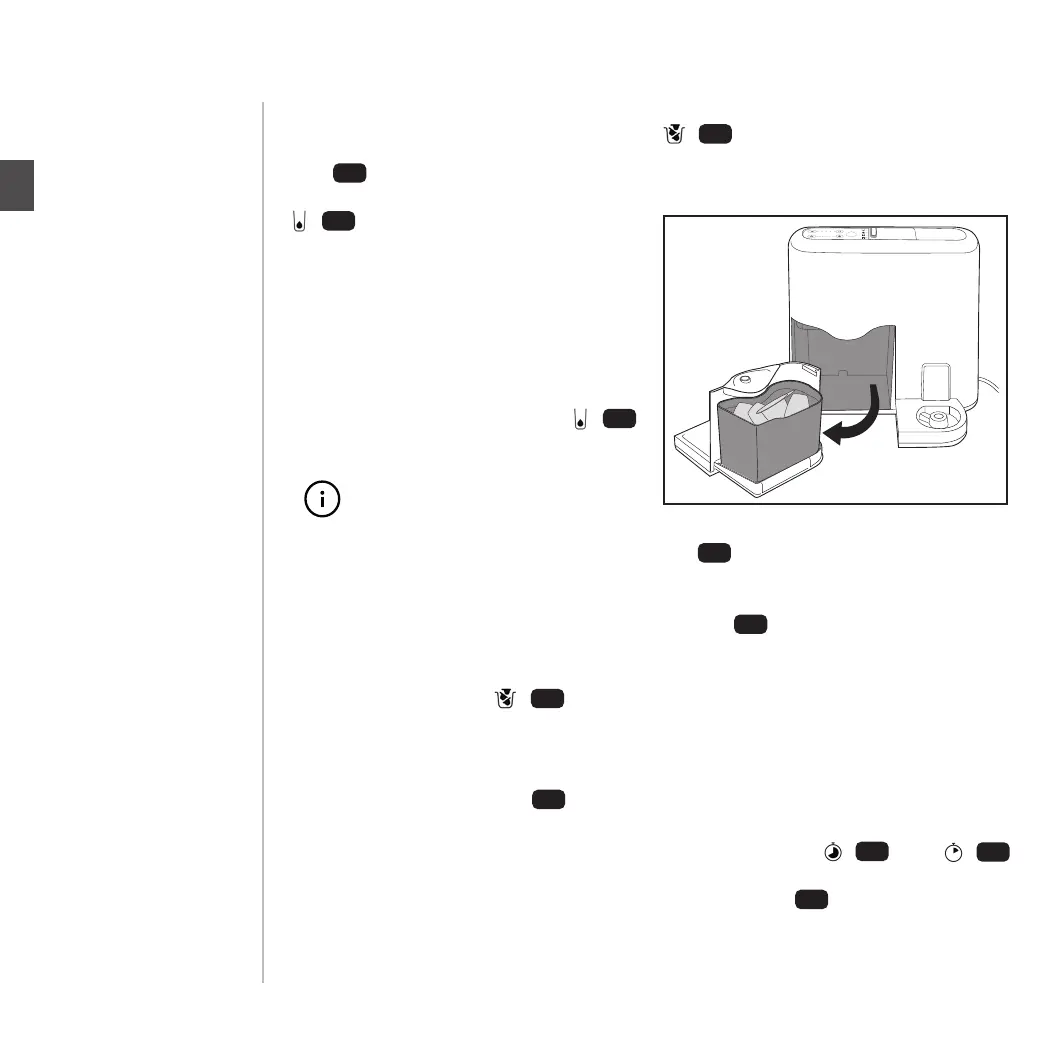
Emptying the pod bas-
ket
After six brewing processes, the “Empty
pod basket” LED
11
will be illuminated
and the pod basket must be emptied.
Otherwise, no further brewing process-
es can be carried out.
1. Remove the pod catching drawer
7
from the tea maker and take out the
pod basket.
2. Dispose of the used pods.
3. Place the pod basket and the pod
catching drawer back into the tea
maker.
The “Empty pod basket” LED will go out
and the tea maker is ready to use again.
Emptying the drip tray
1. Remove the pod catching drawer
7
from the tea maker and empty the
pod basket.
2. Remove the drip catcher
6
.
3. Empty the drip tray.
4. Then replace all the parts in the tea
maker.
Setting the water
hardness
1. Switch on the tea maker.
2. Press the buttons for setting the
brewing time +/–
14
/
15
simulta-
neously.
The display
16
on the tea maker
shows the level of water hardness
currently set.
After ve brewing processes, the “Empty
capsule container” LED / will be
illuminated and the capsule container
must be emptied. Otherwise, no further
brewing processes can be carried out.
1. Remove the drip drawer from
the tea maker and take out the
capsule container.
2. Dispose of the used capsules in the
yellow recycling bin or use the
Avoury recycling bag.
3. Place the capsule container and the
drip drawer back into the tea maker.
7
PAGE 13
USE
Adding extra water
If there is not enough water in the water
tank
4
to complete another brewing
process, the “Water tank empty” LED
10
will be illuminated. You cannot carry out
any more brewing processes until you
have relled the water tank.
1. Remove the water tank and ll with
water up to a maximum level of two
nger widths below the upper edge
of the water tank.
2. Replace the water tank again.
The “Water tank empty” LED will go
out.
If the water level is too low, you
should add fresh water before
the “Water tank empty” LED
lights up.
Emptying the pod bas-
ket
After six brewing processes, the “Empty
pod basket” LED
11
will be illuminated
and the pod basket must be emptied.
Otherwise, no further brewing process-
es can be carried out.
1. Remove the pod catching drawer
7
from the tea maker and take out the
pod basket.
2. Dispose of the used pods.
3. Place the pod basket and the pod
catching drawer back into the tea
maker.
The “Empty pod basket” LED will go out
and the tea maker is ready to use again.
Emptying the drip tray
1. Remove the pod catching drawer
7
from the tea maker and empty the
pod basket.
2. Remove the drip catcher
6
.
3. Empty the drip tray.
4. Then replace all the parts in the tea
maker.
Setting the water
hardness
1. Switch on the tea maker.
2. Press the buttons for setting the
brewing time +/–
14
/
15
simulta-
neously.
The display
16
on the tea maker
shows the level of water hardness
currently set.
Adding extra water
If there is not enough water in the water
tank to complete another brewing
process, the “Water tank empty” LED
/ / will be illuminated. You cannot
carry out any more brewing processes
until you have relled the water tank.
1. Remove the water tank and ll with
water up to a maximum level of two
nger widths below the upper edge
of the water tank.
2. Replace the water tank again.
The “Water tank empty” LED /
will go out.
10
11
4
10
If the water level is too low, you
should add fresh water before
the “Water tank empty” LED
lights up.
Emptying the capsule
container
The “Empty capsule container” LED
/ will go out and the tea maker is
ready to use again.
11
Emptying the drip tray
1. Remove the capsule catching drawer
from the tea maker and empty
the capsule container.
2. Remove the metal cover of the drip
tray .
3. Empty the drip tray.
4. Then replace all the parts in the tea
maker.
7
6
Setting the water
hardness
1. Switch on the tea maker.
2. Press the buttons for setting the
brewing time + / and + /
simultaneously.
The display on the tea maker
shows the level of water hardness
currently set.
14
15
16
EN
PAGE 34


 To Next Page