TROUBLESHOOTING
Troubleshooting
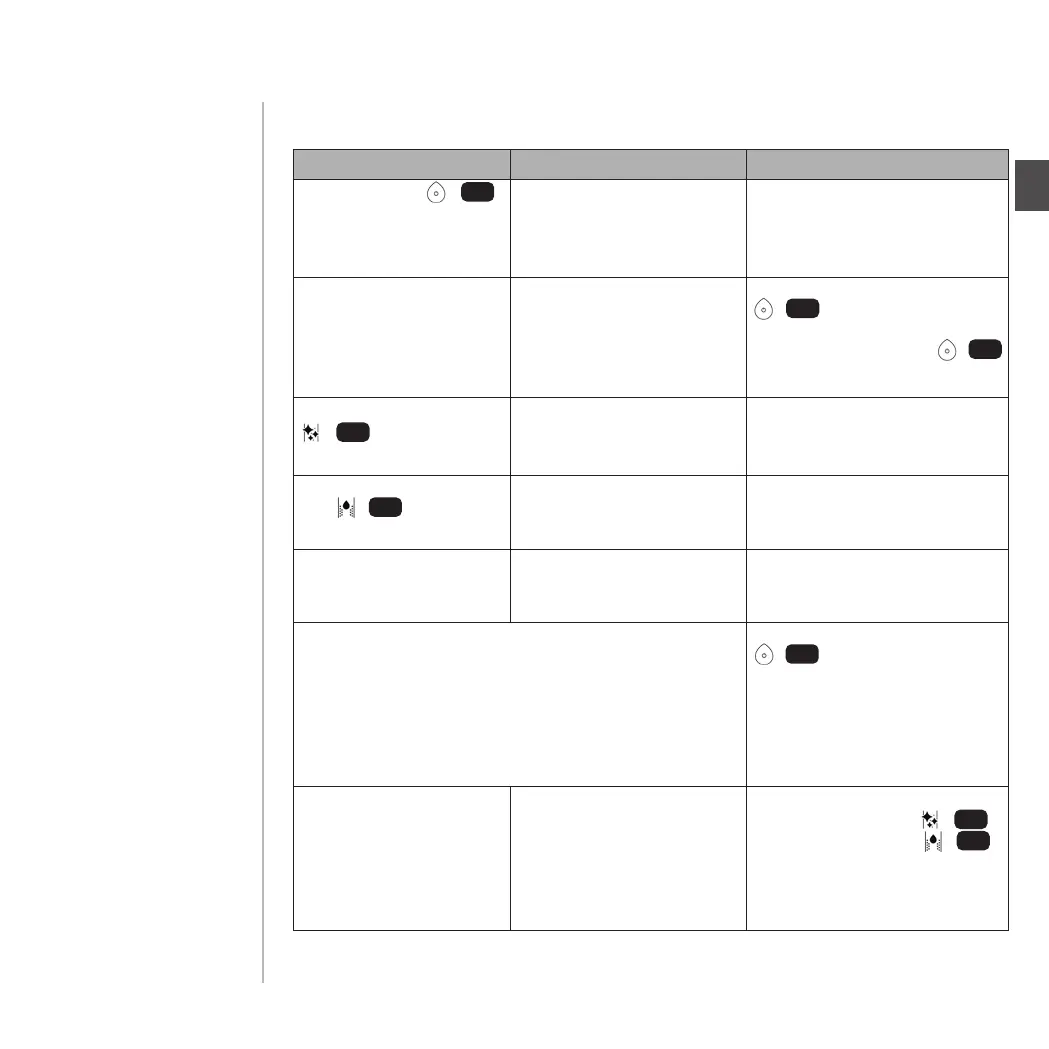
Problem
Possible cause Solution
The Start-Button /
ashes permanently
and the tea maker does
not start up.
The capsule compartment is
open when switching on/
starting up.
Close the capsule compartment.
All 4 LEDs 10, 11, 12 & 13
ash at the same time.
System error
(for further information
regarding system errors and
related error codes see page
40)
Press and hold the Start-Button
/ for 3 seconds until
the red LEDs 10, 11, 12 & 13 stop
ashing. The Start-Button /
ashes and the tea maker restarts.
The LED “Carry out cleaning”
/ does not go out.
The cleaning programme
was cancelled/was not
completed.
Restart the cleaning programme
and allow it to be
completed.
The LED “Carry out desca-
ling” / does not
go out.
The descaling programme
was cancelled/was not
completed.
Restart the descaling programme
and allow it to be
completed.
Only water (and no tea)
is dispensed from the
tea maker.
The lid foil has not
been removed from the
capsule.
Remove the lid foil and
re-insert the capsule.
In the event that the lid foil was not removed,
the capsule has already been inserted into the machine
and this has been noticed before the brewing process
has started.
Press and hold the Start-Button
/ for 3 seconds or open
the capsule compartment. The
capsule will be ejected without
brewing (as long as the
brewing process has not yet
started).
The tea maker ejects
the capsules directly after
being inserted. Tea dis-
pensing is not possible.
The cleaning or descaling
programme was can-
celled/was not completed.
Check to see whether both LEDs
for “Carry out cleaning” /
or “Carry out descaling” /
are illuminated, and then restart
the corresponding programme.
Alternatively - rinse the brewing
chamber (see page 32)
9
9
9
12
13
9
12
13
EN
PAGE 39


 To Next Page