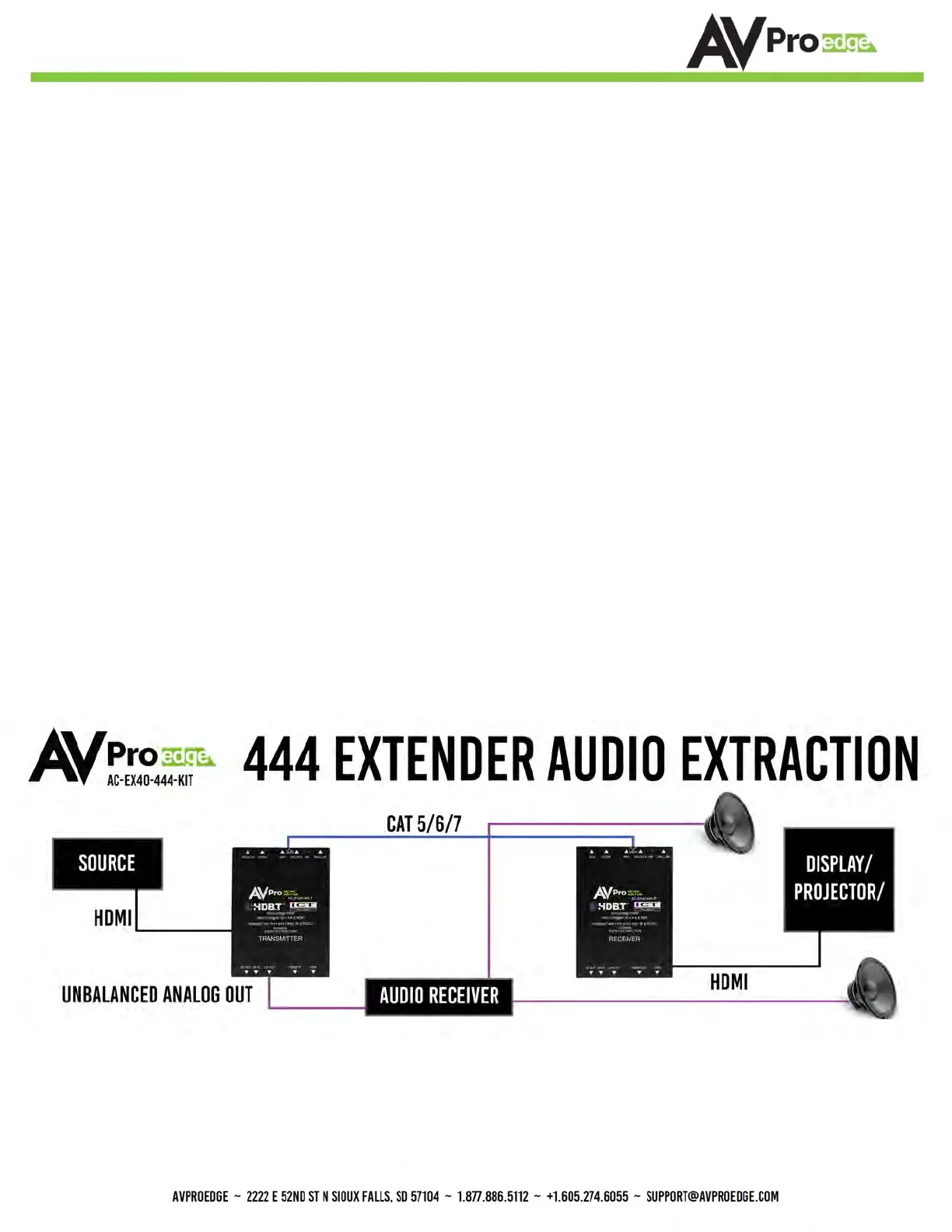
■ Audio Extraction on AC-EX40-444
A feature that is always active on the AC-EX40-444 (Tx and Rx) is Audio Extraction. This feature extracts PCM
Audio (2ch) from the source device in order to be run to a separate amplifier or AVR. BOTH of the audio ports
are always active (on Tx & Rx). NOTE - These ports ONLY work if the source is 2ch. If downmixing is needed,
check out AC-AVDM-AUHD or AC-ADM-COTO.
To use the ports:
1. Simply plug a 3 pin terminal block into the port on the Tx or Rx
(both are always active) and make your own cable assembly.
2. There is an option to buy pre-made unbalanced 3-pin to RCA Female cables (AC-CABLE-3PIN-2CH) see
image on page 14.
NOTE: The source device needs to output PCM audio in order for the feature to work. This can be done by
using the on-board EDID management or setting the source as such.
■ Audio Extraction Routing Diagram


 To Next Page