- 59 -
Events History
Access to this menu imposes to choose the type of connection; USB - PSTN/GSM.
For a connection in local it is necessary:
1- to power the barriers
2- to connect the barrier receiver to the computer using the USB connection.
note: if first connection, carry out the drivers loading procedure for the recognition of the peripheral.
3- to select the barrier address on HPSOFT and then choose "connect"
Once connected, access will be gained to the alarm events history recorded in barrier.
Data loading procedure
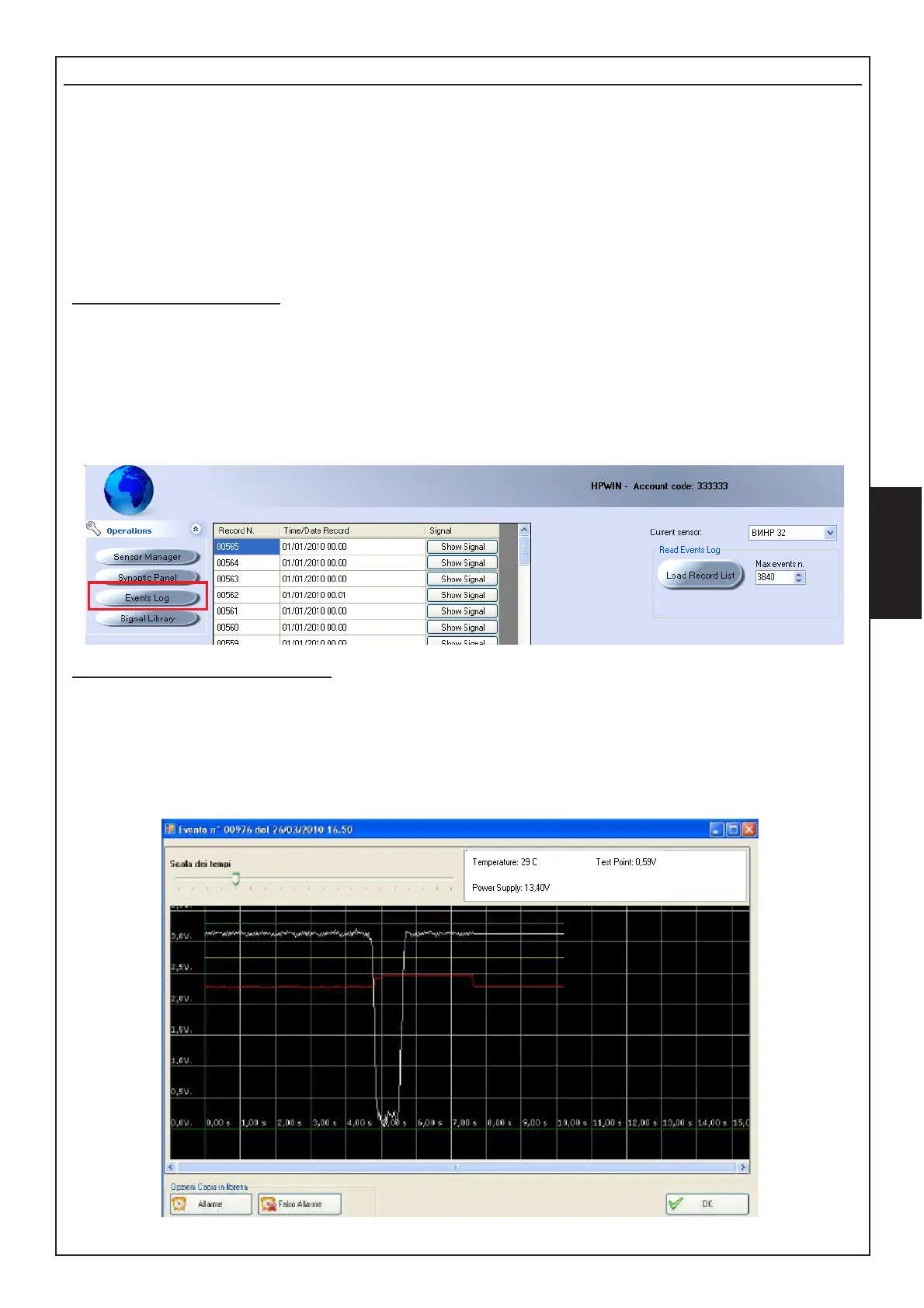
1- Select the satellite - the barrier: "current satellite"-"current detector"
2-Define the number of events to load, with a maximum of 3840: "Max n. events"
3- Start the process: press "Load Record List"
4- The events complete with Record Number, Date and time, will be displayed.
Signals displaying procedure
5- 5- Click on show signal; the software will load the information directly from the barrier
The displaying is complete of certain information recorded at the time of alarm:
- Alarm signal - Test Point - Power supply - Temperature.
6- Press Ok to close the screen



 To Next Page