Phone: 1-803.358.3600 • Fax: 1-803.358.3636
100 Innovation Place • Lexington SC 29072 USA
avtecinc.com • sales@avtecinc.com
l
Aux Inputs - The hookswitch cable for the Avtec handset cradle feature is wired to the terminal block connector
so that when the terminal block connector (green) is inserted, the cable's black wire connects to the input #3
pin and the cable's white wire connects to the input #4 (earth ground) pin
l
Audio Out - Disabled
l
USB - Connects the jack box to a USB port on a Scout console computer
l
NENA - Connects the jack box to a NENA-compliant phone
Appendix C:Understanding the Hardware Connections
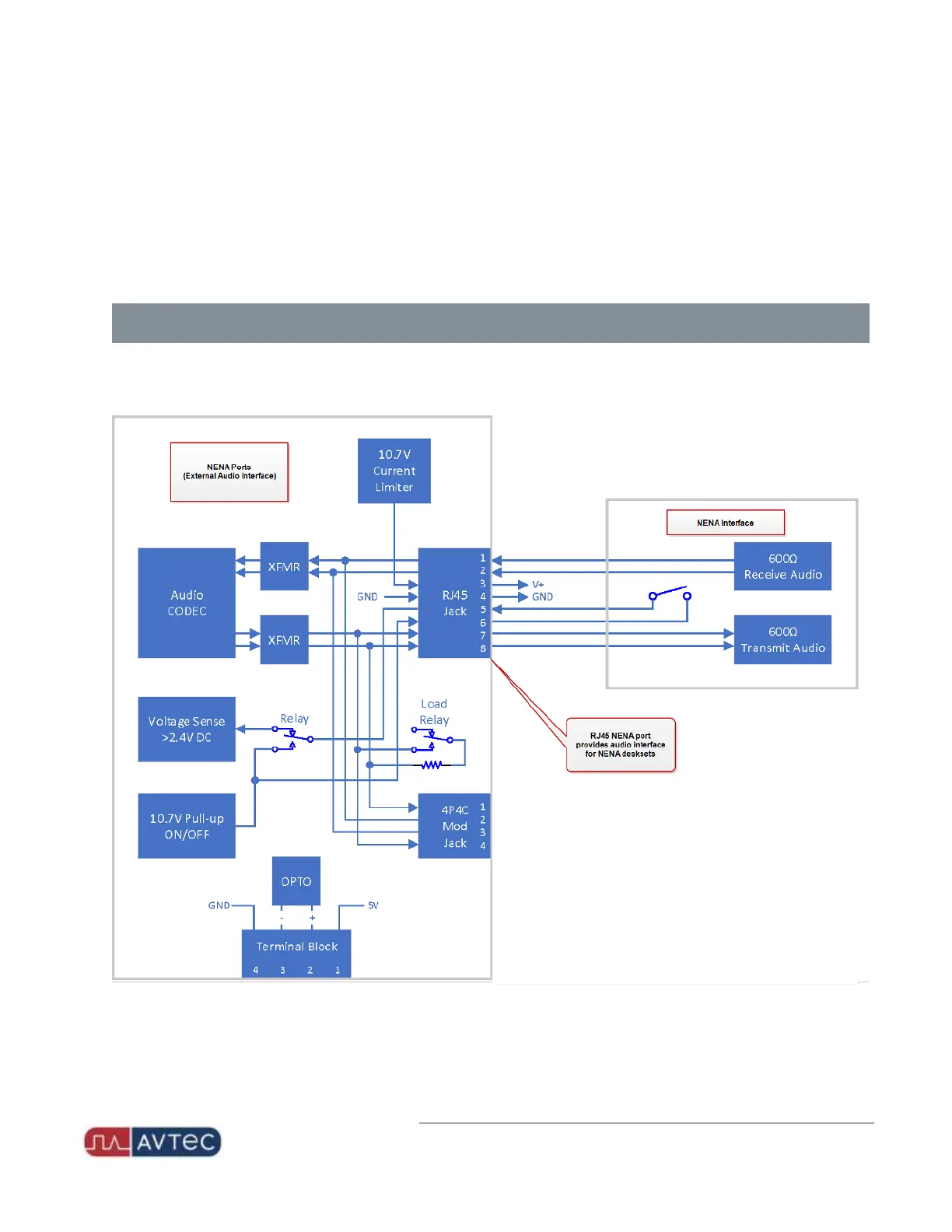
NENA compliant phones feature multiple connections to the USB NENAJack Box. The following block diagram details
the functional wiring.
19
Avtec USB NENA Jack Box Configuration Guide | October 2021 | Revision 9


 To Next Page